Google announced on Tuesday that it is rolling out five new updates to Android focused on accessibility, utility, and personalisation.
The announcement appeared in a blog post and covers features intended to reduce motion sickness, assist blind and low-vision users with navigation, help people remember where they placed items, and add new personalisation options to Google Messages.
Some of these tools place Google behind Apple, which already offers similar capabilities for iPhone users. Other features rely specifically on Gemini to drive improvements.
Motion Assist
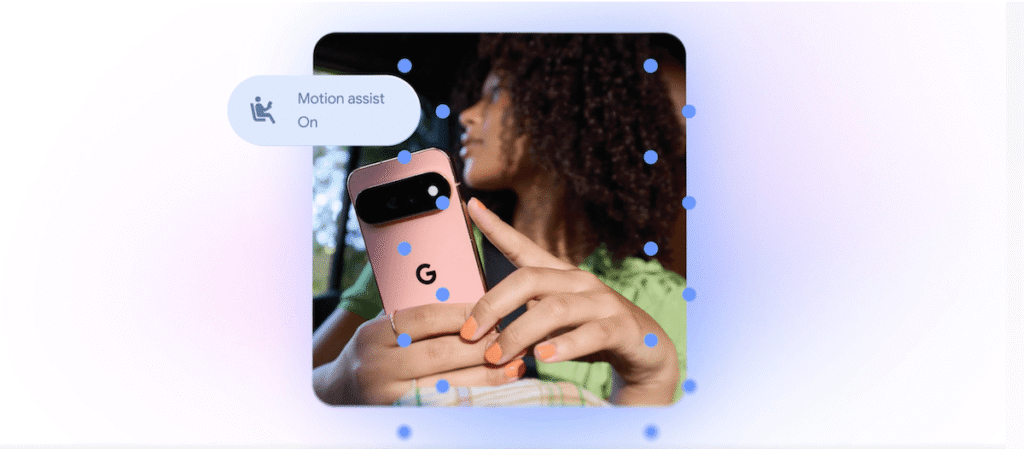
The most notable addition is “Motion Assist,” designed to help people who suffer from motion sickness while using their phones in moving vehicles.
A bubble overlay appears on the screen and moves in response to the vehicle’s motion. This aims to reduce the disconnect between what users see and what their bodies feel.
Apple introduced “Vehicle Motion Cues” in 2024. That feature uses animated dots around the display edges that move in response to vehicle motion.
Users can set “Motion Assist” to activate automatically, add it to Quick Settings, and customise the bubble’s shape, colour, and transparency. Google states this feature is available to Android 17 users.
Guided Vision
Google is also introducing “Guided Vision,” a feature built for blind and low-vision users. It combines the phone’s camera with Gemini to assist with tasks such as reading small print on food labels, viewing menus in dark restaurants, or identifying objects in a home.
The feature provides voice guidance when the camera is not positioned correctly, instructing users to move the phone, pan around, or centre an object. “Guided Vision” arrives on phones running Android 9 and newer in countries where Gemini is available.
Remembered items
A new update gives Gemini a way to help users recall where they stored important items. A “remembered items” section in Find Hub allows users to tell Gemini where they have placed something.
For example, a user could state they put their passport in a bedroom drawer, and Gemini saves that information in Find Hub. Users may also attach a photo to make the item easier to identify later.
Google Messages updates
Google is adding a Google Keep integration to Google Messages. This allows people to share and edit grocery lists, vacation notes, and other information directly within a conversation.
Google Messages also gains more personalisation options. Users will be able to customise individual chats with backgrounds, photos, and colours. The text bubbles will automatically match these choices.
Apple added a similar custom background feature to Messages last year.
What it means
For daily users, these changes address specific friction points. Motion Assist attempts to stop the physical discomfort caused by screen movement in cars. Guided Vision gives blind users a more active tool for scanning their environment rather than just reading text aloud. The “remembered items” function acts as a simple digital log for physical objects, while the Messages updates bring note-taking and chat styling closer to what iPhone users have had for some time.