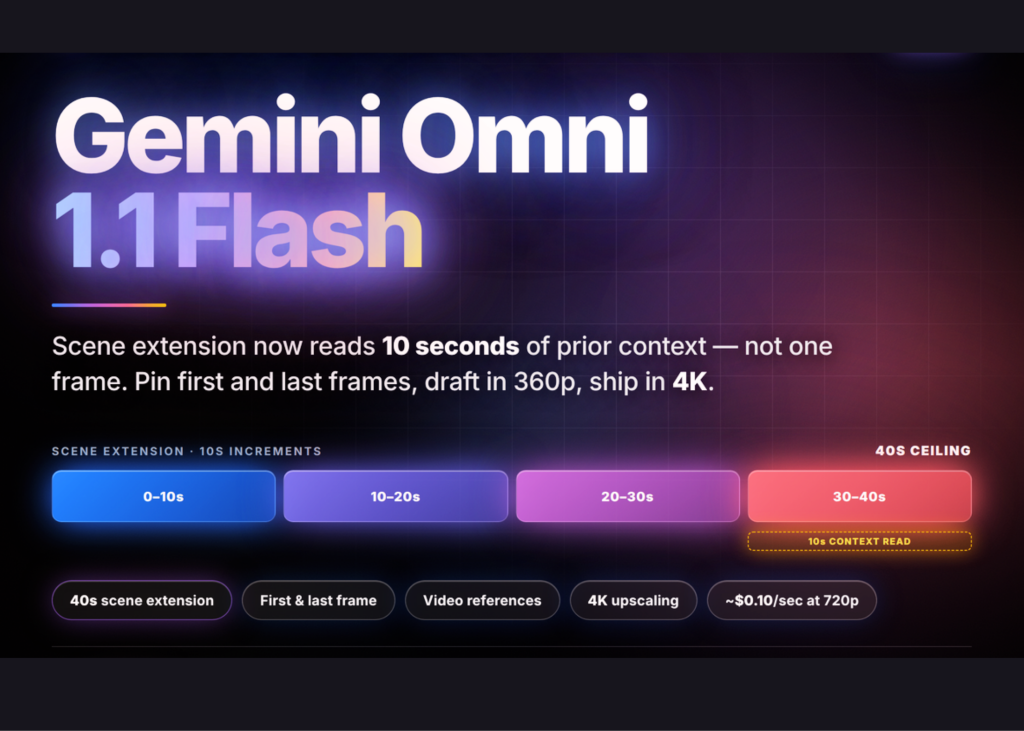
Google has released Gemini Omni 1.1 Flash, an update to its native multimodal video generation and editing model. The release shifts the tool from a capable generator to a directable one. Scene extension now reads up to 10 seconds of prior context instead of a single final frame. First and last frames can be pinned to control camera movement. Drafts render in 360p at a third of 720p cost. Finals upscale to 4K. Video clips can be passed as references for character consistency.
Gemini Omni Flash is built on three properties Google distinguishes from prior video models: native multimodality (text, image, audio, and video processed together), conversational editing through the Interactions API, and world knowledge inherited from Gemini. Editing is stateful. You pass previous_interaction_id and the model applies your change while preserving what you did not mention, without re-uploading the prior video.
Is it deployable?
It is available through the Gemini API in Google AI Studio and the Gemini Enterprise Agent Platform. Adobe, Figma Weave, GMI Cloud, and Runway are already named as production users.
Scene Extension is the Main Change
Omni 1.1 analyzes up to 10 seconds of prior context when continuing a clip. Google states that previous models referenced only the final second. Extensions run in 10-second increments to a cumulative 40 seconds. The model generates a 3–10 second continuation per call. Some final frames of the input are edited to make the seam continuous.
The constraints are specific. Extension appends to the end of a clip only. There is no prepending, no mid-clip insertion. Uploaded input videos must be 10 seconds or shorter, unless you are extending a model-generated video in multi-turn. You cannot add new dialogue when extending an uploaded video where someone is speaking. Spoken dialogue is supported in multi-turn extension via previous_interaction_id.
Keyframes and Video References
You can now supply a first and last frame and have the model generate the continuous video between them. This is the mechanism behind orbits, dolly-zooms, and seamless loops. Prompts bind media to roles with tags: <FIRST_FRAME>, <LAST_FRAME>, <IMAGE_REF_N>, and <VIDEO_REF_N>.
Video references accept a maximum of three clips, up to three seconds each. They work best for likenesses. Audio inside a video reference is ignored. Reasoning across multiple videos is not supported and may degrade output.
Cost Control: Draft in 360p, Ship in 4K
The resolution parameter in response_format takes 360p, 720p (default), 1080p, and 4k. The top two are upscaled. Google reports 360p previews generate up to 60% faster and at a third of the cost of 720p, based on system throughput of 360p versus 720p. That makes the draft-then-upscale loop the intended production pattern: iterate cheaply, render once.
Pricing, provenance, and limits
Input is $1.50 per 1M tokens (text, image, video, audio). Output is $9.00 per 1M text tokens and $17.50 per 1M video tokens. Video billing runs at 5,792 tokens per second of 720p, an effective ~$0.10 per second under standard pricing.
Every generated video carries SynthID watermarking. It is invisible to viewers but programmatically detectable for provenance. Notable gaps include no system instructions, temperature, top_p, stop sequences, or negative prompts. Negatives go in the prompt text. Voice editing is unsupported. Audio references are unsupported. YouTube URLs cannot be used as a source. English is fully supported. Other languages are unevaluated. For outputs above 4MB, use delivery=”uri” and poll the Files API until the file is ACTIVE.
Google names Adobe (Firefly), Figma Weave, GMI Cloud, and Runway as customers already running Omni Flash in production. The model is also live in Google Flow for AI Plus, Pro, and Ultra subscribers, with scene extension in the Gemini app.
Comparison
What it means
Producers can now iterate on shots without burning budget on high-resolution previews. The ability to pin start and end frames allows for specific camera moves like dolly-zooms without manual keyframing in post. The 40-second extension limit means a single prompt can grow a scene significantly, though adding spoken dialogue remains restricted to multi-turn interactions.