
£109, xlnaudio.com
When XLN Audio’s RC-20 Retro Color effects plugin was released it was praised by producers for its ability to easily add vintage vibe and grit to any source. With DB-30 Drum Butter, XLN has doubled down on the format, offering another compelling package for beefing-up audio.
Although it’s primarily aimed at processing drums and percussion, this plugin works on a range of sources. It’s simple enough to be playful and encourage experimentation, but there’s enough depth to provide a vast array of sound design options.
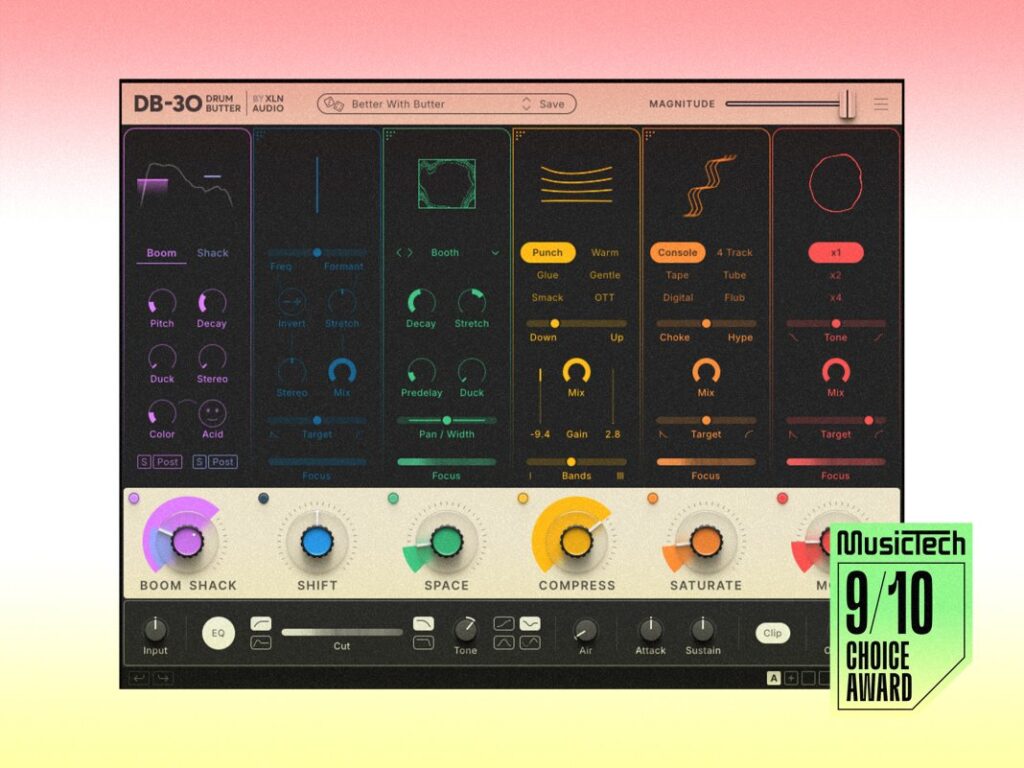
The colourful interface is split into six modules that can be freely rearranged, with single large dials to control the main parameter for each effect. The first module is called Boom Shack, and it allows you to layer in an extra pitched sub to thicken the kick, or one of 18 samples to add texture to the top end. These are triggered by the audio via two sets of range selector and threshold controls. You then get additional dials to fine tune the pitch and decay, and the sub even has a wild distortion control that transforms any kick into a gnarly bass sound.
Next is Shift, which lets you alter the pitch and formant of the incoming audio, with a slider to choose whether it’s one or the other, or both. You can invert the frequency so that they move in the opposite directions, and stretch out the formant, which is useful for adding highs and lows back in after transposing. This thing has no right sounding this convincing for a real-time pitch shifter. It’s clearly been designed with percussive, inharmonic sounds in mind as it doesn’t fare well with pitched material, but for drums it’s incredibly smooth. I found it especially useful for automating subtle movements into beats, or creating sweeps and slow-down effects.
A nice touch here, which appears on several modules, is a Focus slider to narrow down the frequency range of the processing, and a Target slider that lets you balance the processing between the transient and sustain. This becomes particularly handy when you move into some of the other modules such as Saturation – it lets you crush the peaks but let the tails come through cleaner, or vice versa.
Space is a relatively straightforward reverb module, with 20 styles ranging from rooms and halls through to plates, springs, and more experimental spaces. There are controls for Decay, Predelay, a built-in ducker, and Stretch, which alters the pitch, decay time and timbre. You can also control the panning and width, and select a frequency focus to guide the processing away from the low-end. Although simple, the reverb sounds decent and interacts beautifully with the signal being squashed by the other processors.
Of course, no drum plugin would be complete without a compressor. Here we have six style variations including Punch and Glue VCA types, a more aggressive Smack FET setting, subtler Warm and Gentle OPTO styles, plus the ubiquitous OTT mode. You can blend between downwards and upwards compression, which is clearly presented with a dynamic moving line display, and also between single and multiple bands. The compression amount is controlled by the main dial, alongside a mix dial for parallel processing. Compressor control freaks may baulk at the lack of attack, release, ratio and knee controls, but the styles are so well chosen and tuned that you can effortlessly dial in sounds without getting bogged down in the details.

This is something that can be said for the whole plugin actually, as it’s been carefully refined to have a large amount of sweet spots. The interface provides easy access to variations, which invites you to try different settings quickly to either hone in on a sound that works for the material, or come up with something joyous and unexpected.
My only minor gripe with the compressor is that the OTT mode is too fixed. It’s a well-known, heavily squashed multi-band sound, but it has the habit of making the top-end a bit too bright and overpowering. It would be useful if there was a tone control to ease the focus away from the highs.
Moving on, the Saturate module adds anything from subtle harmonics to brutal distortion. There are six flavours to choose from labelled Console, 4 Track, Tape, Tube, Digital and Flub (a unique ring/phase distortion), and each has a slider to adjust its sonic characteristics. As before, you can adjust the frequency range and whether it focuses on transient or sustain, and also the wet/dry mix. There’s enough variety here to provide plenty of harmonic variation, but not so much that you get choice paralysis. The algorithms sound warm, fat and resonant in the right places.
If, by this point, your drums still aren’t quite as huge as you want them to be, then you can apply the last module: More. This is a waveshaper that feeds into a limiter and makes sounds denser, louder and more gritty, whilst shaving off peaks. If you want to go wild, you can choose to have two or four in series. It can be focused on specific parts of the signal and used subtly, or pushed to extremes and blended using the Mix dial.

The Master section at the bottom of the user interface provides useful extras including an EQ with low-cut, high-cut, a flexible Tone control, an Air dial to add sparkle, a transient shaper with attack and sustain controls, and a final clipper to keep everything in check. There are also input and output dials with a useful loudness match feature, undo/redo, and up to four snapshot slots.
All these effects sound excellent when static, but Drum Butter has one final special move with its Magnitude control. This single macro slider scales all the big dials for each module alongside any tweaks made to the master section. It’s a great way to dial things back if you’ve gone too far, or it can be used creatively for big transition effects.
In a package that’s jam-packed with features, the only thing missing is a global wet/dry control. Parallel processing is easy enough in most DAWs so it’s not a dealbreaker, but it would still be useful to have a single built-in dial instead of editing the individual wet/dry controls for each module.
I am really surprised by Drum Butter. I tend to use multiple plugins to process my drums and it takes a while to home in on the right sound, but with this I am getting incredible results far more quickly. On the surface it may not seem cheap, but you’re getting a lot of effects and sound design potential for your money. The individual effects sound excellent in isolation, and even better combined. Drum Butter makes your drums fuller, more characterful and more professional with ease.

Key features
- Drum processing plugin (VST3, AU, AAX)
- 6 modules: Boom Shack, Shift, Space, Compress, Saturate and More
- Drag modules to reorder
- Focus processing on specific frequency ranges
- Process transients, sustain or both
- Option to route the Boom Shack module post processing
- Master section with EQ, Air and Attack/Sustain controls
- Loudness match feature
- Magnitude macro slider to control all modules at once
- Over 250 presets with tags, filters and favourites
- Lock any module to preserve settings whilst browsing presets
The post XLN Audio’s new DB-30 Drum Butter is a delicious delight appeared first on MusicTech.