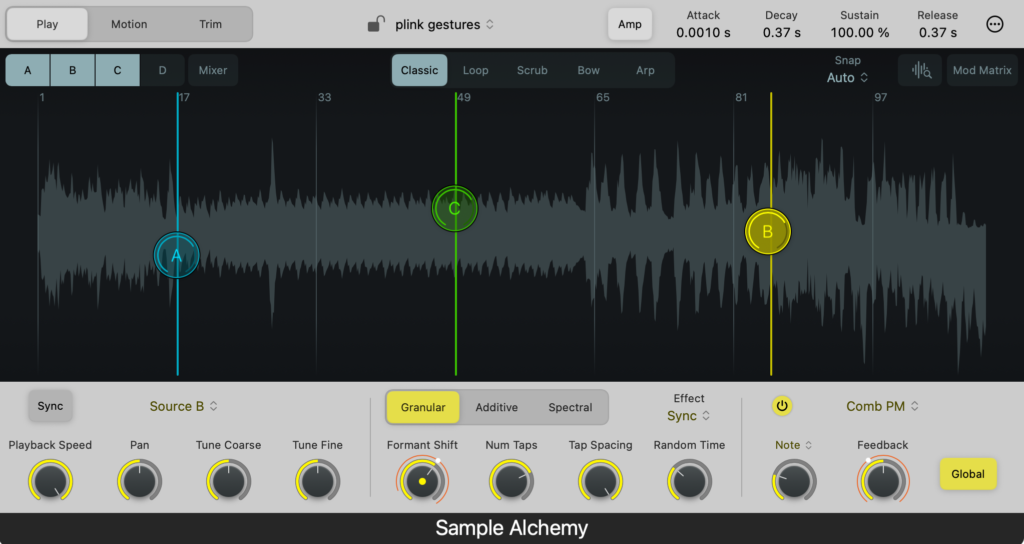
Apple has updated Logic Pro for macOS and iOS with version 12.3. The release adds granular synthesis capabilities to Alchemy and Sample Alchemy, alongside new filter modes for the Beat Breaker effect. These tools expand the range of textures available to users without requiring external plugins.
Granular synthesis in Sample Alchemy
The update introduces a new Sync effect within the Granular engine of Sample Alchemy. It also adds high-pass and low-pass filters to Beat Breaker. Sample Alchemy operates with multiple playheads and modes, a design choice likely influenced by the iPad app Samplr. Both applications occupy space on the same device and produce distinct sounds.
Alchemy’s granular engine
Using Alchemy’s granular engine as one of its four sources is a capability present since the first version of Camel Audio’s Alchemy. Martin Walker reviewed the software in 2009 for Sound on Sound, noting the interface of that era laid the groundwork for Apple’s current version.
Granular synthesis works by slicing audio into tiny fragments and playing them back with overlap. The version in Alchemy is termed “asynchronous,” creating an irregular cloud of grains. A synchronous mode aligns these grains so the resulting timbre can be pitched. This represents a new granular mode with a unique implementation.
Apple provides formant control to fine-tune the re-pitching effect. Pushing this setting to extremes with different source material yields ringing, metallic, and edgy textures. Users can also add multiple taps, or synchronous grain playheads, to create layers. Controls for spacing allow adjustment of the texture density.
Sample Alchemy workflow
Sample Alchemy simplifies the user interface to focus on sample manipulation. This streamlined approach is particularly effective on the iPad, allowing users to sample and granulate work from Logic and other apps. The tool remains useful on the Mac as well.
Drag and drop any sample into the instrument, then select Sync as the Effect. This reveals parameters for Formant Shift, Number of Taps, Tap Spacing, and Random Time. These settings can be targeted via the Mod Matrix. Initial experimentation should be cautious, as some settings produce radical results.
A test patch began with a simple piano and pad sample from another project. The resulting sound demonstrates the instrument’s range.
Alchemy on the desktop
Alchemy is deep, and many users may never move beyond the presets. The software offers four sources with morphing capabilities, assignable to virtual analog, spectral, additive, formant, sampler, and granular modes. After using Sample Alchemy, the desktop version may feel more accessible while offering additional sound design possibilities.
Alchemy does not allow direct selection of granular mode as a source like a standard synth. Users must import a sample first and select the granular or sampler mode during the import process. The software performs analysis on the audio at this stage.
Select a source, labelled A through D, then choose Import Audio. The browser opens with options at the bottom to select Granular or Sampler.
Clicking the Granular engine enables the new Sync mode seen in Sample Alchemy. This access unlocks the full power of Alchemy plus additional tweaking options.
Users can choose a Grain Shape from a list of options. This is significant for designing percussive sounds and provides variety. A particle dust-like mode called Needle is also available.
Adjusting the controls produces non-musical examples immediately. The possibilities for sound design are extensive. The iPad and Mac function as sketchpads for manipulating samples. Users can bounce out regions or grab sounds from apps to create new instruments, percussion, or textures.
Not wanting more granular synthesis in Logic Pro is comparable to not wanting more joy.
New Beat Breaker modes
Major functionality has been added to the Beat Breaker interface. The effect already excelled at slicing, dicing, glitching, and adding synced effects, following the tradition of Camel Audio plugins.
Three new modes are now available for slices: Cutoff, Resonance, and Pan. The Cutoff and Resonance modes handle high-pass and low-pass filtering. The Pan mode moves slices around the stereo image. Icons for these controls appear at the top of the interface, alongside options for curve and slope.
A randomize option provides quick results, marked by a dice icon at the far right.
The tool resembles Sinevibes Cluster. However, the filter and envelope design differ, giving each plugin a unique sonic character. The workflow and interface are completely different, leading to distinct creative patterns. Both plugins allow for ambient or EDM styles, ranging from pronounced rhythmic effects to nuanced textures.
Additional updates
The 12.3 update includes further features. Users can install the Granular Alchemy sound pack from the Sound Library to access extra waves and loops. This library is a modest size, avoiding the multi-gigabyte footprint common during memory constraints.
Other important features include:
- Syncing audio to a video hit point.
- Toggling grid lines over regions.
- Streamlined Flex settings.
The release also includes a demo project by Kehlani, Usher, and Khris Riddick-Tynes. Version 12.1 quietly added new Dolby Atmos options.
Apple Creator Studio users receive this update on the iPad. Mac users who purchased Logic Pro also receive the update. Improvements to the Apple Creator Suite, including integration with Pixelmator Pro, will be discussed separately.