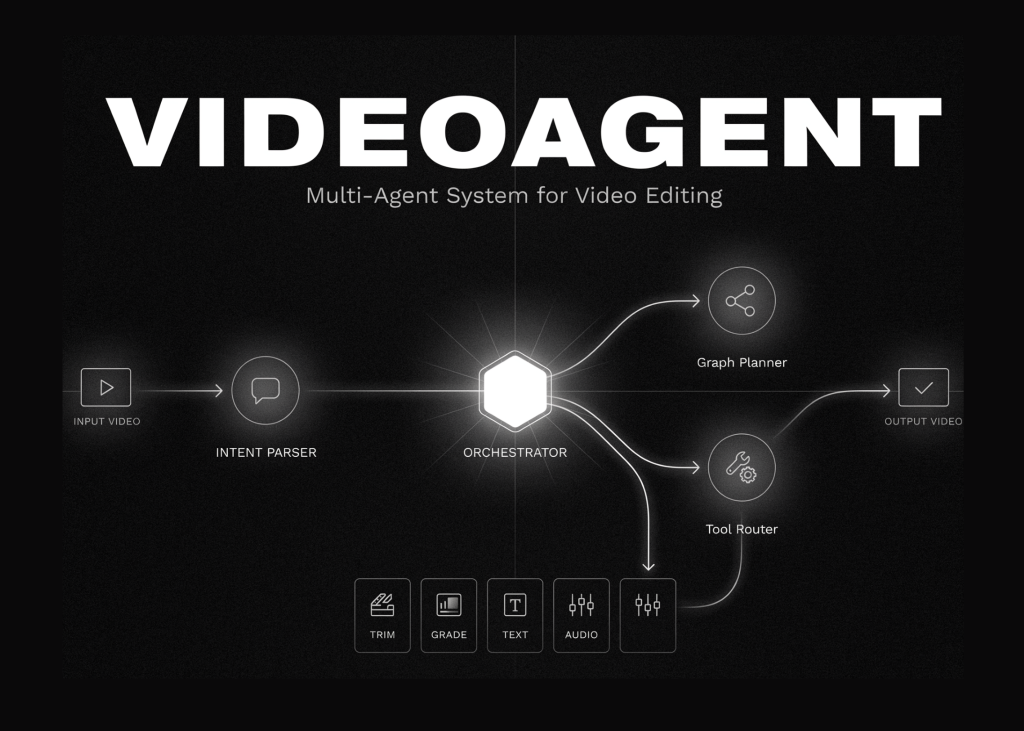
A new tutorial now provides a working reconstruction of the VideoAgent workflow. The guide walks through building a multi-agent system for video understanding, retrieval, editing, and remaking without requiring API keys. It covers an intent parser, agent library, tool router, graph planner, and a textual-gradient optimizer. The system connects to practical tools like FFmpeg, Whisper-based transcription, scene detection, keyframe sampling, captioning, cross-modal indexing, retrieval, trimming, beat-synced editing, and final rendering. The result is a system that answers questions about video content, summarises material, generates news-style overviews, and produces edited artifacts from natural language instructions.
Configuring the runtime and LLM wrapper
The setup begins with the VideoAgent runtime, the optional LLM backend, the working directory, package installation, and lightweight dependency fallbacks. A shared helper layer handles shell commands, pip installs, file paths, and environment detection to ensure the notebook runs in Colab or locally. A unified LLM wrapper supports OpenAI, DeepSeek, Anthropic, and Gemini models. It falls back to deterministic execution if no API key is available.
The configuration block sets the provider, API key, base URL, model, maximum shots, and optional rounds. It defines a list of demos including question answering, overview generation, highlights, and beat-synced editing. The Python environment checks for Colab or a specific environment variable to install required libraries such as openai-whisper, gTTS, and sentence-transformers. It attempts to import numpy and Pillow, installing them if missing. The script checks for FFmpeg availability and creates a working directory at /content/va_workdir for Colab or ./va_workdir locally. A helper function joins paths within this directory.
The LLM class defines default models for OpenAI, DeepSeek, Anthropic, and Gemini. It initialises with a configuration dictionary, extracting the provider, key, model, and base URL. It checks for environment variables if no key is provided in the config. The available method returns true only if a provider and key exist. The post method sends JSON payloads to the appropriate API endpoint with a 90-second timeout. The chat method handles OpenAI and DeepSeek via chat completions, Anthropic via messages, and Gemini via generateContent. It catches exceptions and prints an error message before returning None. A json method wraps the chat call, strips markdown code blocks, and attempts to extract JSON from list or dictionary patterns within the response text.
The code initialises the LLM instance using the CONFIG variable.
Defining intents, agents, and graph planning
The intent list includes audio extraction, transcription, rhythm detection, scene detection, keyframe sampling, captioning, cross-modal indexing, shot planning, visual retrieval, trimming, summarisation, question answering, news overview, beat-synced editing, concatenation, and rendering. User inputs consist of the video path, instruction, question, and query.
The agent library defines specific capabilities. The AudioExtractor takes a video path and outputs an audio path. The Transcriber converts audio to a time-stamped transcript. The RhythmDetector identifies energy peaks and cut points. The SceneDetector finds shot boundaries using histogram deltas. The KeyframeSampler selects one representative frame per scene. The Captioner applies zero-shot CLIP captioning to keyframes. The CrossModalIndexer builds a CLIP text-visual index over scenes. The ShotPlanner generates global-aware storyboard sub-queries. The RetrievalAgent performs cross-modal cosine retrieval of best scenes. The Trimmer executes fine-grained ffmpeg trimming of retrieved scenes. The VideoEditor concatenates clips into one edited video. The BeatSyncEditor assembles scene cuts onto a beat grid. The Summariser creates a recap from the transcript. The VideoQA agent answers questions grounded in the transcript. The NewsContentGenerator writes a news-style overview. The Renderer performs a final encode and normalisation pass.
Terminals map specific tasks to their agents, such as question_answering to VideoQA and summarization to Summariser. A producer dictionary maps outputs to the agents that generate them. The loop iterates through agents and their outputs to populate this mapping. The intent system prompt instructs the parser to decompose user instructions into a minimal set of required capabilities from the defined list. It requires including both explicit and necessary implicit intents, such as noting that answering a question implies transcription and audio extraction. The response must be JSON containing intents, a query subject, and a question field.
The analyze_intents function calls the LLM if a key is set, or uses a faithful deterministic parser otherwise.