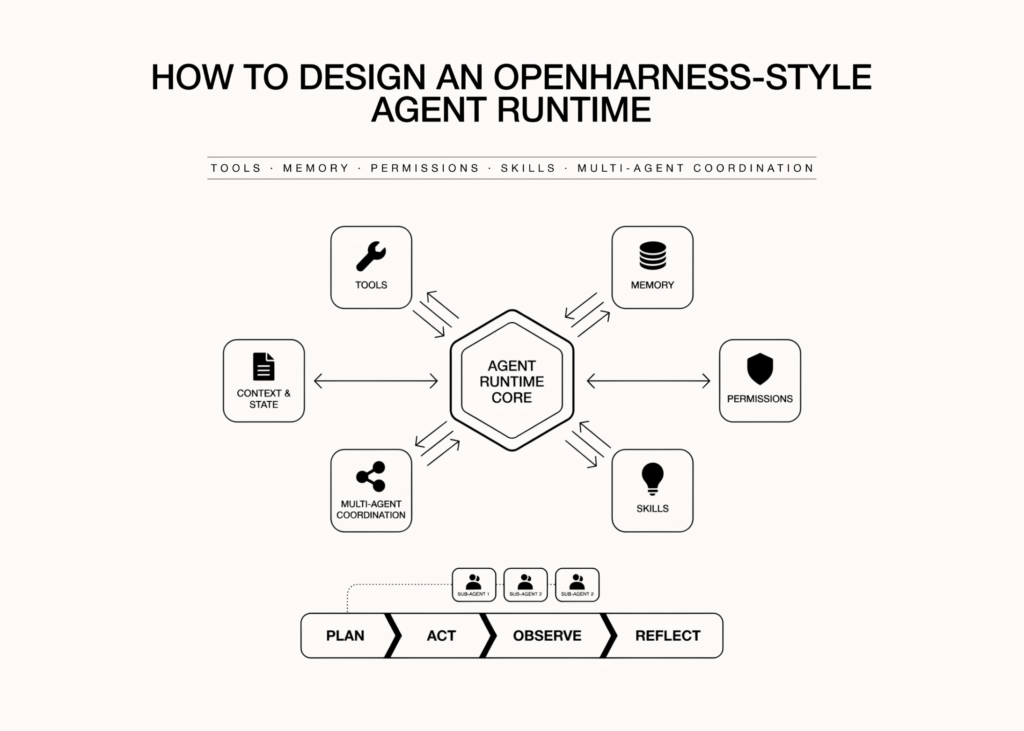
OpenHarness is an agent runtime that exposes the full control flow from user task to model decision to tool execution, without treating the framework as a black box. The tutorial builds this system from scratch to demonstrate practical blocks like tool use, typed schemas, permissions, lifecycle hooks, memory, skills, context compaction, retry logic, cost tracking, and multi-agent coordination. The implementation runs without API keys or complex infrastructure so developers can experiment with the architecture directly.
Setting Up the OpenHarness Core
The codebase begins with standard imports for asynchronous tasks, data handling, and system utilities. A helper function runs coroutines to completion from synchronous code, managing nested event loops if necessary. A banner function prints titles, while a text wrapper limits line length for readability.
Two data classes track usage metrics. Usage accumulates input and output tokens. ToolCall stores an ID, name, and arguments. An AssistantTurn class captures text and zero or more tool calls, including a stop reason and usage data. A Message class represents a single entry in the conversation transcript with roles and content.
Token counting estimates cost by dividing text length by four characters per token. A price book defines costs for models like mock-sonnet, claude-sonnet-4, and gpt-4.1, with a default fallback. The CostMeter class accumulates usage and converts it to an estimated dollar cost based on the selected model.
Field declaration allows defining tool inputs with descriptions and optional defaults. Type conversion logic maps Python types to JSON Schema formats, handling unions, lists, and dictionaries. The build_json_schema function converts a dataclass into a valid JSON Schema object with required fields marked.
Argument coercion ensures raw JSON inputs match the expected types. The instantiate function validates and coerces raw JSON arguments into a typed input instance, raising errors if required arguments are missing or values are malformed.
Permissions categorise tools by risk level. The PermissionKind enum defines READ, WRITE, EXECUTE, and META levels. The ToolResult class holds output text and an error flag. ToolContext provides runtime services and shared state to tools.
The BaseTool class sets the foundation for all tools, defining the name, description, input model, and permission kind. It generates a schema including the input structure. The run method instantiates arguments and calls execute, which must be implemented by subclasses.
Tool registration manages available functions. The ToolRegistry class stores tools by name and provides methods to retrieve specific tools, list all schemas, and get a list of tool names.
A virtual filesystem keeps the tutorial safe and deterministic. The VirtualFS class stores files in memory, normalising paths before writing or reading. It supports checking existence, listing files matching a pattern, and displaying a tree view of the current directory.
What it means
Developers gain direct visibility into how the system processes tasks. They can inspect the loop where the model decides the next action, validate tool calls before execution, and return observations to continue the workflow. The design allows experimentation with architecture without needing live API keys or complex infrastructure setups.