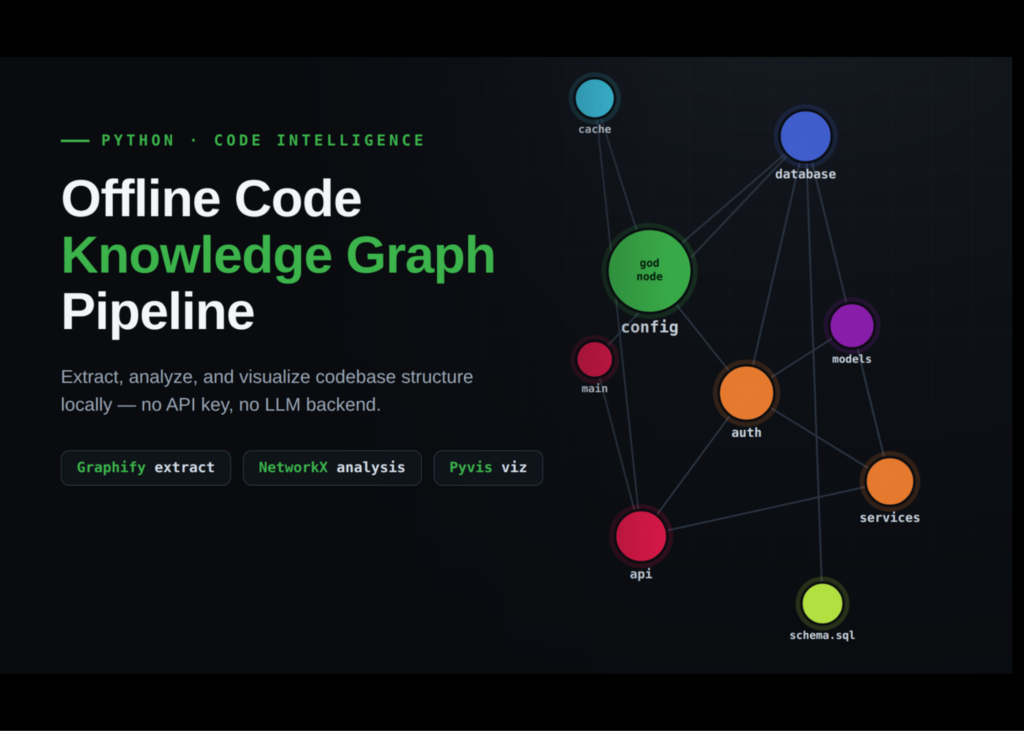
A new offline Python tool, Graphify, now maps codebases into knowledge graphs without requiring an API key or a large language model backend. The workflow builds a sample multi-module application, runs Graphify locally to extract the structure, and then loads the resulting data into NetworkX for analysis. This process identifies central nodes, detects communities, and visualises how modules connect.
Installing the tools
The setup installs Graphify alongside supporting libraries for graph analysis and visualisation. The script imports NetworkX for processing the graph structure and Matplotlib for static plotting. Unnecessary warnings are filtered out to keep the notebook output clean.
import subprocess, sys
def pip(*pkgs):
   subprocess.run([sys.executable, "-m", "pip", "install", "-q", *pkgs], check=False)
pip("graphifyy[sql]", "pyvis", "networkx", "matplotlib")
import os, json, glob, textwrap, warnings
import networkx as nx
import matplotlib.pyplot as plt
warnings.filterwarnings("ignore")
Building the sample codebase
The tutorial creates a realistic application containing multiple Python modules and a single SQL schema file. The files are designed to show meaningful cross-module relationships, including imports, function calls, service dependencies, authentication logic, database access, and rate limiting. These files are written to a local directory named sample_app.
ROOT = "sample_app"
os.makedirs(ROOT, exist_ok=True)
FILES = {
"config.py": '''
# Central settings object — used everywhere (expect this to be a "god node").
class Settings:
   def __init__(self):
       self.db_dsn = "postgresql://localhost/app"
       self.jwt_secret = "change-me"
       self.rate_limit = 100
settings = Settings()
''',
"database.py": '''
from config import settings
class DatabasePool:
   """Connection pool. WHY: reuse sockets instead of reconnecting per query."""
   def __init__(self, dsn):
       self.dsn = dsn
       self._conns = []
   def acquire(self):
       return {"dsn": self.dsn}
pool = DatabasePool(settings.db_dsn)
def get_connection():
   return pool.acquire()
''',
"models.py": '''
class User:
   def __init__(self, user_id, email):
       self.user_id = user_id
       self.email = email
class Session:
   def __init__(self, user, token):
       self.user = user
       self.token = token
''',
"cache.py": '''
from config import settings
class RateLimiter:
   # NOTE: naive in-memory limiter; swap for Redis in prod.
   def __init__(self, limit):
       self.limit = limit
       self.hits = {}
   def allow(self, key):
       self.hits[key] = self.hits.get(key, 0) + 1
       return self.hits[key] <= self.limit
limiter = RateLimiter(settings.rate_limit)
''',
"auth.py": '''
from config import settings
from database import get_connection
from models import User, Session
def hash_password(raw):
   return f"hashed::{raw}"
def verify_password(raw, hashed):
   return hash_password(raw) == hashed
class AuthService:
   def __init__(self):
       self.secret = settings.jwt_secret
   def login(self, email, password):
       conn = get_connection()
       user = User(user_id=1, email=email)
       return Session(user=user, token=self.secret + email)
''',
"services.py": '''
from database import get_connection
from models import User
from auth import AuthService
class UserService:
   def __init__(self):
       self.auth = AuthService()
   def register(self, email, password):
       conn = get_connection()
       return User(user_id=2, email=email)
   def authenticate(self, email, password):
       return self.auth.login(email, password)
''',
"api.py": '''
from cache import limiter
from services import UserService
from auth import verify_password
svc = UserService()
def signup_route(email, password):
   if not limiter.allow(email):
       return {"error": "rate limited"}
   return svc.register(email, password)
def login_route(email, password):
   if not limiter.allow(email):
       return {"error": "rate limited"}
   return svc.authenticate(email, password)
''',
"main.py": '''
from api import signup_route, login_route
from database import pool
def run():
   signup_route("*@*.com", "pw")
   return login_route("*@*.com", "pw")
if __name__ == "__main__":
   run()
''',
"schema.sql": '''
CREATE TABLE users (
   user_id  SERIAL PRIMARY KEY,
   email    TEXT UNIQUE NOT NULL
);
CREATE TABLE sessions (
   token    TEXT PRIMARY KEY,
   user_id  INTEGER NOT NULL REFERENCES users(user_id)
);
CREATE VIEW active_sessions AS
SELECT s.token, u.email
FROM sessions s JOIN users u ON s.user_id = u.user_id;
''',
}
for name, body in FILES.items():
   with open(os.path.join(ROOT, name), "w") as f:
       f.write(textwrap.dedent(body).lstrip())
print(f"Wrote {len(FILES)} files to ./{ROOT}/")
Extracting the knowledge graph
Graphify runs locally on the generated application to extract the project knowledge graph. No API key or LLM backend is used. The script locates the resulting graph.json file and loads it into NetworkX. A version-proof loader handles the node and link data. The graph is converted to an undirected form for structural analysis, and a helper function displays readable node labels.
res = subprocess.run(
   [sys.executable, "-m", "graphify", "extract", ROOT, "--no-cluster"],
   capture_output=True, text=True
)
print(res.stdout[-1500:] or res.stderr[-1500:])
graph_paths = glob.glob("**/graph.json", recursive=True)
assert graph_paths, "graph.json not found — check the extract output above."
GRAPH_JSON = sorted(graph_paths, key=os.path.getmtime)[-1]
print("Graph file:", GRAPH_JSON)
def load_graphify(path):
   data = json.load(open(path))
   ekey = "links" if "links" in data else ("edges" if "edges" in data else None)
   G = nx.DiGraph() if data.get("directed") else nx.Graph()
   for n in data.get("nodes", []):
       nid = n.get("id")
       G.add_node(nid, **{k: v for k, v in n.items() if k != "id"})
   for e in data.get(ekey or "links", []):
       G.add_edge(e.get("source"), e.get("target"),
                  **{k: v for k, v in e.items() if k not in ("source", "target")})
   G.graph.update(data.get("graph", {}))
   return G
G = load_graphify(GRAPH_JSON)
UG = G.to_undirected()
print(f"\nGraph: {G.number_of_nodes()} nodes, {G.number_of_edges()} edges")
def label(n):
   return G.nodes[n].get("label", str(n))
Analyzing centrality and communities
The analysis summarises node types, edge relationships, and confidence levels. Degree and betweenness centrality scores are computed. The script identifies the top eight nodes by degree centrality to find potential god nodes.
Related articles