Fender Studio Pro 8.1 costs £170 for a perpetual licence with one year of updates, or £160 for a Pro+ annual subscription that includes the new Studio Assistant AI tool.
Once known as PreSonus Studio One, the software was acquired by Fender in 2021. The 2026 rebrand to Studio Pro has caused friction within the production community. This marks the second major version under the guitar manufacturer’s control, following a mixed reception for Studio One 7 regarding its pricing model and update schedule.
I am an Ableton Live evangelist with no prior investment in Studio Pro. The question remains whether this version is compelling enough to make me switch software.
First impressions and Studio Assistant
Opening Studio Pro 8.1 for the first time, I was thrown off slightly. I am used to Ableton’s tight immediacy; Studio Pro feels broader and more configurable from the start.
Fortunately, I am not entirely on my own. One of 8.1’s main additions is Studio Assistant, a chatbot currently in beta that acts as both an interactive manual and a creative collaborator. It requires a Studio Pro+ subscription. As someone learning the DAW from scratch, I am glad to have my hand held through the process – even if it is by an LLM.
I saw the feature demonstrated at the Studio Pro 8.1 launch event. I am optimistic that I will be fast-tracked through orientation.
I start simply, attempting to create an eight-bar loop. Studio Assistant’s main shortcoming immediately reveals itself: no images. It tells me the name of the button I need, but not what it looks like, and there are certainly plenty to choose from. Other times, it misunderstands my question, misses a small detail, or is sluggish to reply.
Later, Studio Assistant helps me enable my QWERTY keyboard for note entry. That is often default behaviour in other DAWs, but here it must be configured as an external device first. It speaks volumes of Studio Pro’s design: powerfully flexible, but in a way that sometimes puts small hurdles in front of newcomers.
For now, Studio Assistant can only instruct; it cannot take action inside the DAW, which feels like the obvious next step.
Studio Pro interface and workflow improvements
The transformation from Studio One 7 to Studio Pro 8 included a minor facelift on top of the rebrand. The visual change is not a full redesign – but there are two more meaningful enhancements.
Arrangement Overview provides a tactile way to navigate large sessions, while Channel Overview puts control of your entire signal chain alongside the timeline. Direct access to all your devices from a single panel is a serious timesaver, removing the need to open separate plugin windows to tweak settings.
The Clip Launcher added in Studio One 7 continues to provide a more performance-friendly, idea-sketching dimension. Smaller touches, like the option to use a drum loop as your metronome, make Studio Pro feel particularly welcoming to songwriters.
I really like Fender’s approach to workflow. Nothing is forced upon you: Studio Pro gives you the tools, lets you use as many or as few as you please, and even lets you hide the ones you do not need entirely.
Other handy refinements in 8.1 include pitch curves directly on audio events, and improved Extract Beats and Extract Notes algorithms. Some changes may feel overdue, but it is a positive sign that Fender is listening to the existing user base.
Moises integration
In Studio Pro 8.1, Fender’s masterstroke is a partnership with Moises, bringing its cloud-powered AI tools straight into the DAW: stem separation, stem generation, and voice replacement.
The native stem separation introduced in Studio One 7 remains available, but Moises is a clear step up. In fact, it is among the best I have heard, producing surprisingly clear results with minimal artefacts.
While stem separation may have its more questionable uses, for personal study it is invaluable: I have learnt tremendous amounts about arrangement, sound design, and mixing by breaking existing songs into their constituent parts.
Voice replacement is also impressive, if slightly uncanny, though you will need to use a clean performance for the best results. I had to further split my isolated vocal stem into lead and backing for my new singer, Amelia, to sound her most convincing.
Stem generation is more of a mixed bag, requiring several rounds of prompting before I get something workable, but the concept is powerful. It feels like sample hunting on Splice, but the sounds are entirely unique and context-aware.
What makes these tools especially compelling is how seamlessly they are integrated. Although Moises is also available via the web, Studio Pro eliminates the tedium of exporting and uploading audio, processing and downloading it, and lining it back up on the grid.
Here, it is all completed in a couple of clicks, with a convenience that makes the tech feel less like a utility and more like a genuine creative tool.
Love them or hate them, in-the-DAW AI features are already table stakes, and given Moises’ quality, Studio Pro 8.1 may now be leading the pack.
New effects for guitar and voice
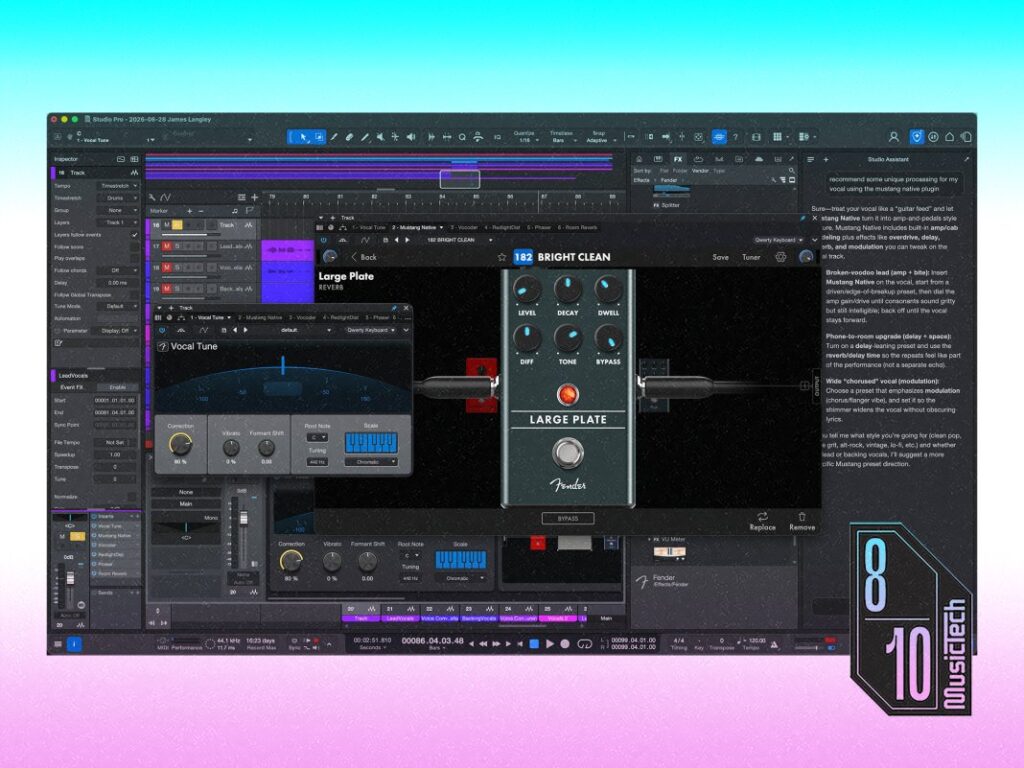
With Fender taking over, a stronger guitar-centric offering was only a matter of time. Studio Pro boasts Mustang Native and Rumble Native, dual smorgasbords of amps and effects pedals for guitar and bass.
The interface is clunky, forcing me to swipe through amps and effects one at a time, but I quickly forgive that once my guitar is chiming through a Deluxe Reverb. Unsurprisingly, Fender’s own amp models are the standouts, particularly for cleaner sounds. High-gain tones are workable too, albeit with the slightly brittle fizz heard in many amp sims.
The effects are the biggest joy. In particular, the 2290- and Space Echo-inspired delays sound fantastic. I quickly regress into a teenager in a guitar shop, patching ridiculous pedal chains into shoegazing walls of sound.
As for vocals, Studio Pro 8 introduced Voice FX, a six-piece suite for more creative vocal processing that aids compatibility with the Fender Studio mobile app. It is not especially remarkable, and as it stands, you can only use one effect at a time within a single plugin instance.
More useful is 8.1’s new Vocal Tune plugin, capable of highly natural pitch correction all the way to aggressive, robotic hard tuning. Want to get more surgical? Studio Pro 8.1 continues to include a Melodyne Essential licence, which usually costs €99 by itself.
Alternatives to Fender Studio Pro
Today, choosing a DAW is mostly a question of personality, as raw feature sets are broadly comparable. Logic Pro is the obvious value play for Mac users, while Cubase is the closest rival for composers and post-production workflows. Ableton Live still leads for performance-led creation, and Bitwig Studio remains the more experimental playground for sound designers.
Studio Pro 8.1 is competitively priced, with its £170 perpetual licence including almost every core feature and one year of updates. For those who want to fully buy into Fender’s platform, a £160 annual subscription adds Studio Assistant, the Notion scoring software, the Fender Studio mobile app, cloud-based storage, collaboration tools, and extra bundled content.
All things considered, the best DAW buying advice remains simple: pick one, learn it inside out, and move on to more important things – like actually creating music.