Nous Research has introduced a Blank Slate mode for its open-source Hermes Agent, fundamentally shifting the onboarding experience. Instead of launching with a pre-loaded suite of capabilities, developers now start with a minimal core. This approach is designed for makers and artists who require granular control over their agent’s environment, ensuring that no toolset is active until explicitly authorised.
Announced by the team on X, this update positions Blank Slate alongside the existing Quick Setup and Full Setup options. While Quick Setup leverages the Nous Portal for immediate access and Full Setup allows users to configure every provider and tool manually, Blank Slate offers a third path: building an agent from the ground up with a strictly defined surface area.
What Blank Slate Actually Does
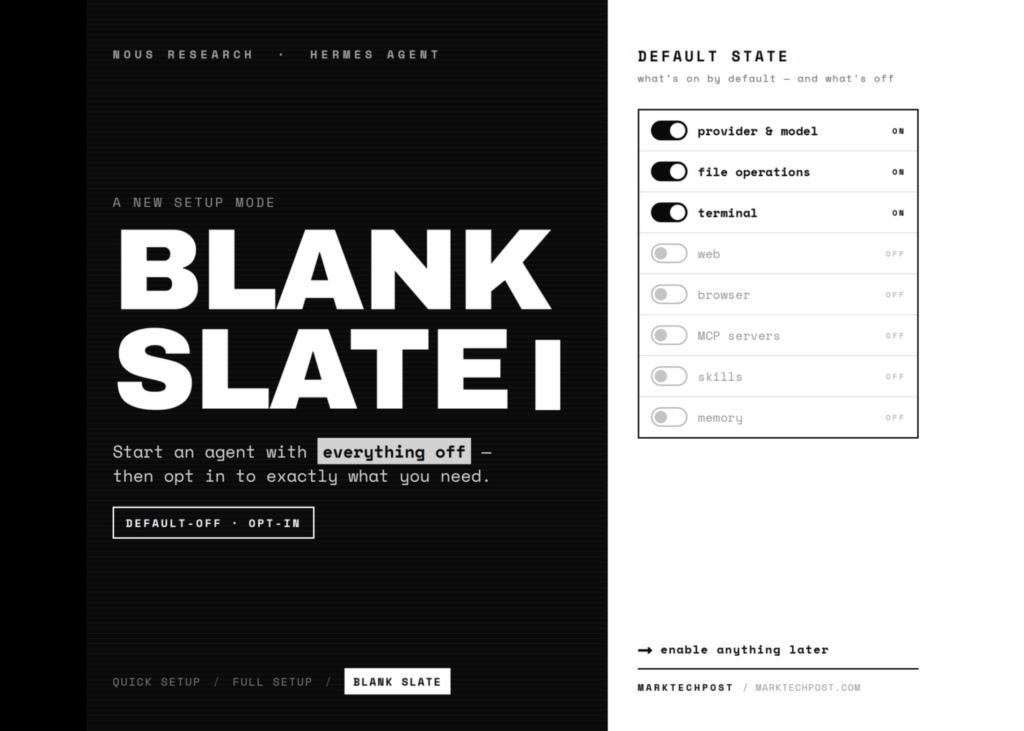
When running hermes setup, users now select from three distinct modes. The Blank Slate configuration disables almost every feature by default, retaining only the absolute necessities to run the agent: the provider and model selection, the File Operations toolset, and the Terminal toolset.
Everything else remains offline and inactive. This includes web browsing, browser access, code execution, vision processing, memory management, delegation, cron jobs, skills, plugins, and MCP servers. Furthermore, features such as compression, checkpoints, smart routing, and memory capture are also turned off.
Hermes Agent has a new Blank Slate setup mode.
The default Quick/Full setup modes work great for most, but if you would rather build your agent from the ground up you can now start with just a provider, model, file operations, and terminal, then manually add in anything else.
– Nous Research
The Two Paths Forward
Once the minimal baseline is established, the user faces two choices. The first path leaves the agent in its bare-bones state, granting access solely to file and terminal operations. The second path invites the user to walk through a configuration wizard to opt-in to specific tools, skills, plugins, and messaging capabilities. The philosophy is simple: enable exactly what is needed for the task, and nothing more.
Why the Configuration Format Matters
Unlike standard toggles that might reset upon an update, Blank Slate writes the decision to disk permanently. It generates an explicit platform_toolsets.cli list and an agent.disabled_toolsets entry. These keys lock the agent’s surface area.
The effect is durable. Any toolset you choose to skip will not load later, even after running hermes update. The system cannot silently re-enable a disabled feature. Additionally, Hermes maintains a strict separation between secrets and settings: API tokens reside in ~/.hermes/.env, while non-secret settings are stored in ~/.hermes/config.yaml.
Use Cases for Blank Slate
This mode is particularly suited for three specific scenarios:
- Security-sensitive deployments: For environments where network access must be strictly controlled, Blank Slate ensures the agent has no web or browser access by default. It ships with file and terminal access only, preventing any unsolicited network traffic unless explicitly added.
- Reproducible team setups: Teams can pin a known toolset across every machine in their infrastructure. Because the configuration is locked, updates will not drift the settings, and new tools will never appear without an explicit opt-in command.
- Teaching and audit environments: Educators can start with a minimal agent and introduce one toolset at a time, ensuring that every capability added is a deliberate choice rather than an accidental inclusion.
Quick Start Flow
To implement this, users can run the standard installation script, source their shell, and select Blank Slate during the setup wizard.
curl -fsSL https://hermes-agent.nousresearch.com/install.sh | bash

source ~/.bashrc

hermes setup # Select Blank Slate, then "finish now"

hermes # Runs with file + terminal only
When a specific capability is required later, the user can re-enable it on demand:
hermes tools # Re-enable a toolset, e.g. web

hermes skills opt-in --sync # Seed skills on demand

hermes setup agent # Tune compression, routing, memory
A Note for Local Setups
Users running Hermes Agent locally must ensure their model supports a context window of at least 64,000 tokens. Smaller windows are rejected at startup. While most hosted models meet this requirement easily, local models require an explicit context size setting, such as --ctx-size 65536 for llama.cpp. Even a minimal Blank Slate agent on a local model must adhere to this floor.
Setup Modes Compared
| Mode | Enabled by default | Keys / auth | Best for |
|---|---|---|---|
| Quick Setup (Nous Portal) | Model + Tool Gateway tools | Free OAuth, no API keys | Fastest first run |
| Full Setup | Every tool and option you pick | Bring your own keys | Hand-tuned, full control |
| Blank Slate | Provider & model, File Operations, Terminal | Provider auth only | Minimal, fully-controlled setups |
Key takeaways
- Minimal by design: Blank Slate starts with only the provider, model, file operations, and terminal enabled, disabling web, browser, code execution, and other advanced features.
- Permanent configuration: Disabled toolsets are written to
platform_toolsets.cliandagent.disabled_toolsets, ensuring that updates do not silently re-enable features you chose to skip. - Targeted use cases: This mode is ideal for security-sensitive deployments, reproducible team environments, and educational settings where capabilities must be added deliberately.
- Local model requirements: All setups, including Blank Slate, require a model with at least a 64K context window.