Mastering The Mix has released STEREOVAULT, a plugin designed to give engineers precise control over stereo width while maintaining mono compatibility. The tool addresses common issues where standard widening creates phase cancellation, hollow mixes, or frequency clashes.
While panning instruments creates space, simply adding a widener to the mix bus often leads to problems. The goal is a sound stage with depth, where every element occupies its own room without cluttering the centre or the sides.
How the mix splits
Think of the audio split between speakers not just as left and right, but as information living in the centre versus information living at the sides. Core elements like kick, snare, vocal, and bass tend to sit in the middle. Supporting instruments and spatial effects such as reverb and stereo delays carry more information at the sides, with varying crossover points.
A good sound stage requires balancing individual pan placement against width and the overall width of the mix across different frequencies. When checking each channel, ask if the part needs to be prominent, if it clashes with others, or if it requires narrowing to avoid clutter or widening to stand out.
Where stereo fails
A mix that is too narrow feels congested and cheap. One that is too wide makes the centre hollow and lacks punch. If the low end is too wide, the track loses its grounding.
The biggest risk is phase cancellation and mono compatibility. Even if a system is stereo, smart speakers or club subs often sum to mono. If the waves from the left and right speakers differ slightly, they can cancel each other out when collapsed. This is most noticeable in sub frequencies below 100Hz where longer waves overlap.
Checking a mix in mono often reveals sections where the kick and bass sound weaker, or a unison synth part sounds quieter and duller. This usually stems from phase issues. Using the Haas effect to delay one side creates wide sound in stereo but fails in mono. Layered unison synth bass can also cause this disaster.

Taking control
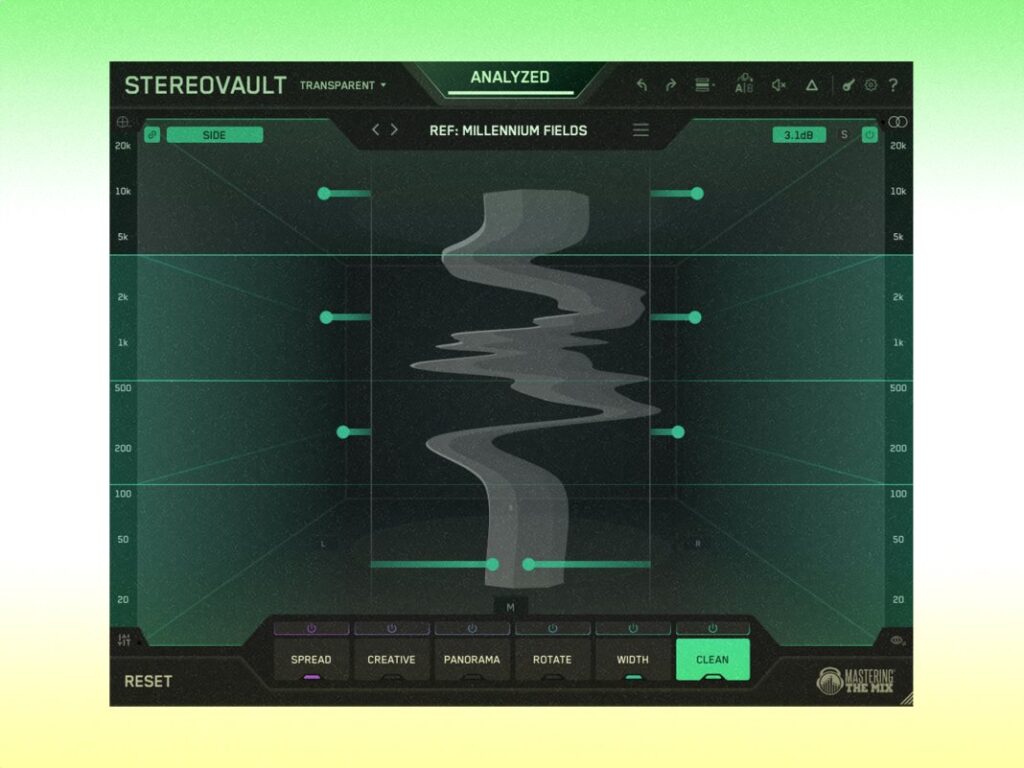
Select tools that offer control while remaining phase-safe. STEREOVAULT includes eight widening modes plus panning tools across six tabs:
- Spread: cleanest widening (Pristine / Diffuse / Vintage modes)
- Creative: characterful spatial width (Stretch / Flux / Chorus / Haas / Space modes)
- Panorama: per-band pan and reposition (Pan / Skew)
- Width: redistribute Mid/Side energy (Blend / Balance)
- Rotate: rotate the image rather than level it (Stereo / Mid / Side)
- Clean: surgical Mid/Side EQ (Side / Mid)
You can split the spectrum into four bands in Transparent mode, or six bands in Flexible mode. This helps target specific areas of the mix. Placing STEREOVAULT on the mix bus suggests using Transparent mode, which keeps band crossovers consistent for the cleanest sound. Flexible mode allows varying crossovers for more control on individual tracks. Every move is automatically volume matched so decisions are not influenced by volume changes.

Making a mono source sound wider
A centred bass provides a strong foundation, but adding width can make it fuller. Keep deep subs fairly central, but add warmth and size in the low-mids from 100Hz to 250Hz, or even up to 750Hz.
Diffuse mode and Vintage mode are useful here. Diffuse sounds cleaner, while Vintage adds warmth and character. Use the I/O tab to change the output and test that the result sounds consistent in mono.
Widen sounds to add depth and space
Two sounds might compete in the mix without needing to pan to opposite sides. In a scenario with a background pad and a lead synth, the engineer used Diffuse mode, Flux (a diffuser with subtle modulation), and the Width and Clean tabs. This pushed energy away from the centre to the sides.
This gives the pad and lead their own spaces and reduces frequency masking that was burying the pad, without panning left and right. Other examples include using Pristine mode on a vocal bus for a natural lift in the upper mids and top end, or panning the low-mids of a guitar part while keeping the tops central.

Control the width across the spectrum on a full mix
Once you have depth and separation, compare the whole mix to references to ensure you have not gone too far. STEREOVAULT has a smart preset system that listens to your audio when you select the material type and genre. It outputs eight custom presets relevant to your mix. You can load a reference track to make adjustments across the four bands to match the spread.

Use your ears to double check everything by setting the output to mono. The built-in metering shows stereo energy and turns red when phase issues are detected. In this example, the sub frequencies were centred because they were too wide, while the mids and tops opened transparently to increase depth and separation.
Choosing the right tools for the job
Understanding which tools fit which situations allows you to create full sounding mixes that translate across multiple systems. Use the most transparent tools for fuller busses or the mix bus. Smaller elements allow for more creative widening techniques provided the sound remains acceptable in mono.
Consider context. A raw, bass-heavy garage track sounds more powerful if mixed narrower than an intricate melodic techno track. Width works best with contrast, blending central focal points with expanded elements around them.
STEREOVAULT is available from masteringthemix.com for £59, with a free trial available.