EPROM, the West Coast bassist and producer, has released Memory Rites, a collection of 60 patches for Minimal Audio’s Current synthesiser. The pack includes 25 bass sounds, 14 leads, 9 pads, 6 keys, and 6 sound effects. It is available now as a standalone expansion or as part of the full Current platform.
This guide is a partnership between EPROM and Minimal Audio.
Watching an artist use a synthesiser reveals the instrument’s limits and the creator’s approach. EPROM’s name references the memory chips found in Oberheim synths, which gives the project instant credibility. He has been busy recently, both solo and with the Shades duo alongside Alix Perez.
Current is already a powerful platform with many options. EPROM’s patches offer a specific way to approach that open canvas.
Memory Rites contains 60 patches across the categories mentioned above. The sounds feature angular, aggressive basslines, evolving machine textures, and modulating rhythms. It functions as both an experimental album and a masterclass in patch design.
The new Current Expansion Player allows you to use these sounds without owning the main Current synthesiser. The patches remain tweakable. If you do own Current, you can examine how the patches are structured to learn from them.
Here is an overview of both versions. I will cover the basics of the player first for those new to Minimal Audio plug-ins, then explain how to dig deeper with the full version.
The primary rule is to explore by playing. This involves using the computer keyboard and the physical knobs. The patches are voiced to support this method. Even with the Player, you can quickly generate your own sounds.
Current Expansion Player guide
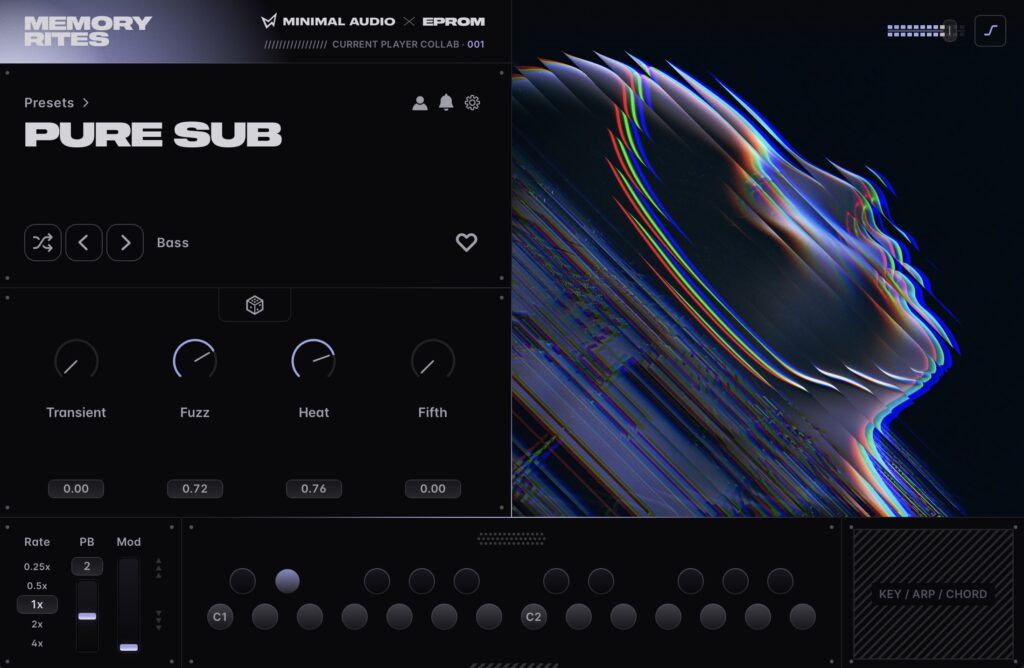
The Current Player provides macro controls and a selection of options.
Browse the presets or jump to categories by clicking “Presets >” above the large text name. Clear any filters by clicking the triangular shape with an x on the right side.
Each patch has four pre-assigned macro controls. EPROM’s personality is evident here; every patch is unique. You are invited to start turning the knobs immediately. You can also randomise those four parameters using the dice icon in the center for quick contrast.
Below these controls are the LFO Rate, Pitch Bend, and Modulation settings.
Modulation typically adds to an existing macro range. You can watch this animation in the user interface.
Pitch bend range. The number above Pitch Bend (PB) sets the bend range. In the EPROM patches, extreme ranges are particularly effective.
Rate. You must try the Rate on each patch. Depending on the sound, it may not be relevant or have a subtle impact. Note that clicking a different rate retriggers the note. You should set a rate and leave it. This is a feature request for the Player to allow changing rates while playing and to show what is being modulated.
EPROM has mapped other rates to a macro in some patches. This aligns with how producers and performers typically use patches.
Here is a bass patch, Ping Pong Bass, with different LFO rates set via the Rate control:
At the top right of the UI, there is an output limiter. It has three modes: off, Soft limiting, and Glue. Glue provides light compression. The effect is subtle on these patches. To hear the difference more clearly, move the output gain into the red zone.
In Ableton Live, I mapped the macros for easier access. Right-click the plug-in title bar, choose Group, then click Map and go through the four faders. This gives easy access from a controller, such as a Novation LaunchKey.
Exploring by playing
This becomes fun as you pull up presets and experiment with the macros. Here are a couple of fast examples.
Lush Grains uses the granular engine to create a wide variety of different sounds as you manipulate the macros.
Seeded Clap offers leftfield SFX textures you can push in all kinds of directions. It is a hybrid of wavetable, granular, and sampled percussion. Watch how adding modulation adds value to the Airpusher parameter.
Super PWM Bros shows the arpeggiator and scale mode. You can still drive things into textures and colours that differ from your initial imagination. The genre remains flexible.
Different patches will show a placeholder in the bottom right or interactive scale, arpeggiator, and chord settings depending on what suits the patch.
Digging deeper in Current
If you have a license for the full Current via subscription or lifetime purchase, you can examine these patches, learn how they are made, and use them as a basis for your own creations.
After installation, the full expansion appears in the Stream. You should download all of them; they do not use much space.
Once opened, you gain many options. You can check which sections EPROM used for each patch. What is in the Wavetables, Granular, and Sub sections? Where is FM or AM used? How are the filters, envelopes, LFOs, and curves configured?
Here is the Seeded Clap loaded into the Player. You can quickly mangle this into completely different sounds using the original as a template.
Get Current
It will be interesting to see how you use this and if you want more sound design ideas with these tools.
You can purchase the Memory Rites Expansion for 29 US$/EUR. It includes the standalone Expansion Player. Full access to the underlying synthesis and editing capabilities is available if you own Current.
System requirements: macOS 11.1 or later / Windows 10 or later. Supported formats include VST2, VST3, AU, and AAX.
What it means
The standalone player allows immediate experimentation without the cost or complexity of the full synthesiser. It is designed for quick sound generation rather than deep architecture study. The full Current version offers a transparent view into the synthesis engine, letting users deconstruct the patches to understand their construction.