When you pick up your phone today, what exactly are you holding? The definition of a photograph is becoming increasingly fluid as major tech firms embed generative AI directly into their camera software. Devices from Google and Samsung now offer capabilities that allow users to erase people from a frame, reposition subjects, and insert entirely new objects into the scene.
Apple is joining the fray with fresh generative tools within its Photos app, yet Jon McCormack, the company’s head of iPhone camera software, insists on a more restrained strategy than its rivals. He explicitly states the company is not “doing AI for the sake of AI.”
During the annual Worldwide Developer Conference on Monday, Apple unveiled several new AI integrations for the Photos app arriving in iOS 27 later this year.
While the existing Clean Up tool allows for the removal of unwanted items, its performance will improve significantly in iOS 27 thanks to upgraded machine learning models. Two new additions, Extend and Spatial Reframe, allow users to expand the boundaries of an image or shift the perspective, all by generating synthetic pixels. The software essentially “thinks” about what belongs in the frame and renders it.
What this means for makers and artists
McCormack argues that generative AI is now solving a massive backlog of previously unfixable photographic issues. These new tools are highly deliberate. “You don’t have to know all the details of how to do something in Photoshop or something else-it gives normal people these absolute superpowers,” McCormack says.
However, Apple does not intend to let users create unbridled digital fakery, at least not within the Photos app. While the App Store hosts numerous tools for creating photorealistic slop, the Photos app imposes strict boundaries. The synthetic pixels generated are confined to the background and will never alter the face of the main subject. For instance, the Clean Up tool prevents the removal of the primary subject. The Extend function is a one-off operation that expands the image by only 25 percent; you cannot save, edit, and infinitely extend the image.
McCormack also revealed that Apple will integrate Google DeepMind’s SynthID technology later this year. This will add an invisible watermark indicating that an image has been altered by generative AI, potentially allowing other platforms to flag it as edited. (It is worth noting that researchers have demonstrated that digital watermarks are not foolproof.)
“A photograph is of something that actually happened,” McCormack says. “We really do believe in this idea of authentic journalism to your own life-when you’re capturing photographs, you’re making memories, you’re putting moments of your life in a bottle that you can go back to. It’s really important to us that we create tools that keep the sanctity of that moment.”
This sentiment mirrors a conversation I had years ago with the head of Google’s Pixel camera division. While he agreed on the importance of memory, he emphasised the freedom to alter an image to match your recollection. If the sky in your mind was bluer, Google’s approach allows you to change it. Apple’s new tools are more restrictive, designed specifically to solve compositional errors you may have missed during capture. Perhaps you missed an unsightly plastic bag in the background, took a photo of your child from too high an angle, or framed your spouse too close to the edge.
Della Huff, product manager for Apple’s Camera and Photos software, notes that the team trained the AI models to minimise hallucinations. “It’s not going to create anything that shouldn’t be there,” Huff says. She explains that if a street scene is extended, the model will not assume a car should be parked outside the original boundary. “How the model has been trained is if you don’t need to create something there, then just don’t-do the minimum amount of hallucination to achieve the goal the user is asking the model to do.”
Despite these safeguards, I tested the Extend feature in the iOS 27 developer beta. When I photographed a friend at a table and tried to expand the scene to the right, the app added tables with fake people sitting at them. These individuals were never present in real life.
Huff explains the feature is attempting to match the existing aesthetic. If people are already visible in the background but Extend does not generate more figures as the photo expands, the result may look odd. “If we said the rule is we could never generate a background human ever, then the feature would become less useful,” she says.
Control vs. Conversation
A major theme of Apple’s WWDC presentation this year was using natural language to accomplish tasks. You can speak to Siri naturally, describe an event for the Calendar app to create instantly, or define a shortcut in the Shortcuts app without fiddling with triggers. You can even speak an extension into existence in Safari. So why cannot you edit a photo using natural language? That is a feature Google introduced last year on Google Photos.
Huff states that the new Siri AI can handle minor touch-ups, but Apple is not ruling out future capabilities. Currently, Siri cannot utilise the new AI features because they are strictly human-controlled. This is partly due to user experience considerations; it is difficult to talk Siri through the complex process of changing a photo’s perspective.
“There’s so much more that’s open-ended about that, especially something like Spatial Reframing where that’s really a user-intent thing that you need to express,” Huff says.
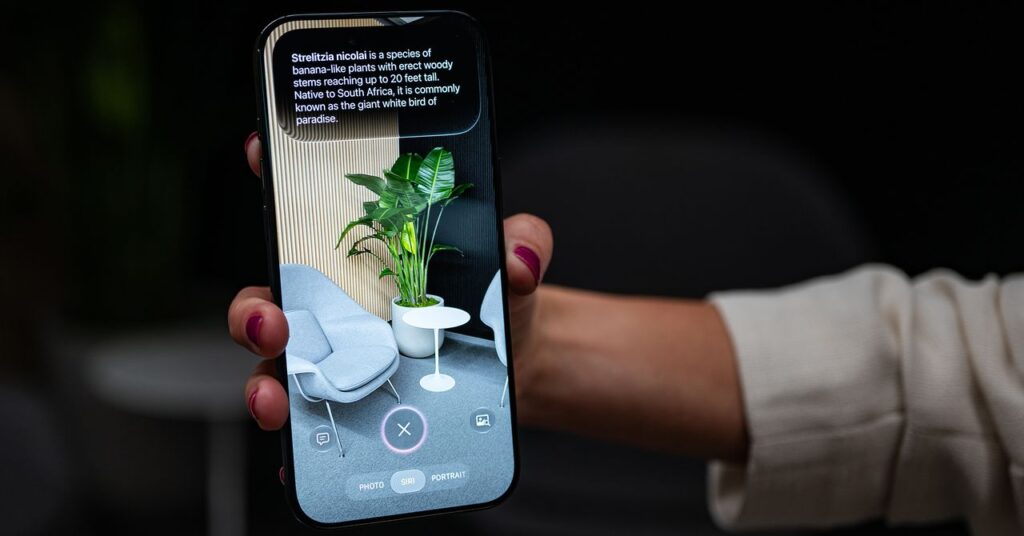
Regarding Siri, the other major change in iOS 27 is its injection into the Camera app. McCormack says “Sirifying” the iPhone’s camera is purely about reducing friction. Siri’s Visual Intelligence feature, which uses computer vision to study an image like Google Lens, is currently activated via the Camera Control button. McCormack argues it makes sense for this camera-specific function to reside within the Camera app.
“It’s embracing the idea that the camera is really a number of things,” he says. “It’s a memorialization device … it’s a note-taking device … or I’m just curious what that plant is.”
Apple’s measured approach might seem contradictory next to its Image Playground app, which allows users to create AI-generated images via text prompts or by injecting photos from their library. In iOS 27, Image Playground defaults to generating photorealistic images unless a specific art style is requested. McCormack notes that these different uses of AI will feel distinct based on their context. In the Photos app, users expect a safe space where memories remain intact. In Playground, the name is intentional-it is “a place to play.”
“Both use cases are totally valid,” Huff says. “I want to improve this photo. A photo is something that happened, I captured it with my camera, and the Photos app is where I can improve it. But I also want to be creative and let my imagination be able to run wild, and so they’re two separate experiences intentionally.”
Key takeaways
- Apple is introducing generative AI tools in iOS 27 that allow users to expand images and adjust perspectives, but these features are strictly limited to the background to preserve the integrity of the main subject.
- To combat misinformation, Apple plans to integrate Google DeepMind’s SynthID watermarking technology, ensuring AI-edited images can be flagged on other platforms.
- While Google prioritises creative freedom to match user memories, Apple restricts its tools to fixing compositional errors, preventing the removal of primary subjects or infinite image extension.