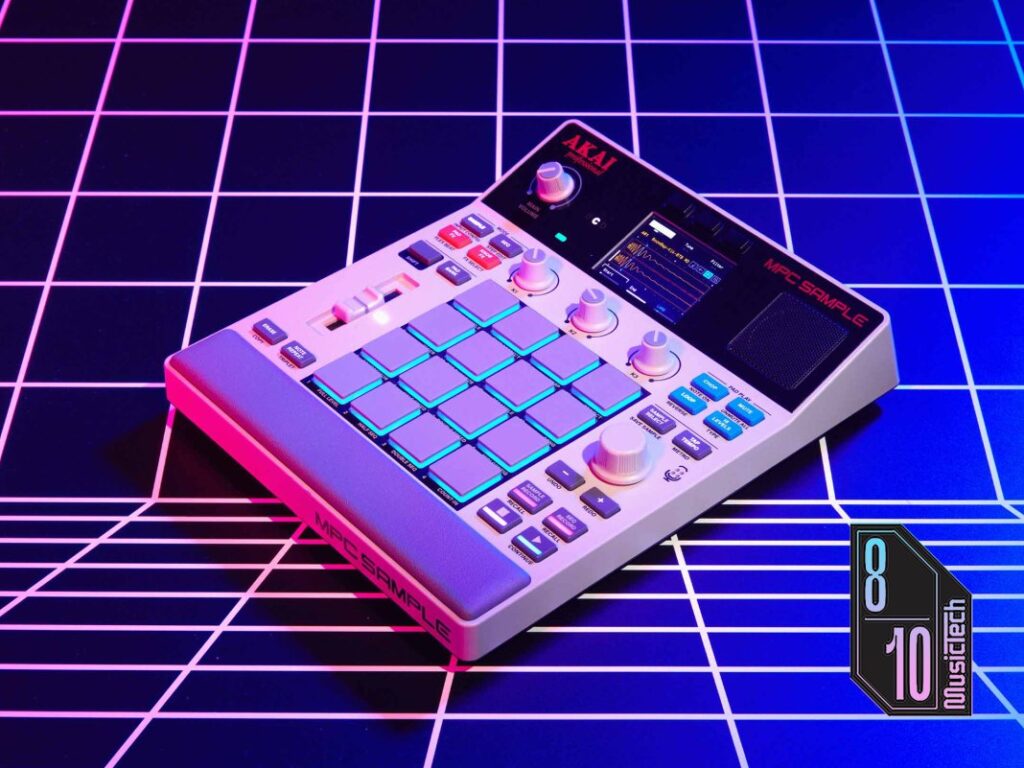
The Akai MPC Sample costs £339 and arrived at The NAMM Show in January 2026 with enough hype to make the brand promise a landmark moment for itself.
I approached the device with scepticism. It looked like a toy and felt like a direct competitor to the Roland SP-404 and the Teenage Engineering EP-133 K.O II. After using the $400 instrument casually for a couple of months, I found the hype justified.
It is fun to make music with.
Immediate use
Akai wants you to experience immediacy the moment you unbox the MPC Sample.
The 7.6 x 9.3-inch beat machine requires near-zero setup. My review unit came with a full battery, so I perused the one-sheet quick start guide, hit the power button, and was making beats with the Sample’s 2GB library of built-in sounds in seconds. The tiny speaker is just loud enough to keep me locked in. The battery reliably lasts for five hours, too, so I found myself picking it up multiple times in a week and bashing out a few beats before needing to plug it back in.
In fairness, having owned an MPC 2000XL and reviewed several other MPC products, I found the workflow familiar, but newcomers to the series will likely hit some hurdles. That workflow is a major appeal for the MPC Sample, with its tiny LCD screen, 16 pads, and retro-inspired design. Compared to the EP-133 K.O II, the MPC Sample has more songbuilding features, which take some time to wrap your head around, but are plenty versatile and creative once you’ve sussed them out.
Akai has published a series of in-depth video tutorials, hosted by the brand’s Andy Mac. You can easily binge-watch these in an evening and learn to navigate the MPC Sample much quicker.
There’s also no additional software required to get up and running. You can update the device’s firmware via browser, which I used for upgrading the Sample to version 1.3. This was a breeze, but the browser app serves no other function, meaning you can run everything directly on the hardware. If you want new samples, load them onto an SD and pop it in. I love this approach, especially when many gear brands in 2026 require you to download companion apps to unlock further features of your hardware. With the MPC Sample, you unbox it, power it up, and it’s all there in front of you.
A classic MPC workflow
Playing the MPC Sample is a blast. The 16 pads — which are RGB-backlit, velocity-sensitive and have polyphonic aftertouch — are a joy to use. It’s also fun to use classic MPC features, such as 16 Levels to play with a sample’s pitch and velocity, and the trio of K knobs, which let you make quick changes to your sounds, apply filters, and change global parameters of your project.
You can save up to 16 sounds per sound bank, with a total of eight sound banks on the MPC Sample. That means that, at any given time, you can have 128 sounds loaded onto the machine, with 32 voices of polyphony. Having that many sounds to play with is immensely freeing and almost overkill at times, but I’m not complaining!
Sampling is straightforward, too. You can record your sounds directly via the stereo inputs on the rear, via the built-in microphone, or load sounds from your SD card or internal memory. If you want to slice a drum loop into individual hits, for example, the Chop button will automatically slice it across the 16 pads. You can use the K knobs to quickly set new start and end points, apply filters, and even warp samples to timestretch them to your project’s current tempo. Note, however, that the timestretching engine isn’t that sophisticated, so your samples may occasionally sound a little distorted.
Looping a sample is easily done thanks to the dedicated Loop button, and the Shift button will allow you to quickly deploy functions such as resampling, time correction, Flex Beat, and more. There are secondary functions for almost every button on the MPC Sample, and there’s also the classic MPC fader to the left of the 16 pads, for quickly changing a track’s amplitude, effects parameters and more.
Swing and quantisation are also worthy of a shout-out here. The MPC family is revered for its implementation of swing, largely in part thanks to the work of legendary instrument designer, Roger Linn, who implemented swing tech into the MPC60 — the first ever MPC and the design of which inspired the MPC Sample. As such, real-time swing is implemented excellently into the MPC Sample, allowing you to apply it to specific tracks.
The microphone is fine, but not impressive. You might use it occasionally if you’re sketching out a demo track, but if you’re serious about recording a source, you’re better off just plugging a mic into the inputs on the rear.
Pumped-up effects
Editing sounds is easily done once you’ve familiarised yourself with the MPC workflow.
The Pad FX, Knob FX effects engines are surprisingly intuitive. After quickly building a French house beat, I realise I’m missing some sidechain compression. Within a minute, I find and apply the Pumper effect to the beat’s main sample, and it pumps in line with the four-to-the-floor kick drums — instantly a groove.
I’m quickly frustrated, however, when I realise that effects can’t be applied on a per-track basis, nor can they be recorded into my sequence. A workaround is to resample a sound you’ve applied effects to, which isn’t exactly elegant, but instruments like this historically require some creative puzzle-solving.
Similarly, there’s no easy way to export your sounds to a DAW, nor can you output individual stems. There are ways around this, too, like soloing a track and recording that to your DAW, but that’s not exactly intuitive.
Should you buy the MPC Sample?
In this price bracket, there are three strong options if you’re after a portable sampler: the MPC Sample, the Roland SP-404MKII, and the Teenage Engineering EP-133 K.O II. Each have their own quirks and workflows — you might find the SP-404 is more your style with its deep functionality and effects routing, or the EP-133 might attract you for its design and decidedly unserious workflow. However, the MPC Sample is my favourite of the bunch.
At $400, you’re getting the MPC that producers would’ve dreamed of having in the early 2000s. It’s immensely portable, surprisingly capable, and heaps of fun. It was tough for me to return my review unit, and I often found myself picking the Sample up occasionally throughout the day, just for a quick five-minute jam in between whatever else I was doing.
If you’re looking for your first sampler, the MPC Sample won’t disappoint. If you already produce music with a more accomplished sampler, the MPC Sample will feel limited, and perhaps frustrating at first. But once you understand what it can’t do, you’ll have plenty of fun with what it can do.
Key Features
- 16 RGB-backlit, velocity sensitive pads with polyphonic aftertouch
- 32-voice polyphony, stereo sampling
- 60 effects types with Flex Beat, Pad FX and Knob FX
- Eight banks of 16 sounds (128 loadable at once)
- 2GB RAM, 8GB internal storage, microSD expansion
- Built-in 3W speaker and internal microphone
- Rechargeable lithium-ion battery, ~5 hours
- 23.6 × 19.4 × 5.0 cm