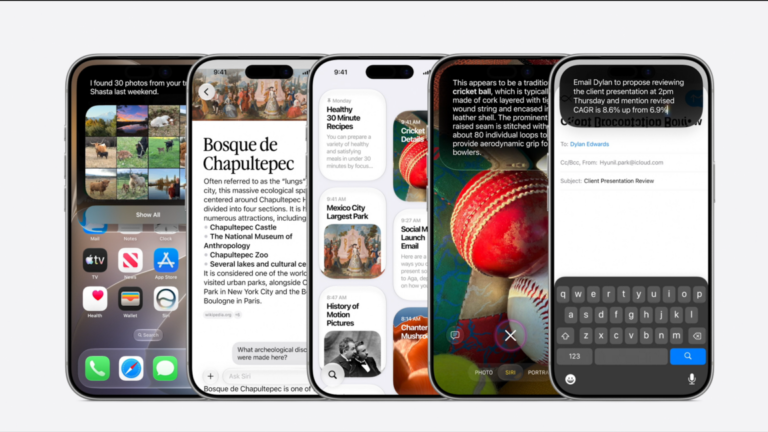
For creators and artists, the new Siri AI represents a shift from a clunky command-line tool to a proactive collaborator. While the original assistant struggled with context, this revamped version-powered by Apple Intelligence and Google’s Gemini model-actually understands your creative workflow. It can sift through your photo library to find inspiration, draft project updates based on your messaging history, and automate mundane tasks like scheduling or file management without needing verbose prompts. For makers, this means less time wrestling with interfaces and more time creating, provided your device can handle the indexing required to make it work.
A New Architecture for the Assistant
The transformation is significant, moving away from the isolated, menu-driven experience of the past. The new interface is now integrated directly into the iPhone search bar, accessible via a swipe-down gesture. Interactions are conversational and persistent; you can swipe down on any response to draft follow-up questions, which are then stored in a dedicated app for future reference.
Crucially, the output is concise. Rather than generating endless streams of text, the assistant typically provides single-paragraph summaries. Key terms are bolded within the text response to aid quick scanning before you listen to the audio. If deeper details are required, a swipe-down gesture reveals the full context. This efficiency is vital for artists and professionals who need rapid answers without wading through verbosity.
This overhaul relies heavily on a partnership with Google, where the Gemini model powers the underlying engine. The result is an assistant that feels attuned to specific user intent rather than merely listing generic web links. When asked for generic suggestions, such as “What should I do today?”, the system cross-references recent messages to highlight plans you discussed but never finalised.
Hyper-personalisation is another defining feature. The assistant leverages data residing on your device, including photos and messages, to tailor responses. It also avoids locking users into Apple’s walled garden; for instance, when drafting a text, it will ask if you prefer to send it via Apple’s Messages or Meta’s Messenger service.
However, this capability comes with a cost: the assistant must index your phone. During the developer beta testing on an iPhone 16 Pro Max, the indexing process took slightly over a week to complete. This background scanning is necessary for the AI to catalogue your data for easy retrieval.
Regarding privacy, Apple emphasises a “Private Cloud Compute” approach at WWDC 2026. The company states it does not store user data permanently, pulling information only when a specific query is made. As with previous iterations, users retain the option to disable Siri AI entirely within their settings.
Hardware Requirements and Availability
It is important to note that hardware compatibility is tiered. The iPhone 16 Pro Max was used for testing, but it does not possess every feature available in the final release. Currently, only the iPhone Air, iPhone 17 Pro, and iPhone 17 Max will support the full suite of capabilities, including varied voice options.
All iPhone 16 and iPhone 17 models will run the new Siri, and the iPhone 15 Pro and Pro Max will be compatible to a limited extent. Older devices will not support the new voice assistant.
Visual Search and Photo Management
Integrating with the camera app allows for visual queries. By showing the assistant a photo of a foggy path, it identified the location and provided historical context about the Cypress Tree Tunnel at Point Reyes National Seashore. While the identification of Monterey cypress trees was accurate, the location suggested was an hour away, highlighting a potential disconnect in local context.
Despite minor navigation hiccups, the tool excelled at uncovering archived memories. When asked to find images from a trip to Costa Rica, it successfully located photos from two years ago and displayed them directly within the Siri app. Similarly, queries for specific events, such as a hot pot dinner, retrieved relevant images, though it occasionally included unrelated shots, like a hot tub session, demonstrating the need for more precise filtering in a beta environment.
Automation and Communication
The assistant’s ability to automate daily tasks was tested by requesting a selfie. It launched the camera app, provided a countdown, and captured the image using the front camera. Following this, the user asked Siri to text a partner named Sam, attaching the photo and a message about eating pancakes with a skull emoji.
The execution was mostly successful but revealed some literal interpretation quirks. The assistant correctly identified the contact for Sam but initially included the phrase “with a” before the emoji in the draft. On other attempts, it selected the wrong emoji or confused the recipient with a contact named Adam. These errors suggest that while the automation is powerful, the dictation and intent recognition still require refinement.
Contextual Research and Future Integration
Later in the day, the assistant was queried about sea lions at Fisherman’s Wharf. It correctly noted that it was currently the off-season and advised that sightings would be fewer than average. On-site, the assistant provided accurate historical facts about the dock and sea lion behaviour, pulling context from Wikipedia and the official Fisherman’s Wharf website with clickable links for further reading.
While the San Francisco tour only scratched the surface of the assistant’s potential, the utilitarian approach feels like a genuine improvement over previous iterations. The system does not attempt to be a synthetic friend offering pleasantries; instead, it operates as a direct, straightforward helper.
Apple’s vision extends beyond the mobile device. Siri AI is being integrated across the ecosystem, including iPads, MacBooks, Apple Watches, and the Vision Pro. Unlike standalone AI apps like ChatGPT or Claude, this assistant is woven into the operating system, ready to automate complex workflows rather than just answering questions.
The success of this rollout depends on whether users will alter their daily habits to leverage these new capabilities. For now, the technology promises a more capable digital companion, provided the hardware supports it.
Key takeaways
- The new Siri AI is powered by Google’s Gemini model and offers concise, context-aware responses integrated directly into the iPhone search bar.
- Full functionality requires a recent iPhone model, specifically the iPhone Air, iPhone 17 Pro, or iPhone 17 Max, with older devices receiving limited or no support.
- The assistant leverages on-device data for personalisation and automation but requires a week-long indexing period to fully catalogue user content.
- While privacy-focused with on-device processing, the current beta shows occasional errors in intent recognition and emoji handling.