Alibaba released Qwen 3.8 27B on Friday. It is an Apache 2 licensed vision-capable large language model from the Qwen research lab. The model runs on a 27 billion parameter scale, a size that fits reasonably on a laptop with decent specifications.
Qwen’s own benchmark results show a performance jump compared to Qwen 3.6 27B and the closed-weight Qwen 3.7-Plus. The 3.7-Plus was a strong contender as recently as May. Independent benchmarks will determine if these claims hold true.
I tested the model on two machines: a 128GB M5 Max MacBook Pro and an NVIDIA DGX Spark. I used LM Studio with their 17GB Q4_K_M quantized build on both systems. I also ran llama-server directly on the Spark.
The default of extra high results in spectacular over-thinking
Qwen’s documentation states the model defaults to xhigh for reasoning effort. The LM Studio GGUF build preserves this setting:
Qwen3.8 comes with official support for reasoning_effort, which can be used to adjust reasoning depth and control cost:
- xhigh (default): for complex tasks demanding thorough analysis
- medium: balancing accuracy and speed
- low: efficient reasoning optimizing for speed and cost
This is a poor default for running on consumer hardware. The results were entertaining at best.
I hit the LM Studio default context limit of 8,192 tokens quickly. The model consumed them all while thinking about simple problems. Loading the model with the full 262,144 token maximum context length fixed the issue.
Here is the SVG I received from my first attempt with that increased context length. It took 21 minutes to generate, using 22,276 reasoning tokens to produce 3,223 tokens of output. You can read the reasoning trace here.

This is the best pelican SVG I have generated with a model that runs locally. The file is just 17GB on disk. There is a lot to like about this:
- The bicycle frame has the right shape
- It has legs on each side of the bike, which is very rare
- Good, clear pelican pouch
- The wings extend to touch the handlebars
- The motion lines are behind, not in front
- It has a tasteful background with a nice sun, clouds, hill, flowers and grass
Was that worth waiting 21 minutes for? Absolutely not.
Here is that same prompt run with reasoning turned off. The transcript is here. This one produced 3,715 tokens and took 137 seconds, just over two minutes.

For completeness, I used OpenRouter to run the same prompt through the much larger Qwen 3.8 2.4T-A95B, released last week. It produced this animated SVG:
I said Qwen at xhigh has a tendency to over-think things, but how bad really is it?
I tried a much simpler prompt, again with that default extra high setting:
draw an svg of a circle
Qwen’s reasoning trace started like this:
The user is asking for an SVG drawing of a circle. Simple request — but I want it to be a carefully crafted piece. Let me make something that goes beyond just <circle>: a single self-contained SVG file with character — maybe a geometric “circle study,” with subtle animation, layered rings, and a distinctive palette.
Keep the scope right: they asked for an SVG of a circle. So the core is a circle. But I can add craft: concentric guide circles (like a compass/geometry drawing), tick marks, a soft gradient fill on the main circle, restrained ambient motion (a slowly rotating dashed ring, pulsing glow). Respect prefers-reduced-motion? That’s more for CSS; SVG SMIL or CSS inside SVG will do.
Palette options: deep teal ink on warm paper? Or bold vermilion circle on off-white with navy construction lines — Bauhaus/compass-drawing vibe. Let me go with a “geometric study” look: cool slate background, or bright paper white? Paper white is fine if it’s not the cream-and-terracotta combo. […]
Several minutes later it produced this absolutely beautiful animated circle, which was entirely not what I had asked for!
My strong recommendation: ignore that default. Run Qwen 3.8 27B on low or even no reasoning levels at first. It is a great model, but wow that default setting is a bad place to start.
It is very good at bounding boxes
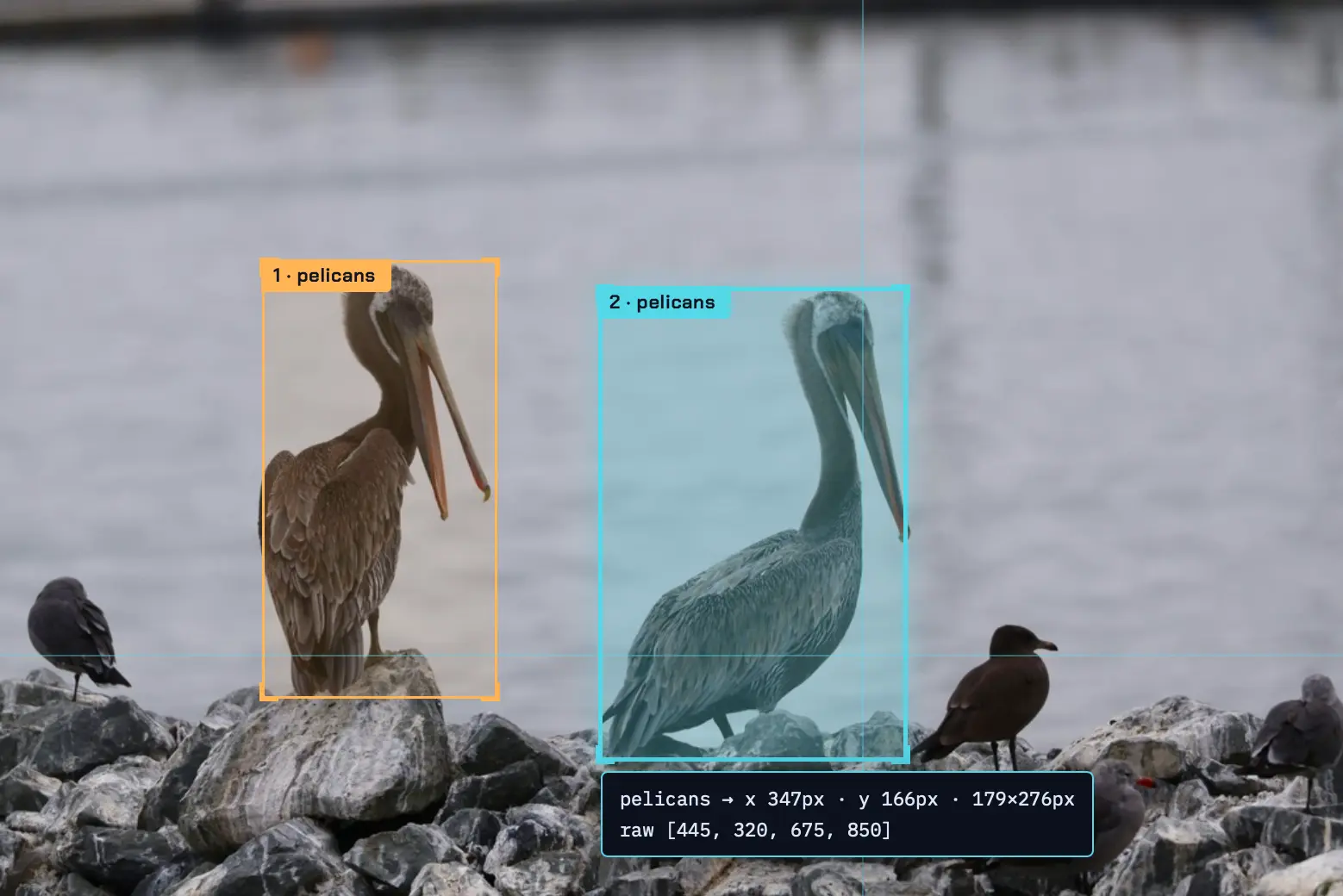
A fun way to test a vision model is to see how well it can return bounding boxes around items in a photograph. I have seen previous Qwen models deal well with this, so I decided to put it to the test drawing bounding boxes around some pelicans.
I have seen asking for 0-1000 scale produce good results in the past. I tried this:
llm -a https://static.inaturalist.org/photos/714731804/large.jpg \
  -m lmstudio/qwen/qwen3.8-27b \
  'Return JSON bounding boxes for the pelicans in this photo, 0-1000 scale for each dimension'
Here is the reasoning trace, which produced this:
[
  {"bbox_2d": [195, 290, 370, 780], "label": "pelicans"},
  {"bbox_2d": [445, 320, 675, 850], "label": "pelicans"}
]
This is such a good match. Here are those boxes rendered on top of the photo:
Building a tool to label bounding boxes
That visualization of the bounding boxes was taken using a new custom tool that I had Qwen 3.8 27B build for me, running offline on my laptop.
I forgot to dial down the thinking effort so it was massively over-engineered, but it did manage to produce this full interface from this single prompt:
[
   {"bbox_2d": [195, 290, 370, 780], "label": "pelicans"},
   {"bbox_2d": [445, 320, 675, 850], "label": "pelicans"}
]
Build an HTML page which has an input box for accepting the URL to an image and a textarea for accepting the above style of JSON.
It appends the image to the page, measures its width and height, then treats the coords in the bbox_2d as scaled from 0-1000 and scales them against the actual width and height, then it renders labelled boxes over the image.
This screenshot shows one of the features I did not ask for – a demo scene, for if you do not have a photograph to test the tool with:
Source Read original →