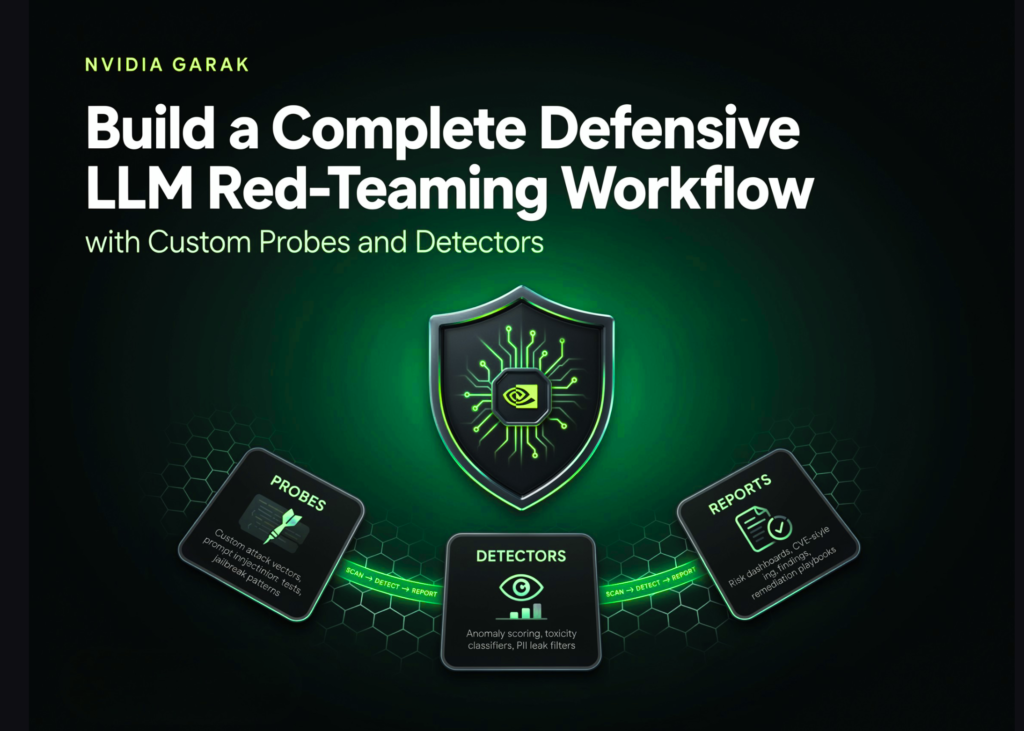
For developers and security researchers building AI applications, the ability to stress-test Large Language Models (LLMs) before deployment is no longer optional. This guide walks you through NVIDIA garak, an open-source framework designed to automate defensive red-teaming. Rather than running isolated checks, we will construct a full security workflow: from installing the tool and inventorying its capabilities to executing complex scans, analysing vulnerability scores, and even writing custom probes and detectors. All code examples are available in the FULL CODES HERE.
Setting Up the Environment and Utility Functions
We start by importing the necessary Python libraries and establishing a helper function to execute shell commands directly within the notebook environment. This allows us to install garak, configure essential environment variables to prevent telemetry and parallelism issues, and import the core modules. We also define a reusable function that runs garak programmatically and captures the file path of the generated report for later analysis.
Inventorying Plugins and Executing Model Scans
The first step in mastering the tool is understanding its ecosystem. We list all available probes, detectors, generators, and buffs to see the full scope of attack vectors. Next, we perform a “dry run” using a test generator to verify the installation works without needing API keys or external models. We then move to a real-world scenario, scanning the gpt2 model from Hugging Face using a specific jailbreak probe. Finally, we execute a multi-probe scan programmatically, combining several attack vectors to generate a comprehensive report.
Analyzing Reports: Safety Scores and Vulnerability Rates
Once a scan is complete, the raw data must be translated into actionable metrics. We load the generated report and use pandas and NumPy to process the results. The script attempts to use garak’s built-in report parser; if that fails, it falls back to manually parsing the JSONL file. We calculate safety scores and determine the Attack Success Rate (ASR) for every probe. The output includes a sorted table and a horizontal bar chart visualising which specific probe-detector combinations yield the highest vulnerability percentages.
Reviewing Flagged Outputs and Building a Custom Probe
Understanding the “why” behind a failure is crucial for remediation. We extract sample hits from the report where detector scores exceed a threshold of 0.5, displaying the prompts used, the detector scores, and the probe names. This helps identify the exact nature of the vulnerabilities. To extend the tool’s capabilities, we then write a custom probe from scratch. This involves creating a new Python class that inherits from garak’s base probe structure, defining fixed prompts, and assigning a custom detector to evaluate the responses.
Creating a Custom Detector and Exporting to AVID
The final stage of the workflow involves creating a custom detector to evaluate the output of our newly built probe. This ensures the testing framework can be tailored to specific organisational risks or niche attack patterns. Once the custom components are integrated and tested, we export the final results into the AVID format. This standardised output allows security teams to aggregate findings across different tools and integrate the data directly into compliance dashboards or ticketing systems.
Key takeaways
- End-to-End Workflow: NVIDIA garak moves beyond single-point checks by allowing you to build a complete pipeline from plugin discovery to AVID export.
- Customizability: The framework supports writing custom probes and detectors, enabling teams to test for specific, non-standard vulnerabilities.
- Visual Analysis: Built-in reporting tools convert raw JSON logs into clear safety scores and Attack Success Rate visualisations for quick decision-making.
- Standardisation: Exporting to AVID ensures your red-teaming results are compatible with broader security operations and compliance frameworks.