When you paste a 200-page PDF into Claude, the cost does not stop at the first message. The entire document is re-sent to the model with every single follow-up question, creating a hidden, compounding charge for context windows.
Marktechpost AI Media Inc released Token Saver on GitHub on 30 July 2026. It is an open-source Model Context Protocol (MCP) extension for Claude Desktop, licensed under MIT and currently at version 1.0. Arnav Rai, a CS student at Rochester Institute of Technology, developed the tool during his internship at Marktechpost. He worked under the supervision of Jean-marc Mommessin and Asif Razzaq.
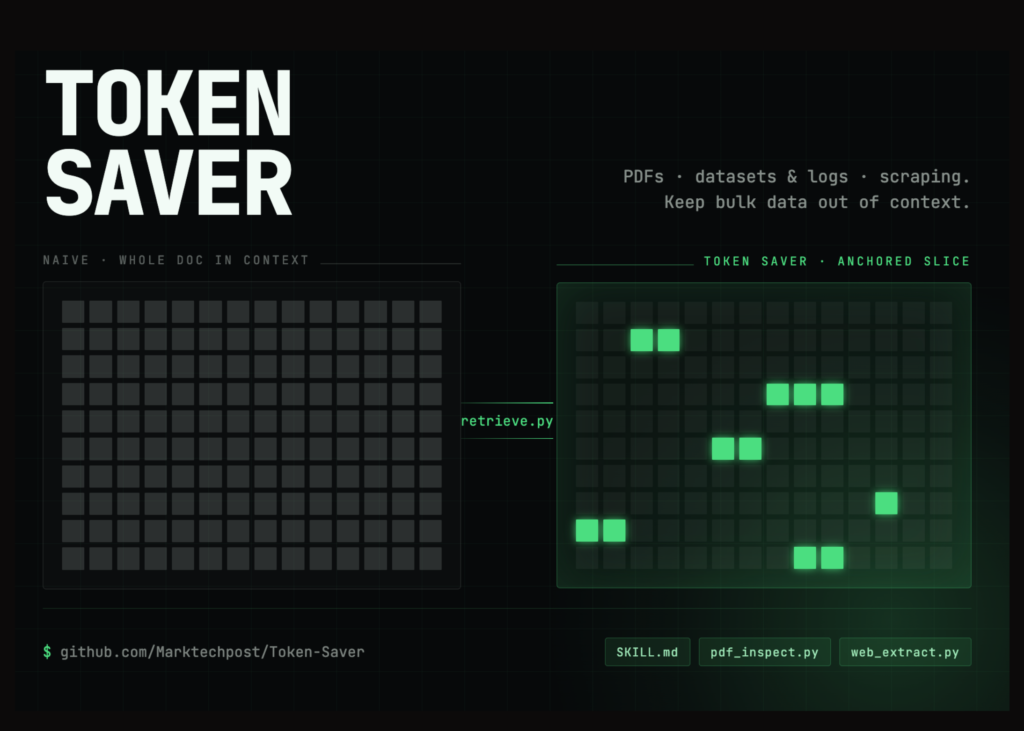
The extension implements Local Hybrid RAG to allow users to query massive PDFs without uploading the actual file to the provider’s servers. Token consumption drops by 92% to 99%, privacy is maintained locally, and setup requires zero Python environments or terminal configurations.
The hidden token drain of large PDFs
Users often assume that dropping a PDF into Claude simply extracts the text. In reality, Claude’s default behavior converts each page into an image to preserve charts and layouts while separately extracting text. Before a single image token is counted, the text alone can run 1,500 to 3,000 tokens per page.
While Prompt Caching and Claude Projects help soften this blow, they do not solve the core issue: the entire document still crosses the boundary to the provider’s servers. If you only need two relevant paragraphs from a 1,000-page textbook, forcing the LLM to search the entire 1,000 pages is inefficient and prone to hallucination.
How local hybrid RAG solves the problem
Token Saver acts as a local MCP server: a lightweight background program on your machine that Claude can call as a tool. The PDF never leaves your hard drive.
When you ask a question, Token Saver uses Local Hybrid RAG to find the answer. Hybrid RAG is the gold standard for document retrieval because it combines two powerful search methods:
- Keyword Matching (BM25): Runs over SQLite’s built-in FTS5 search (weighted at 0.4) to find exact terminology.
- Semantic Search (Cosine Similarity): Uses a local all-MiniLM-L6-v2 embedding model (weighted at 0.6) to understand the meaning of your question, rather than just matching exact words.
By blending these two approaches locally, the server searches the file and hands Claude only the highly relevant passages. Claude then synthesizes the answer, citing the exact page numbers and providing a running tally of the tokens you just saved.
The 8-stage processing pipeline
Token Saver runs entirely inside a single, long-running local process. Before any text reaches Claude, the local Hybrid RAG pipeline executes eight rapid steps:
- Extract: Uses pypdfium2 (with pypdf as a fallback) to pull text.
- Chunk: Splits text into 180-word passages, overlapping by 40 words so context is never blindly cut.
- Score (Hybrid RAG): Evaluates chunks using the blended BM25 and local embedding model.
- Gate: Enforces a quality threshold. Passages sharing no exact keywords must pass a semantic similarity floor of 0.25 to qualify.
- Deduplicate: Drops near-identical passages.
- Trim: Narrows the passage down strictly to the sentences that answer the user’s prompt.
- Budget: Caps the total payload sent to Claude at 8,000 characters.
- Envelope: Wraps the retrieved text in a document-chunk element containing the source file and precise page number.
(Note: The embedding model is optional but recommended. If it fails to load, the system gracefully falls back to keyword-only matching.)
The numbers: 99% savings at scale
Because the Hybrid RAG pipeline caps the returned text slice, the token savings grow exponentially with the size of the document. Here is how Token Saver performed in benchmarking (measured via tiktoken, assuming one question per document):
| Document | Pages | Whole Doc Tokens | Returned Tokens | Tokens Saved |
| FDA drug label | 33 | 23,959 | 1,021 | 95.7% |
| GDPR (EU 2016/679) | 88 | 70,260 | 996 | 98.6% |
| SFFA v. Harvard | 233 | 133,349 | 740 | 99.4% |
Disclaimer: Token counts use cl100k_base as a stand-in, and baselines assume the whole document is charged on every search.
For professionals working repeatedly with court opinions, technical standards, financial reports, or dense textbooks, Token Saver eliminates the repetitive token tax.
Security and local privacy
For enterprise users and legal professionals, data privacy is non-negotiable. Token Saver’s security model rests on three pillars:
- Zero Uploads: The document never leaves your machine.
- Folder Allowlisting: You configure a specific folder for Token Saver. The server will actively refuse to read files outside of this designated directory.
- Network Isolation: The server communicates with Claude Desktop over standard I/O (stdio) only. There are no listening network ports, drastically reducing the attack surface.
Model performance: Sonnet vs Opus
Token Saver works across all three Claude 3.5 tiers, but testing revealed distinct behaviors:
- Claude 3.5 Sonnet (Recommended): The sensible default. It handles loose file references perfectly, asks clarifying questions if two files have similar names, and correctly applies the retrieved page numbers.
- Claude 3 Opus: Excels at complex documents with multiple voices (e.g., legal rulings with majority opinions and dissents). Opus is smart enough to flag when it infers an attribution based on context rather than explicit text.
Getting started in minutes
Unlike many open-source AI tools that require complex Python environments and JSON configurations, Token Saver is packaged as a single .mcpb bundle.
- Download token-saver-ccr.mcpb from the project’s GitHub Releases page.
- Open Claude Desktop -> Settings -> Extensions -> Install extension.
- Enable the extension, click Configure, and select a dedicated folder where you keep your reference PDFs.
- At the first prompt, choose Always allow.
The extension will not run until a folder is chosen, because that single choice serves three purposes at once.
That folder is worth a moment’s thought. It sets the boundary of what can be read, it is what lets you ask for a file by name instead of typing a path, and it is the list the server shows Claude when a conversation starts. A small folder holding only what you intend to ask about works considerably better than pointing it at all of Documents.
What it means
Users can now query massive legal or technical documents without paying for the full text on every turn. The tool handles the retrieval locally, sending only the necessary sentences to the model. This reduces costs to a fraction of the original price while keeping sensitive data on the user’s own machine.
References: MCP Bundle format | all-MiniLM-L6-v2 | pdfkb-mcp