Our house has a box room full of unpacked items from a recent move. Something in there started beeping intermittently. The intervals were long enough to make finding the source frustrating, so I did not want to dig through every box. I asked Claude Code to build Beep Locator, a system that triangulates the noise using multiple devices scattered around the room.
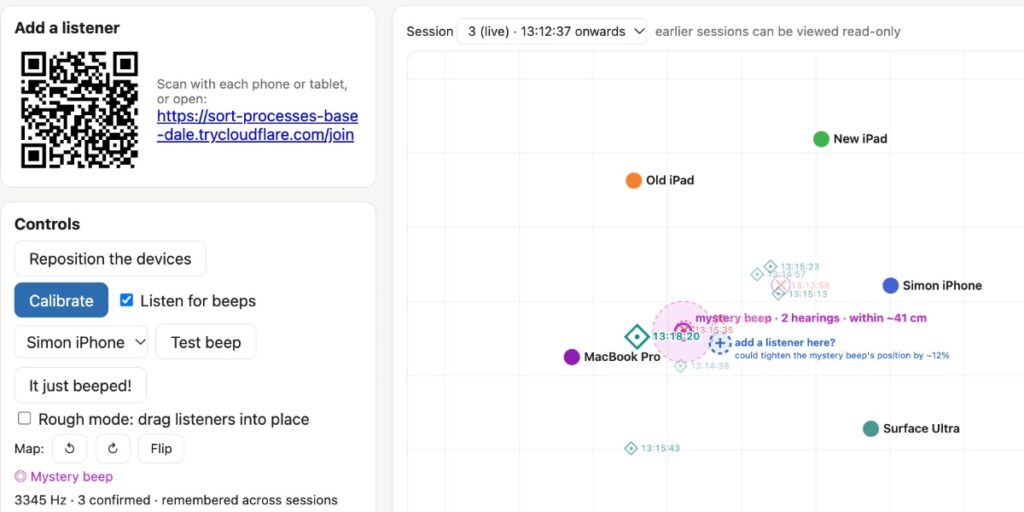
After running for a while, the interface shows a map with device locations and sound markers. A pink circle near the MacBook Pro indicates the mystery beep is within about 41 centimetres. A dashed plus marker suggests adding a listener could tighten the position by roughly 12 per cent. A panel below lists device loudness levels. The Surface Ultra recorded the sound at -6.0 dB, which is about 11.6 dB warmer than the other devices. A table at the bottom logs recent sounds or warns if arrival times are not physically possible.
You run a Python web server to host the primary UI. Then you connect as many devices as you have via a QR code or URL. I used two iPads, a phone, a MacBook Pro and a Surface Ultra.
The devices play noises to each other to estimate their locations. This did not work particularly well. I added a Rough mode where you drag icons around in the space to provide rough locations which are then adjusted based on the sounds.
Once that is set up, the devices listen for the beep.
I added a clapping mode to test the system by clapping my hands in different locations around the room. These appear as diamonds on the map. This helped me gain confidence that the system was capable of locating a sound.
Beeps show up on the map as an X, plus a line in the Sounds located log. You can replay these sounds from each device in turn to confirm they are the mysterious beep you are looking for. Then you click “This is the mystery beep” to mark them as such.
Once you have confirmed the frequency, the system listens out for it, measures the interval between beeps, and uses the triangulated locations to lock down the most likely spot on the map.
The system worked as intended. It gave me the position of the beep to within about 40 centimetres. Then I dug through that specific pile of boxes and found an ancient carbon monoxide detector that desperately wanted its batteries replaced.
How it works
When I started working through this problem with Claude, it quickly found BeepBeep, a 2007 paper by Chunyi Peng, Guobin Shen, Yongguang Zhang, Yanlin Li and Kun Tan. The abstract states the system operates in a spontaneous, ad-hoc, and device-to-device context without leveraging any pre-planned infrastructure. It is a pure software-based solution that uses only the most basic set of commodity hardware – a speaker, a microphone, and some form of device-to-device communication – so that it is readily applicable to many low-cost sensor platforms and to most commercial-off-the-shelf mobile devices like cell phones and PDAs. It achieves high accuracy through a combination of three techniques: two-way sensing, self-recording, and sample counting.
That sounded exactly like what we needed to build.
Beep Locator runs a Python web application server that does most of the work. The listening devices then connect to that server via WebSockets and present a UI which requests browser microphone access. The listeners mainly work by recording a 60 second buffer of recent audio. They also run a simple beep detection algorithm, which uses Fast Fourier Transform and a high-pass filter to identify potential beeps. It sends these events to the main server.
When a beep is reported, the server has a device play a short chirp, then asks every listener upload a clip from about 0.6s before the beep to 0.8s after that chirp. This chirp allows the clips to be aligned with each other, a crucial step in locating the beep.
How I built it
I started this project using Claude Code Cloud via my iPhone, with Opus 5.5 running in Extra thinking effort mode. I began with a prompt against a newly created empty GitHub repository:
Write out a problem.md file describing the problem we want to solve
There is a device beeping in a room and I cannot find it
I want to set up several devices – laptops, phones, iPads – around the room all listening at the same time and have them help triangulate where the beep comes from
There needs to be a Python web app which coordinates it all – one device shows a web page for the app, other devices join a URL which turns them into listeners – all via browser WebAudio and WebSockets back to the Python server app
Ideally I wouldn’t need to manually input the relative locations of the devices – it would be amazing if they could play sounds to each other in order to locate each other in 2D space – is that even possible though?
That got me to a problem.md file. As part of writing that up Claude found and read the BeepBeep paper, which is described in that file.
The research looked good, so I told it:
Ok try and build it, add a mechanism so you can send new code to the listeners which they will then run automatically – that way I can set everything up in the room and then leave you alone to continue hacking and experiment while I do something else
That got me to a point where most of the system was built, but nothing had actually tried running it yet.
I cloned the new repository to my laptop and fired up Claude Code. Then Fable 5.2 was released, and this project seemed like an excellent opportunity to put that through its paces.
I had Claude Code on my laptop start the server running, then made sure it could both see what was happening and make live changes to the software as it ran.
This was already baked into the software. Opus 5.5 had built an installModule method on the listeners that could be triggered over the WebSocket connection, meaning the admin server could execute arbitrary new code on any of its clients.
On some devices, web pages that listen on the microphone request user permission any time the page reloads. The hot-swap module mechanism meant that we could deploy new code without having to manually interact with each of the listening devices in turn.
From that point on my involvement was mainly to sit by the laptop chatting with Fable 5.2 about what was going on, and occasionally requesting new features. Here are some of the feature prompts I ran:
I think we need to make it so I can drag things around on the map in “rough mode”, where my job is just to put them roughly where they are, then switch out of rough mode and it attempts to get them accurate
This gave me the ability to drag listeners around the map.
what’s a good way for me to test this I wonder? Can we have it listen for claps, then I could clap and it could identify the location of the clap? […]
Claps should use a different symbol on the map than beeps
That added the thing where any time I clapped it would show on the map as a different symbol from the beeps.
each symbol on the map should include a HH:MM:SS timestamp
That made it easier to spot which symbol likely reflected which real-world sound.
The log should show beeps and claps with their timestamps AND have a little play button which, when clicked, replays the recorded noise from each of the listeners in sequence (with clear text on screen showing which listener recorded which snippet) while temporarily turning off microphone recording while that replay plays
Now I could replay sounds, making it much easier to identify which recorded clip was the mysterious beep I was looking for.
There should be a button next to a recording for “This is the mystery beep” – then I can hit replay to see and then confirm it was the mystery beep if that’s the one I am looking for
Then the system can categorize noises in the future to see if they are likely that same mysterious beep and use that information to build a more accurate idea of where it is
At this point I was getting close – I had a solid idea of where the beep was coming from, but wouldn’t it be neat if I could reposition the listeners around that point to get an even finer location?
I want a feature for this, I don’t want to have to restart each listening device etc, I want to be able to click a “Reposition the devices” button which lets me switch into repositioning, then I click “Repositioned” and it puts me into Rough mode and asks me to roughly locate them, then I do that and click, then it starts up again. The previous session can be read-only viewed through the app.
And since I had one spare device, I then said:
add a feature where the map includes a spot that is a suggestion for a location that it would be useful to add a listener at – based on data collected so far
Giving Claude Code ears
I think the most interesting part of this