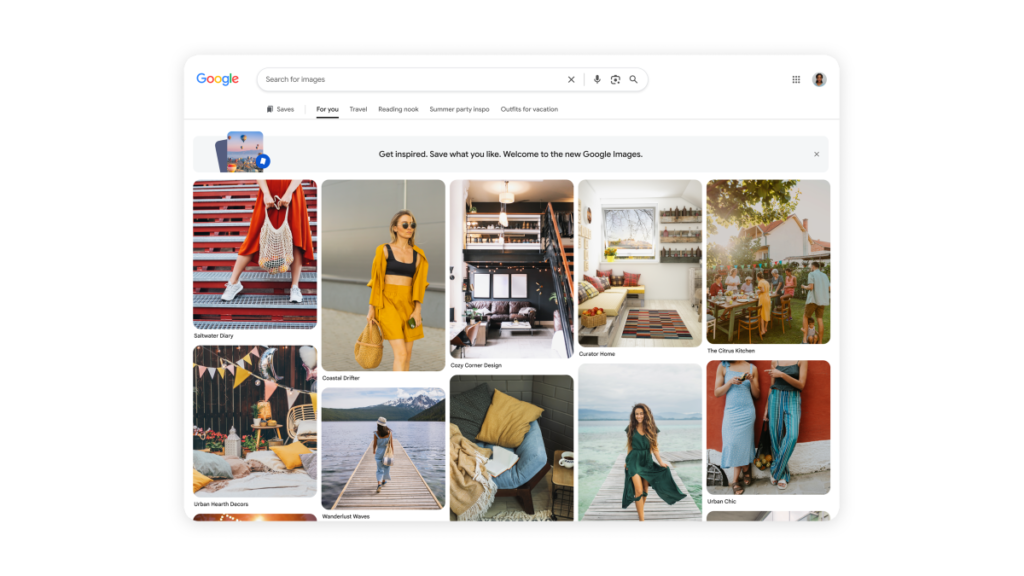
Google Images is launching a Pinterest-style redesign that turns the search engine into a browsable gallery, while also adding a tool to generate AI images directly inside Search.
This update marks the 25th anniversary of Google Images. The move shifts the site away from simple queries toward visual discovery, a strategy that could increase time spent on the platform and boost ad revenue.
Google likely hopes users will stay within its ecosystem to create visuals rather than switching to third-party services like ChatGPT when they cannot find existing results.
The new interface
Visitors to the updated site will see a “For You” gallery tailored to their interests and browsing history. The layout encourages continuous scrolling, with Google stating the feed updates in real time.
Users can save ideas to “collections” appearing as tabs above the main photo gallery. Examples include vacation outfit ideas, travel inspiration, or designs for a reading nook.
Rolling out over the coming weeks, the redesign is available on desktop in the U.S. Users must be signed into a Google Account to access it.
Generating images in Search
The new image generation feature targets specific ideas that do not yet exist online. Google is integrating this directly into AI Overviews within Search.
The system uses the latest Nano Banana model to turn text prompts into custom visuals. Applications include reimaging spaces, such as seeing a room painted red or visualising a dorm with a coastal theme.
Image generation in AI Overviews will begin rolling out over the coming weeks in English for all regions currently supporting image creation in AI Mode.
What it means
The change puts image creation and discovery in the same place, reducing the need to switch apps. Users can now refine a visual idea immediately without leaving the search results.