NVIDIA launches SimReady Central, an open library of 2,000 simulation-ready assets for robotics
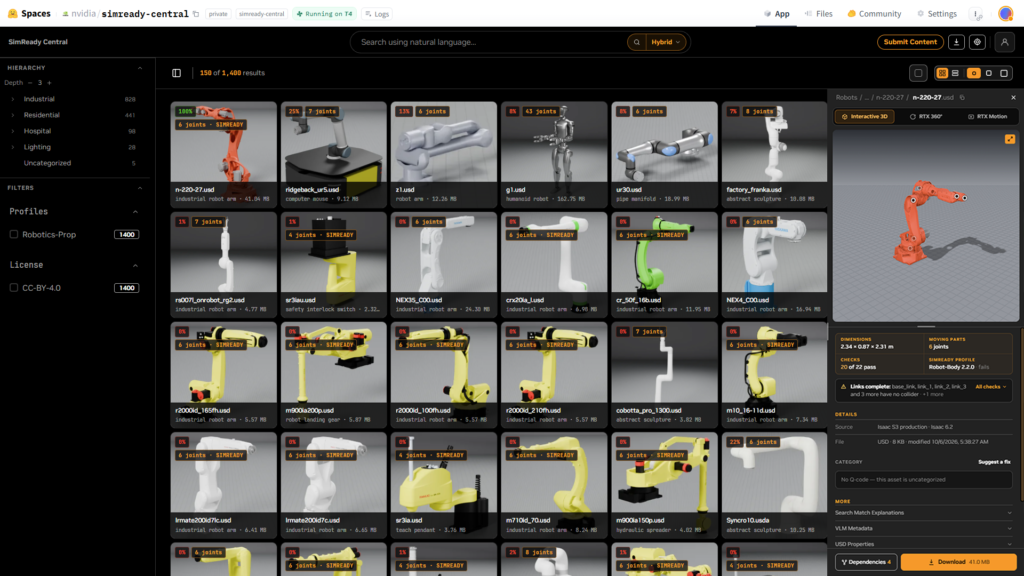
NVIDIA has opened SimReady Central on Hugging Face. The repository hosts more than 2,000 OpenUSD assets designed for physical AI training and digital twins. These models include collision geometry, mass, and friction data, removing the need for developers to add those properties manually.
The library covers infrastructure and equipment, ranging from robot arms and grippers to warehouse racks and cooling systems. Users can filter assets by capability and combine models from different suppliers into a single scene.
Manufacturers can now prepare and validate their own models against SimReady requirements. This allows them to share validated assets with developers, enabling faster scenario testing and quicker decision-making for their customers.
The post outlines the SimReady specifications, explains how OEMs contribute, and demonstrates building a robotic pick-and-place scenario and comparing AI factory layouts.
What defines a SimReady asset
A SimReady asset is an OpenUSD model prepared with the specific data required for simulation workflows. While a detailed CAD file is a good starting point, simulation requires extra information about how an object behaves physically.
For robot manipulation tasks, this includes mass, collision geometry, and friction. For AI factory workflows, it involves equipment geometry and electrical or thermal metadata.
OpenUSD is an open framework for describing and composing 3D scenes. Using these scenes to train autonomous machines also requires data on physical behavior, collisions, and sensor interactions.
SimReady Foundation provides specifications, profiles, and validation tools to make these requirements explicit. A profile defines the logical grouping of features an asset needs for a specific use case.
The following table lists the features associated with each simulation use case:
| Asset structural elements | What it enables |
|---|---|
| Collision geometry and physical properties | Contact and physics simulation in a supported runtime |
| Joint structure and limits | Articulated robot and equipment movement |
| Semantic labels | Object identification and annotated synthetic data |
| Materials and sensor attributes | Rendering and supporting sensor simulation |
Developers should select assets from SimReady Central whose profiles match their workflow needs and compose them into an OpenUSD scene.
Why OEMs should publish to SimReady Central
OEMs can convert their CAD equipment models into SimReady assets. The library makes these models discoverable on Hugging Face, helping manufacturers reach teams building robotics simulations and digital twins.
For AI factory OEMs like Vertiv, the library offers a path to distribute assets such as warehouse racks, server racks, and cooling equipment. Developers can incorporate these items into digital twins while reusing the geometry and properties specified by the SimReady profiles.
Robotics OEMs including Comau, FANUC, Franka Robotics, Robotiq, Standard Bots, and Universal Robots use the library to make their arms and grippers discoverable. Developers can combine these parts with industrial equipment to build warehouse and factory scenarios.
For asset providers like Palatial, the library features the NVIDIA Robotics 1K Dataset. It also includes complex articulated assets generated from text, images, scans, datasheets, and CAD. Developers can build assets and scenes for robot training and evaluation.
LG Electronics, which develops robots for home use alongside appliances, can share assets such as refrigerators and dishwashers. Developers can use assets informed by LGE’s experience in both appliances and robotics to build household simulation environments.
AI-assisted CAD providers like ForgeCAD make articulated robotics props with high-quality textures available. Developers can use these to build environments for robot perception, manipulation training, and synthetic data generation.
To contribute, OEMs can use the SimReady Central submission skill to validate assets against relevant profiles, package them, and submit them for inclusion.
Building simulation environments with SimReady assets
SimReady Central gives robotics and industrial developers a reusable starting point for workcells and digital twins. Users and AI agents can find assets that meet specific workflow profiles and compose them into OpenUSD environments.
Developers can populate training environments with objects and obstacles, then vary their placement to evaluate robot behaviors. These environments support projects such as Microduck, an open-source robot from Hugging Face and Pollen Robotics.
NVIDIA USD Search powers natural-language search in SimReady Central Library. Hugging Face has integrated USD Search into its platform search with indexed USD properties and simulation metadata, helping agents discover assets suited to physical AI simulation tasks.
AI-assisted authoring adds another method for building with these assets. Developers can use frontier models like OpenAI’s GPT-6 Astra combined with asset search and scene-authoring tools. Given task requirements and spatial constraints, Astra can find suitable assets, write code to assemble a scene, and create scenario variations.
OEMs can also use Astra to help prepare and refine OpenUSD assets against SimReady Foundation requirements before validating and submitting them to the library.
Building a robotic pick-and-place scenario
A developer building a robotic pick-and-place scenario might start with this prompt:
Using SimReady assets from SimReady Central on Hugging Face, create a basic warehouse pick-and-place scenario in Isaac Sim using PhysX.
Use the nvidia-simready-central.hf.space to find a FANUC robotic arm, a compatible Robotiq gripper, and suitable warehouse assets. Generate the Python code to assemble the scene and configure the pick-and-place task. Render a .mov preview so I can review the results.
Include the scripts, asset versions, and runtime versions so I can reproduce the scenario.
In this workflow, Astra performs the following steps:
- Queries the SimReady Search API to find relevant assets distributed on Hugging Face
- References and payloads them into an OpenUSD stage
- Generates Python code to assemble the workcell
- Configures the Pick-and-place task
- Render a preview for user review
The resulting workcell illustrates how AI-assisted scene authoring can turn developer requirements into a simulation scenario for review and refinement in Isaac Sim.
Comparing AI factory layouts
The same approach supports an independent software vendor building an AI factory digital twin. The task shifts from robot interactions to equipment placement: arranging racks, cooling equipment, and supporting infrastructure within specified spatial constraints.
Using SimReady assets from SimReady Central on Hugging Face, create two alternative AI factory layouts with racks and cooling equipment.
Use the supplied equipment dimensions and aisle-clearance requirements. Check for equipment overlaps and clearance violations, and report any issues.
Save each layout as an OpenUSD scene. Include the scene-building scripts, asset versions, and runtime versions so I can reproduce and compare the results.
In this workflow, Astra assembles the selected SimReady assets into two OpenUSD layouts. It then generates scripts to check equipment overlaps and aisle clearances against the supplied requirements. Developers can inspect the layouts in their simulation application, compare equipment placement and access paths, and review any flagged issues before refining the preferred configuration.
An AI factory layout assembled from SimReady assets illustrates how AI-assisted scene authoring supports equipment placement, aisle-clearance checks, and layout refinement in OpenUSD.
Developers can extend these environments in several ways:
- Reuse the environment: Keep layout and task-specific changes in separate OpenUSD layers so the same source assets can support multiple experiments.
- Vary the scenarios: Introduce additional assets from the library and vary object placements, equipment configurations, or surrounding infrastructure to evaluate different conditions.
- Build application-specific tests: For robotics, configure training and evaluation tasks in Isaac Lab. For AI factories, connect the scene to the equipment data and simulation tools needed for analyses such as power distribution or cooling performance.
- Carry validated layouts into operations: For AI factories, connect the scene to live BMS and IT telemetry to keep the digital twin synchronized with an AI factory facility.
Shaping the next wave of assets
SimReady Central’s roadmap includes more OEM partners and a growing asset library, expanding the equipment and environments developers can assemble from reusable content.
Community feedback will help identify which additions matter most. Users can comment on which assets they need, which runtimes they use, and where they encounter integration gaps.