
Artist: $398 / Artist Pro: $528 / Subscription rent-to-own available, acestudio.ai
AI is slowly creeping into DAWs. A chatbot here, stem separation functions there. Yet while others merely nibble around the edges, ACE Studio goes straight for the jugular as an all-in-one AI audio workstation.
It’s a genuinely ambitious piece of software that aims to package a host of next-gen features into a single platform. There’s AI virtual instruments, AI vocal synthesis, and a suite of generative AI audio tools. In fact, ACE Studio injects artificial intelligence into just about everything in the hope of streamlining familiar tasks and perhaps even creating some brand new production paradigms.
What’s more, ACE says it’s taken an ethical approach to training its AI models. The company claims each model is built on performances of real musicians with licensing and royalties included in its partnership with artists.
It’s an all you can eat AI buffet, but can it satisfy my creative appetite?
The first feature to catch my eye is the AI vocal synth. Easily loaded by creating a new region and choosing an AI model, simply input some MIDI notes in the clip view and press the playback button to render and listen to the results.
Out of the box, the vocal engine does a stellar job of producing realistic and usable performances that sound polished. The bank of vocal models are well developed, with over 140 voices to choose from in eight languages. The ability to blend different vocal models to create new voices is a useful and interesting idea to play with. Additionally, any lyrics that you type are automatically arranged across the MIDI phrase, making it a breeze to produce a vocal line.
The virtual instruments, however, are less impressive. There are 36 included AI virtual instrument models spanning strings and brass. They operate in much the same way as the vocal engine: choose an AI model, write a MIDI line, and then the engine will render a performance of the instrument, automatically choosing the best performance techniques to suit your arrangement.
In theory, bypassing the trouble of manually programming MIDI expression, style and dynamics—as you would with a traditional virtual instrument—is an alluring shortcut. But sadly, the results aren’t convincing enough for my ears. The instruments share a strange breathy timbre and are noticeably lower in quality when compared even to free virtual instruments and sample libraries already available on the market.
ACE’s generative audio tools don’t fare any better. The Add a Layer feature, for example, will analyse your session and render an instrument track that fits with the arrangement. This tool uses a text prompt interface that asks you to describe what kind of track you want to generate. This was my first experience using plain language to write music, and, honestly, I enjoy it even less than I thought I would. Reduced to broad words like ‘jazz’ or ‘samba’, and vague phrases like ‘laidback groove’, I feel like I’m back in English class rather than making music. Surely it would be easier to plug in a MIDI keyboard and jam something out instead?

The deeper I dig into the generative tools, the further I drift from the fun of making music. The Music Enhancer tool is one of ACE Studio’s newer production concepts which allows you to highlight a track or arrangement and ‘enhance’ it. Once again, it uses a text prompt interface to steer the transformation. The result is an entirely AI-generated song based on the melodies and harmonies in your session, plus the input prompts.
Rendered out as one stereo track, the results make a fun party trick, but once again suffer in quality – noticeable artefacts in the audio render it unusable for professional projects. More importantly, however, is the feeling that this tool is robbing me of the fun that comes with producing new music. It is incredibly boring waiting a minute or more at a time to render each new version, and by the end I feel little connection to the music that has been produced.
Another major drawback is the rendering time required to use any of the AI features in ACE Studio. Whether I edit a single MIDI note, or tweak a setting in the AI model, the engine takes anywhere from three seconds up to 10 seconds to render. The more tracks that need rendering, the longer it takes. For the Add a Layer or Music Enhancer feature, this can take a minimum of a minute, or even longer.
I’m testing the software on a powerful M4 Pro Mac Mini using the Turbo Boost feature in ACE Studio – this means the audio is rendered locally, theoretically with faster render speeds. Alternatively, the software can be run on their servers using an internet connection. Technically, ACE Studio achieves extremely fast processing speeds for AI. But compared to the speedy workflows producers and musicians have grown accustomed to, it’s like stepping back in time to the era of tape recording. Having to stop and wait to render every new idea I have is hugely frustrating. My inspiration suffers death by a thousand loading screens.

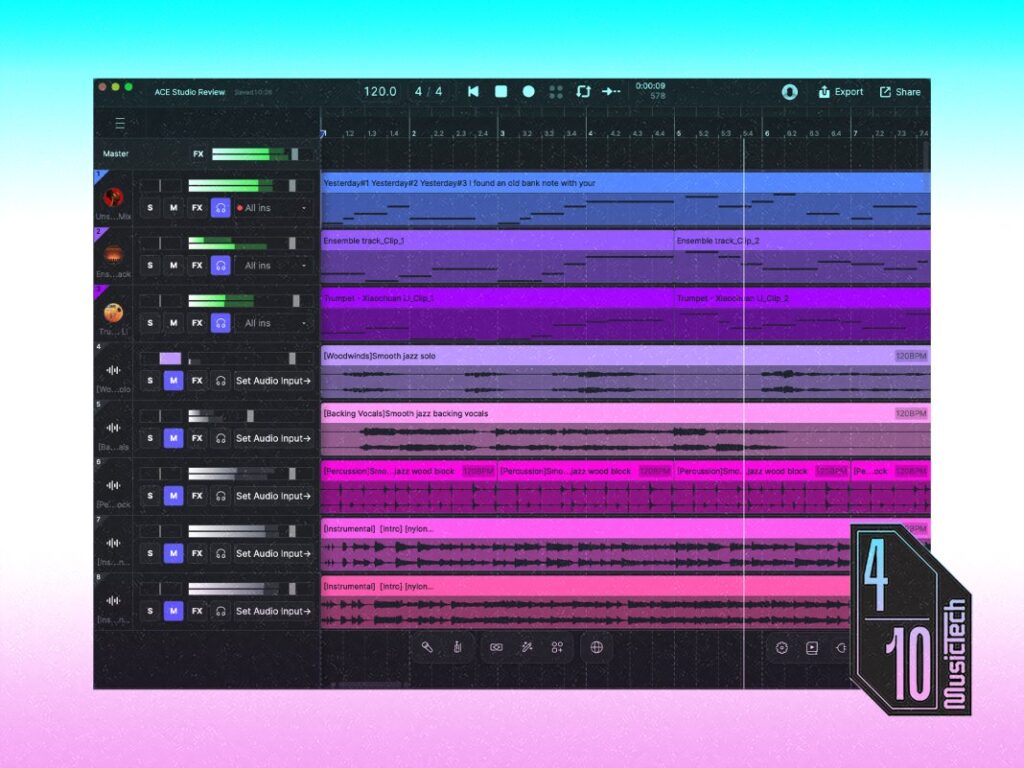
It is while I wait for things to render that I make an unfortunate discovery. My CPU is clocking in at around 70-80% for a six-track session with a scant eight bars of music. By comparison, a full-length song with 80 tracks and multiple instruments in Logic Pro uses 40-50% of processing power. Out of interest, I add a couple of third-party plugins onto the two AI instrument tracks, and it tips the M4 Pro over 100%. Whether ACE Studio is poorly optimised or the computing power needed for AI audio software is extremely high, this is a big red flag.
Ultimately, while ACE Studio has a capable AI vocal synth, it faces stiff competition from long-running VOCALOID6 by Yamaha, and the more recent Synthesizer V by Dreamtonics, both of which use AI to help craft more realistic results.
The remainder of the AI features on offer in ACE Studio are hardly selling points. In my experience, these tools actually slow down the production process, and making music via text prompts is, for me, far from fun. Add in the extreme processing power to produce results of questionable quality and it’s difficult to recommend this software to anyone.
The final nail in the coffin is the price. ACE Studio costs $528 for a lifetime copy of the Artist Pro software, or you can subscribe with a rent to buy option. Additionally, if you buy the Artist/Artist Pro copy you will receive 2,500/5,000 AI credits per month for the first two years — a requirement for rendering audio. Following this period, you will need to get a subscription to receive more credits. Not counting the long-term cost of AI credits, this puts it in the same range as fully-featured professional DAWs like Logic Pro or Ableton Live Suite, which come with a huge library of virtual instruments, loops, samples, effects and tools for generating music beats, melodies, or chords. If ACE Studio aims to make it easier, faster, or even cheaper to create music using AI, it’s got a long way to go.
Perhaps AI-centric DAWs will eventually deliver the goods, but ACE Studio left me starving for hands-on creativity.
Key Features
- AI-based DAW
- AI vocal synth
- 140+ AI vocal models in 8 languages
- 36 AI virtual instruments
- Stem separation
- Stem generation
- Song generation
- AI rendering can run locally or via internet connection
- Subscription rent-to-own option available
- Supports VST/AU plugins
The post ACE Studio 2 review: Next-gen AI features, stone age workflows appeared first on MusicTech.