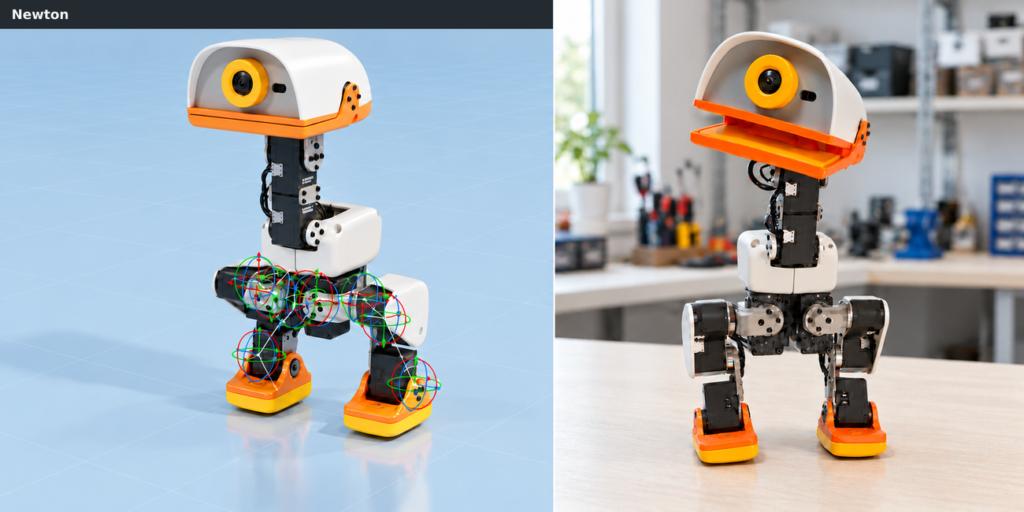
Pollen Robotics and Hugging Face have released Microduck, a low-cost bipedal robot, alongside a workflow that allows developers to train walking policies in simulation and deploy them on physical hardware using NVIDIA Isaac Lab 3.0.
Antoine Pirrone, Augustin Crampette, Matthieu Lapeyre, Coralie Deplanne, Anne-Charlotte Passanisi, and Thomas Wolf authored the guide. The process involves training a policy in a simulated environment, exporting it as an ONNX file, and loading it onto the real device.
Getting started
Training a walking policy in simulation requires a Linux workstation with a supported NVIDIA GPU and driver, Git, and uv. Deployment needs a configured physical Microduck with its onboard software installed and a control interface, such as a gamepad.
Install uv on your Linux machine, clone the Isaac Lab repository, and sync the dependencies:
curl -LsSf https://astral.sh/uv/install.sh | sh
source "$HOME/.local/bin/env"
git clone --branch develop https://github.com/isaac-sim/IsaacLab.git
cd IsaacLab
uv sync
Verify that the Microduck tasks are available by running:
uv run isaaclab list_envs --keyword MicroDuck --show_presets
Isaac Lab provides the robot model, scene, observations, actions, rewards, and domain randomization. Begin with the flat-walking task; the rough variant includes stairs, slopes, and uneven ground.
The policy accepts 61 observation values and outputs 14 joint positions. Maintain the observation order, normalization, and action scaling when moving from simulation to hardware. The full configuration is available in the Microduck task settings.
Isaac Lab accelerates training by running thousands of simulated environments in parallel on a GPU. Distributed training across multiple GPUs, such as a 16-GPU setup, increases the speed of the process. This configuration reaches up to 1.25 million steps per second with rough terrain and backlash enabled.
The tutorial uses Newton with the MJWarp solver and Newton-based Better Actuator Models (BAM) to model servo response. The backlash preset converts position targets into realistic servo torques by modelling the firmware controller, motor electrical limits, friction, and delay. Domain randomization randomises mass, centre of mass, ground friction, joint inertia, encoder offsets, battery voltage, and command latency on each duck. Terrain and pushes are varied, as well as backlash independently per joint to represent uneven wear.
Backlash refers to mechanical play in a gearbox. When a joint changes direction, the transmission moves slightly before engaging. Modelling this effect and varying it across joints during training exposes the policy to differences it may encounter on the real robot.
Start training with this command:
uv run isaaclab train \
  --rl_library rsl_rl \
  --task IsaacContrib-Velocity-Rough-MicroDuck \
  --num_envs 4096 \
  presets=backlash
You can alternatively train the flat terrain environment:
uv run isaaclab train \
  --rl_library rsl_rl \
  --task IsaacContrib-Velocity-Flat-MicroDuck \
  --num_envs 4096 \
  presets=backlash
Deploying the model
Export the policy to ONNX after evaluating it in simulation. Isaac Lab’s RSL-RL playback workflow automatically exports both TorchScript and ONNX files. Use the policy.onnx file with Microduck’s onboard runtime, ensuring the observation order, normalization, and action scaling match the training setup.
Visualise the latest checkpoint in the Newton viewer:
uv run isaaclab play \
  --rl_library rsl_rl \
  --task IsaacContrib-Velocity-Rough-MicroDuck \
  --checkpoint latest \
  --num_envs 16 \
  --viz newton_gl \
  presets=backlash
Replace latest with the path to a specific checkpoint if required.
The RSL-RL playback backend exports the policy to an exported directory. Microduck’s onboard runtime loads ONNX policies. Use the policy.onnx file for the hardware handoff.
With the policy exported, you can:
- Compare it in Microduck Arena, a Hugging Face Space for testing compatible policies on shared challenges and comparing leaderboard results. Arena accepts models with 61 observation values, 14 action values, and a maximum size of 64 MiB. Follow the submission guide to check compatibility and enter a challenge.
- Run it on the real Microduck. After checking the observation and action interface, use the ONNX file with the robot’s onboard runtime.
- Share it on the Hugging Face Hub. Upload your policy so others can discover and download it. Add a short model card explaining how to use it. Include the training configuration to help others reproduce your results.
Deploy the policy to a configured Microduck:
- Copy the policy from your workstation, replacing ROBOT_HOST with the robot’s hostname or IP address:
scp exported/policy.onnx microduck@ROBOT_HOST:/home/microduck/my_walking.onnx
- Connect to the robot and inspect its current policies:
ssh microduck@ROBOT_HOST
robotctl policy list
- Support the robot on its stand, then load the walking policy. If it is already walking, loading returns it to its home pose and resumes motion:
sudo robotctl policy load walk /home/microduck/my_walking.onnx
- Use the documented controls to test standing, slow walking, turning, and stopping. Monitor its state; restore the default walking policy if needed:
robotctl monitor
sudo robotctl policy reset walk
Figure 5 demonstrates the deployed policy’s robustness to falls: Microduck recovers its footing and resumes walking after being knocked over.
Further possibilities
Isaac Lab 3.0 supports GPU-parallel robot learning across locomotion, dexterous manipulation, and vision-based tasks, with extensible environments and configurable physics and rendering backends.
- More complex locomotion: Adapt Microduck’s rough-terrain task for stairs, slopes, and uneven ground, with a curriculum that increases terrain difficulty.
- Perception and navigation tasks: Extend Microduck’s walking policy with head-camera depth and robot-state observations to explore perception-based tasks in simulation. The GIF below shows ramp traversal. Explore camera-based observations in the Kuka–Allegro examples for vision-enabled manipulation.
- Dexterous manipulation: Try the Kuka–Allegro lift and reorient tasks to train an arm and multi-fingered hand to manipulate objects.
- Custom environments: Use the project generator to build your own task, then add simulation-ready assets from SimReady Central Library, and tailor observations and rewards to new challenges.
Start with the Microduck task in Isaac Lab, train your first walking policy, and share the exported ONNX model on the Hugging Face Hub. Validate it in Microduck Arena, enter a challenge, and see how your policy compares. Then build on what you learn—try rougher terrain, add perception, or create your own task.
This workflow builds on Pollen Robotics’ Microduck hardware and software, the original Microduck reinforcement-learning project, BAM actuator modeling work, and the Isaac Lab and Newton integrations.