Three multiplications consume nearly half the processing time on AWS Trainium chips when running a naive RMSNorm implementation.
This is the first part of a series on system-level profiling for AWS Trainium. The guide assumes no prior experience with profiling tools. It uses TorchNeuron, an open-source PyTorch backend for Trainium. The setup supports eager execution, torch.compile, and standard PyTorch APIs with minimal code changes. TorchNeuron also integrates with the Neuron Kernel Interface (NKI) for custom operators and performance tuning.
By the end of this post, you will understand:
- How to configure
torch.profilerwith the Neuron backend to capture a clean trace. - How to read the
key_averages()table to find operations that use Neuron device time. - How to follow a single operation through Neuron Explorer, from framework dispatch to hardware execution.
- How performance signals change across three different implementations of the same operation.
Neuron as a PyTorch Backend
Understanding how Neuron integrates with PyTorch helps before you start profiling.
The Neuron backend uses PyTorch’s PrivateUse1 extension point. This mechanism allows an accelerator to integrate with the framework without adding a dedicated dispatch key like cuda. The torch_neuronx package registers Neuron as a native backend for PyTorch code. For details on this extension mechanism, see Facilitating New Backend Integration by PrivateUse1.
Set Up the Profiler
You need two objects to profile a Neuron workload:
NeuronConfigcontrols which Neuron data streams and NeuronCores to capture and where to write the output. You pass it totorch.profiler.profileasexperimental_config.NeuronProfilertakes aNeuronConfigand provides anexport_tracecallback. The callback writes the framework trace,trace.json, alongside the Neuron system traces.
nc = NeuronConfig( modes=[ProfileMode.DEVICE, ProfileMode.RUNTIME], profile_output_dir=OUTPUT_DIR, capture_enabled_for_nc='0', correlate_device_time=True, ) exporter = NeuronProfiler(nc)The
modesparameter selects the data streams to capture, such as device instructions and runtime traces. Thecapture_enabled_for_ncparameter selects the NeuronCores to trace. Settingcorrelate_device_time=Truepropagates device time from the trace into thekey_averages()table, where you can compare CPU and Neuron device time. For the complete parameter reference and availableProfileModevalues, see the NeuronConfig Profile Modes documentation.Tooling: Neuron Explorer
Neuron Explorer is a browser-based viewer for the system trace, device timeline, and per-engine breakdown. You can access it through an SSH tunnel or the Visual Studio Code extension. This post uses Explorer to confirm what
key_averages()reports numerically and to inspect what happens between dispatches.After profiling, the output directory contains the system trace and, when you capture device data, matched
.neffand.ntfffiles. The Neuron Executable File Format (NEFF) contains the compiled Neuron executable, while the matching NTFF contains its hardware instruction trace. The files share a numeric hash that identifies them as a pair. To open the profile in Neuron Explorer, upload the complete output directory for a system or combined profile. For a device-only profile, upload the matching.neffand.ntfffiles individually. See Step 5: Upload your profile for the UI and command-line instructions.Profile RMSNorm
This first analysis profiles RMSNorm. It is a small operation with a clear sequence of arithmetic and reduction steps.
You profile three implementations of the same operation:
- Naive RMSNorm with individual PyTorch operations: multiply, mean, add, reciprocal square root, and multiply.
torch.rms_norm(), the PyTorch built-in lowered to a single fused Neuron kernel.- Naive RMSNorm with
torch.compile, using the same operations as the first implementation.
The scripts use the same inputs, profiler configuration, and schedule so the results are directly comparable.
All scripts to reproduce this work are available in the torch-neuronx examples directory.
Profile 1: Naive PyTorch Operations
Start by writing RMSNorm with individual PyTorch operations. Each line maps to one or more ATen operations and can create intermediate tensors.
device = torch.device('neuron') x = torch.randn(4, 512, dtype=torch.bfloat16, device=device) weight = torch.ones(512, dtype=torch.bfloat16, device=device) def rms_norm_fn(t): x_sq = t * t # square mean_sq = x_sq.mean(dim=-1, keepdim=True) # mean of squares rms = torch.rsqrt(mean_sq + 1e-6) # 1 / sqrt(mean_sq + eps) return t * rms * weight # normalize + scaleCall the profiler with two arguments required for the Neuron backend:
- Include
ProfilerActivity.PrivateUse1to collect activity from the Neuron device. - Pass
NeuronConfigasexperimental_configto enable the Neuron-specific Kineto features.
The schedule uses wait=2, warmup=1, and active=1 across four prof.step() calls. This records one warm iteration without including initial setup overhead.
Call torch.neuron.synchronize() inside the profiler loop. Without this synchronization, the profiler can export before the device finishes and leave the Neuron time column empty.
with torch.profiler.profile( activities=[ProfilerActivity.CPU, ProfilerActivity.PrivateUse1], experimental_config=nc, record_shapes=False, on_trace_ready=exporter.export_trace, schedule=torch.profiler.schedule(wait=2, warmup=1, active=1), ) as prof: for step in range(4): with torch.no_grad(): _ = rms_norm_fn(x) torch.neuron.synchronize() prof.step()After profiling finishes, inspect the
key_averages()table. Sort byself_privateuse1_time_totalto place the operations with the highest device cost first. The table shown here is filtered to the RMSNorm operations that report Neuron device time. The fullkey_averages()output also includes CPU-side events such as allocations and host-to-device transfers.print(prof.key_averages().table(sort_by="self_privateuse1_time_total", row_limit=4))The key averages table shows that three aten::mul calls account for the largest share of Neuron device time.
The table shows which ATen operations ran, how often they ran, and how much time they spent on the CPU and Neuron device.
aten::mulhas the highest total device time because the function performs three multiplications.
| Name | # Calls | Self CPU | Self NEURON | % NEURON |
|---|---|---|---|---|
| aten::mul | 3 | 60.9 μs | 1,164.5 μs | 49.5% |
| aten::add | 1 | 26.6 μs | 434.6 μs | 18.5% |
| aten::rsqrt | 1 | 15.6 μs | 415.0 μs | 17.6% |
| aten::mean | 1 | 21.1 μs | 340.8 μs | 14.5% |
Self NEURON total: 2.355 ms
Each row maps directly to the function. aten::mul runs for x * x, x * rms, and the final multiplication by weight. aten::mean reduces the last dimension. aten::add adds the epsilon value and triggers a host-to-device copy because the scalar starts on the CPU. aten::rsqrt computes the reciprocal square root.
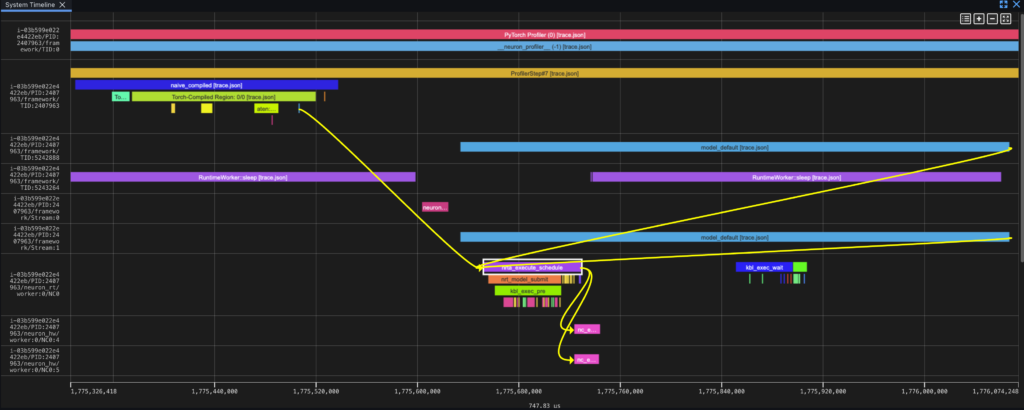
Neuron Explorer follows an aten::mul operation from framework dispatch through runtime scheduling to execution on the Neuron hardware lanes.
Read the Trace in Explorer
In Explorer, time flows from left to right and the event lifecycle flows from top to bottom. Each ATen operation follows the same pattern: creation in the framework lane, scheduling in the runtime lane as nrta_execute_schedule, and device execution in the hardware lane as nc_exec_running.
The system trace view organizes events into lanes. In the Default grouping mode, labels follow the pattern instance/PID/subsystem/identifier:
| Lane | Label suffix | What it shows |
|---|---|---|
| Framework dispatch | framework/TID:<id> | Operator dispatch events (PrivateUse1 runtime), grouped by thread ID. |
| Framework device | framework/Stream:<n> | Device interaction events (PrivateUse1 driver), grouped by stream number. |