For makers and developers building local AI agents, the new Hermes Agent Profile Builder from Nous Research removes the friction of setting up distinct agents. Previously, configuring a new agent meant navigating a series of command-line instructions. Now, a single guided flow within the local dashboard handles identity, model selection, skill installation, and Model Context Protocol (MCP) server connections.
The Profile Builder
In Hermes, a profile functions as a dedicated home directory. It houses its own config.yaml, .env, and SOUL.md files. Crucially, it maintains separate memory, sessions, skills, cron jobs, and a state database. This isolation ensures that a coding agent and a research agent never share data or state.
You launch the dashboard by running hermes dashboard. The interface opens at http://127.0.0.1:9119 in your browser. By default, the connection binds to loopback only, meaning no data leaves your local machine. The builder accepts the same inputs as the traditional CLI profile commands but writes them directly into the profile’s files via a browser form.
Configuration Fields
The tool consolidates five key groups of settings into one interface:
- Identity: You define a name and description. The name automatically generates a shell command alias; for instance, a profile named
coderallows you to runcoder chat. Personality depth is stored in the profile’sSOUL.mdfile. - Model and Provider: Hermes connects to various backends including Nous Portal, OpenRouter, NVIDIA, and OpenAI, plus custom OpenAI-compatible endpoints.
- Built-in Skills: These are toggled on or off for each specific profile.
- Skills Hub Installs: You pull external skills from a catalog using their identifier.
- MCP Servers: These are added either via URL or local command.
Two terms require clarification. Skills are SKILL.md files containing a name, description, and procedure. The agent reads these descriptions cheaply and only loads the full content when a task demands it, preventing performance bloat. MCP servers expose external tools via the Model Context Protocol. Hermes accepts HTTP servers via URL and stdio servers via local command. A Nous-approved catalog offers one-click installs that prompt inline for necessary keys.
GUI Flow versus CLI Sequence
The dashboard does not replace the command line; it mirrors it in a graphical form. The table below maps each builder step to its CLI equivalent:
| Step | Profile Builder (dashboard) | CLI equivalent |
|---|---|---|
| Create and name | Name field | hermes profile create coder |
| Description | Description field | --description "..." or hermes profile describe |
| Model and provider | Model picker | coder config set model <id> |
| Built-in skills | Toggles | coder skills list / toggle |
| Skills Hub install | Search and install | coder skills install <slug> |
| MCP servers | Add or catalog install | edit mcp_servers / coder mcp install |
Both methods edit the same profile directory. The builder offers a lower-friction entry point, while the CLI remains the scriptable option.
Use Cases
- Focused coding assistant: Equip it with a code-aware model and a filesystem MCP server. Add Git and testing skills while keeping memory scoped to a single project.
- Research agent: Pair a capable model with web-extraction skills. Its findings remain separate from other agents, and cloning the profile preserves this isolation.
- Operations bot: Attach a messaging channel and schedule cron reports. Each profile runs its own gateway and bot token, preventing accidental token sharing.
In every scenario, the builder produces one isolated agent, allowing you to run multiple agents without state collisions.
Under the Hood
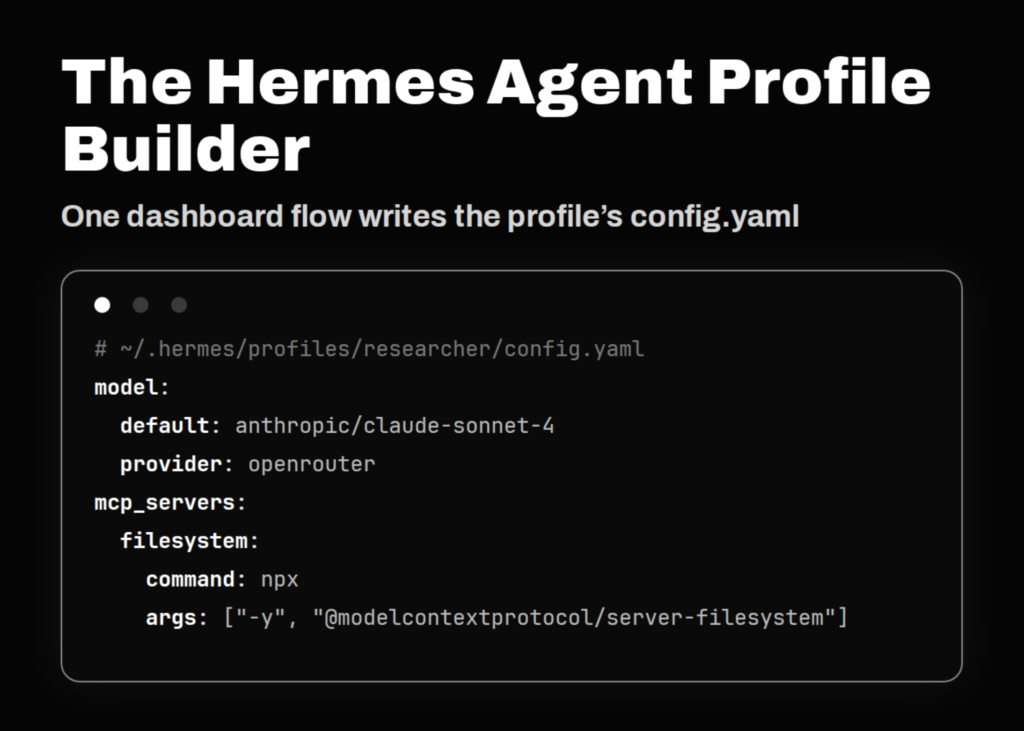
The builder edits the files the CLI already reads. Model and provider settings land in the profile’s config.yaml. MCP servers populate the mcp_servers block within that file. API keys are stored in the profile’s .env.
Here is the equivalent CLI sequence for creating a research profile:
hermes profile create researcher \
  --description "Reads source code and external docs, writes findings."
researcher setup                      # configure API keys + model
researcher config set model anthropic/claude-sonnet-4
researcher skills install openai/skills/k8s
A matching config.yaml for that profile looks like this. Note that mcp_servers is a map keyed by server name:
# ~/.hermes/profiles/researcher/config.yaml
model:
  default: anthropic/claude-sonnet-4

mcp_servers:
  filesystem:
    command: npx
    args: ["-y", "@modelcontextprotocol/server-filesystem", "/home/user/projects"]
A remote HTTP MCP server uses url and headers instead of command:
mcp_servers:
  docs:
    url: "https://mcp.example.com/mcp"
    headers:
      Authorization: "Bearer ${DOCS_API_KEY}"
Accessing the builder requires the dashboard extra, as the base install does not ship with the HTTP stack. You can install it with:
pip install 'hermes-agent[web]'Strengths and Limitations
Strengths
- One flow replaces several CLI steps for a new profile.
- Identity, model, skills, and MCP settings sit in one place.
- Output remains in standard
config.yamland.envfiles. - The dashboard runs locally and binds to loopback by default.
- The catalog handles MCP and Skills Hub installs inline.
Limitations
- Profiles do not sandbox filesystem access on the local backend.
- A non-loopback bind fails closed unless an auth provider is configured.
- Skill and MCP changes take effect on the next session or gateway restart.
- The builder surfaces controls that also live on separate dashboard pages.
Key takeaways
- Unified Configuration: The Profile Builder consolidates identity, model selection, skills, and MCP servers into a single browser-based workflow, replacing multiple CLI commands.
- Isolation by Design: Each profile creates a separate home directory with its own memory and state, ensuring distinct agents do not interfere with one another.
- Local-First Security: The dashboard binds to localhost by default, keeping data on the machine, though extending access requires explicit authentication configuration.
- Developer Friendly: The tool generates standard YAML and environment files, meaning the output is fully compatible with existing Hermes CLI scripts.