Why builders and artists need a better way to run CI
For creators and developers, the standard GitHub Actions runner is often a bottleneck. While convenient, the default hosted machines are generic, frequently slow, and prone to downtime during maintenance. Crucially, they do not offer GPU access, which is essential for many machine learning workflows. For projects like Trackio, relying on these limitations meant missing out on necessary hardware acceleration while paying for a service that could not run their specific CUDA tests.
The solution is to decouple the orchestration from the execution. You can keep GitHub Actions as the brain that manages your continuous integration, but point the actual work to Hugging Face Jobs. This approach delivers a significant speed boost, reducing CPU job times by roughly 30% for Trackio, and unlocks the ability to run test suites on real GPU hardware without maintaining your own always-on infrastructure.
How the system works
Hugging Face Jobs allows you to execute commands or scripts across a serverless infrastructure supporting various hardware options, from standard CPUs to high-end GPUs like the t4-small or h200. A single Job definition includes:
- The command to execute
- A Docker image sourced from Docker Hub or a Hugging Face Space
- A specific hardware flavor
- Optional environment variables and secrets
Because CI jobs are inherently command-driven and benefit from clean, isolated environments, this platform is a natural fit. For machine learning libraries, the advantage is clear: you can validate performance on actual GPU hardware without the overhead of maintaining persistent runners.
The core mechanism relies on a bridge application known as huggingface/jobs-actions. This tool transforms a GitHub Actions job into an ephemeral self-hosted runner operating inside an Hugging Face Job. The process flows as follows:
- A pull request triggers a workflow on GitHub.
- GitHub queues jobs with specific labels, such as
hf-jobs-cpu-upgradeorhf-jobs-t4-small, and sends a signed webhook to the dispatcher via a GitHub App. - The dispatcher Space validates the webhook, verifies the required label, generates a short-lived runner registration token, and initiates the Hugging Face Job on the matching hardware.
- The Hugging Face Job boots a temporary GitHub Actions runner and registers it with the repository using that one-time token.
- GitHub assigns the queued job to this runner, which executes the steps, reports status, and exits.
Step-by-step setup
Begin by creating the dispatcher, a small Docker Space that listens for GitHub webhooks and launches the necessary jobs. You must create this first because the GitHub App requires a webhook URL, which is generated by the Space.
Navigate to huggingface/jobs-actions-dispatcher and duplicate the Space. Configure it with the following details:
- Owner: Your Hugging Face user or organisation
- Name:
jobs-actions-dispatcher - Hardware:
cpu-upgrade
Use the cpu-upgrade flavour for production CI to ensure the dispatcher remains online for incoming webhooks. The cpu-basic option is suitable for testing but may sleep; if a webhook arrives while the instance is waking up, the workflow could remain queued indefinitely.
Once the Space builds, open it to find the GitHub App webhook URL. It will appear in the format:
https://YOUR-HF-NAMESPACE-jobs-actions-dispatcher.hf.space/webhook
If you prefer a command-line approach, you can duplicate the Space and set the environment variable using the following commands:
export HF_NAMESPACE=your-hf-user-or-org
export SPACE_ID="$HF_NAMESPACE/jobs-actions-dispatcher"

hf repo duplicate huggingface/jobs-actions-dispatcher "$SPACE_ID" \
  --type space \
  --flavor cpu-upgrade \
  --exist-ok

export DISPATCHER_URL="https://${HF_NAMESPACE}-jobs-actions-dispatcher.hf.space"
Next, create and install the GitHub App directly from the dispatcher Space. This application requires permission to listen for queued workflow jobs and generate ephemeral runner tokens.
Open your duplicated Space at https://YOUR-HF-NAMESPACE-jobs-actions-dispatcher.hf.space. In the setup form, enter your GitHub repository in the format YOUR-GITHUB-ORG/YOUR-REPO. Click the button to create the GitHub App. GitHub will prompt you for a name; choose any available name in your account.
After submission, the screen will provide instructions for uploading the App credentials to the Space using the hf CLI. You must provide an Hugging Face token with permissions to launch Jobs, corresponding to your personal account or an organisation where costs should be billed. Save this token as the HF_TOKEN secret in your dispatcher Space.
Finally, install the App on the specific GitHub repository you entered. In the Trackio configuration, this was applied to gradio-app/trackio. For GitHub organisations, the installation settings can be found at https://github.com/organizations/YOUR-GITHUB-ORG/settings/installations.
By default, Hugging Face Jobs launch under the same namespace as the dispatcher Space. If you wish to bill jobs to a different user or organisation, set the HF_NAMESPACE as a Space variable and restart the Space:
export SPACE_ID=YOUR-HF-NAMESPACE/jobs-actions-dispatcher
hf spaces variables add "$SPACE_ID" -e HF_NAMESPACE=your-billing-namespace
hf spaces restart "$SPACE_ID"
The token you configured in the previous step must correspond to this billing namespace.
Updating your workflows
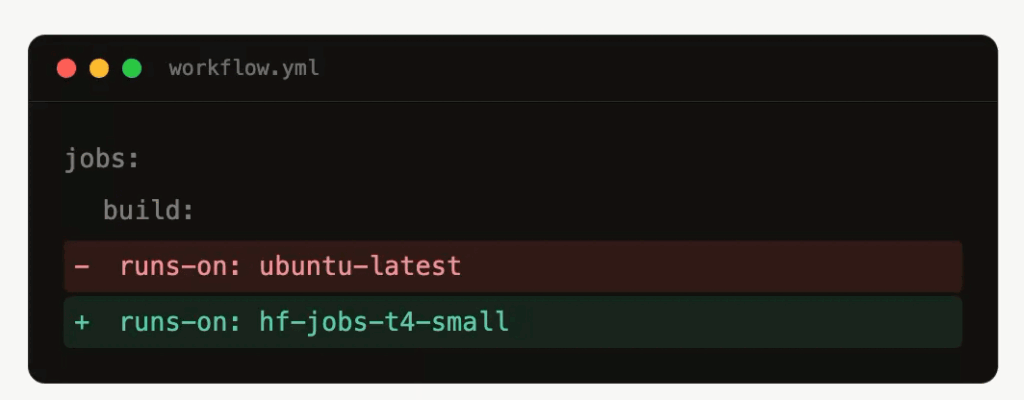
The modification to your workflow files is minimal. Replace the standard runner label with one recognised by the dispatcher:
runs-on: hf-jobs-cpu-upgrade
For GPU tests, specify a GPU label:
runs-on: hf-jobs-t4-small
With this single-line change, any GitHub Action can now execute on Hugging Face Jobs.
To add a minimal smoke-test workflow via the CLI, create the following file:
mkdir -p .github/workflows
cat > .github/workflows/hf-jobs-test.yml <<'EOF'
name: HF Jobs Test

on:
  pull_request:
  push:
    branches: [main]
  workflow_dispatch:

jobs:
  test:
    runs-on: hf-jobs-cpu-upgrade
    steps:
      - uses: actions/checkout@v4
      - run: echo "Hello from Hugging Face Jobs"
EOF

git add .github/workflows/hf-jobs-test.yml
git commit -m "Run CI on Hugging Face Jobs"
git push
To verify the setup, you can check the runs list or inspect logs directly:
gh run list --repo YOUR-GITHUB-ORG/YOUR-REPO --limit 5
hf jobs ps --namespace "$HF_NAMESPACE"
hf spaces logs "$SPACE_ID"
Performance and practical considerations
Choosing the right Docker image is critical. A bare Ubuntu image often requires installing missing system packages during every run, which adds latency. GitHub’s ubuntu-latest image includes extensive developer tooling by default, whereas a minimal image does not.
For Trackio, UI tests require Playwright browsers, Node, ffmpeg, sqlite, git, and standard Linux build dependencies. Switching to the Microsoft Playwright image improved performance significantly. For GPU jobs, the nvidia/cuda:12.4.0-runtime-ubuntu22.04 image was used.
Comparing the results from Trackio’s CI:
| Runner setup | Runtime | Compared to GitHub average |
|---|---|---|
GitHub ubuntu-latest baseline | 1m40s | baseline |
| HF Jobs CPU, Playwright image | 1m10s | -30s, about 30% faster |
HF Jobs GPU, t4-small label | 45s | no GitHub-hosted GPU baseline |
The most significant gain was the ability to run GPU CI. The Trackio GPU check completed in 45s on Hugging Face Jobs at the t4-small rate, costing less than a cent. The CPU results were also encouraging, with the custom image making the Linux test job faster than the GitHub-hosted baseline. This suggests Hugging Face Jobs is a practical backend for ML projects requiring custom images or accelerators.
Log management is another advantage. While GitHub Actions logs can be heavy in the web UI, Hugging Face logs are easily fetched via the CLI for inspection with local tools or coding agents:
hf jobs logs <job_id> > logs.txt
The bridge setup mirrors GitHub Actions job logs into the Hugging Face Job log, ensuring both systems have sufficient information for debugging. Additionally, Hugging Face Jobs supports mounting volumes, which is highly useful for loading datasets or models quickly during the CI process.
Key takeaways
- Decouple your CI orchestration from execution by using GitHub Actions to trigger Hugging Face Jobs, enabling access to real GPU hardware without maintaining persistent runners.
- Switching from a default Ubuntu runner to a purpose-built Docker image can reduce CPU job times by approximately 30% and eliminate the need for manual dependency installation.
- Logging is streamlined via the CLI, allowing developers to inspect large logs locally or programmatically, while volume mounting facilitates quick access to datasets and models.