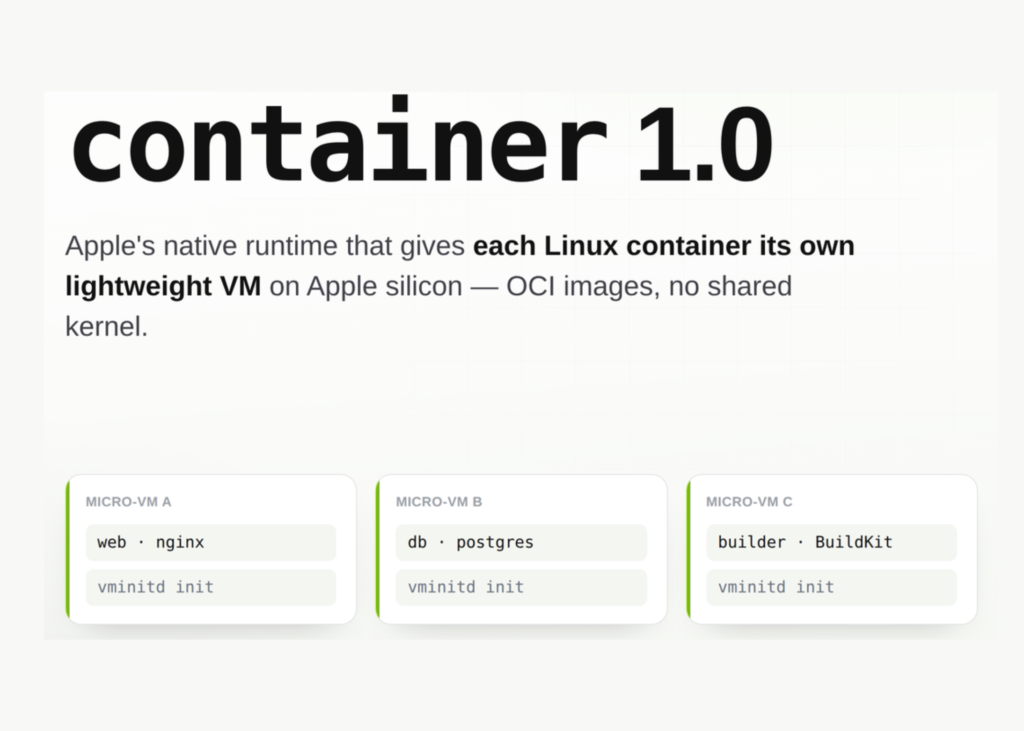
Apple has released an open-source Swift tool called container. It runs Linux containers as lightweight virtual machines on Apple silicon. The project uses the Apache 2.0 license.
Developers usually ship reproducible environments by running a single shared Linux virtual machine. Apple now provides a native path that avoids this always-on overhead.
What is Apple’s container?
The tool is a command-line interface for building images, running containers, and moving images to and from registries. It handles OCI-compatible container images. You can pull from Docker Hub or GitHub Container Registry and run those images. You can also push images you build to any standard registry.
Apple uses the open-source Containerization Swift package. That package manages low-level container, image, and process details. The tool requires a Mac with Apple silicon. Intel Macs are not supported. Apple supports container on macOS 26, which adds virtualization and networking enhancements. You can run it on macOS 15, but with networking limitations.
How container Runs Your Containers
Most macOS container tools run one shared Linux virtual machine that hosts every container. Apple takes a different path. container runs a separate lightweight virtual machine for each container you create. Apple describes three properties of this design:
- Security: Each container has the isolation of a full virtual machine. A minimal set of core utilities and dynamic libraries reduces resource use and attack surface.
- Privacy: You mount only the data each virtual machine needs, instead of sharing everything.
- Performance: These containers use less memory than full virtual machines. Boot times are comparable to containers in a shared virtual machine.
The runtime integrates several macOS frameworks. It uses the Virtualization framework for the virtual machines, and the vmnet framework for networking. It uses XPC for interprocess communication, launchd for service management, and Keychain services for registry credentials.
The control plane has a few moving parts. container system start launches container-apiserver, a launch agent. The apiserver then starts an XPC helper container-core-images for image management and the local content store. It also starts container-network-vmnet for the virtual network. For each container, it launches container-runtime-linux, the per-container management helper.
Use Cases With Examples
Local backend development. Run a service in its own isolated virtual machine, then forward a port to your loopback address.
container run -d --rm -p 127.0.0.1:8080:8000 \
  node:latest npx http-server -a :: -p 8000
curl http://127.0.0.1:8080
Reproducible CI-style builds. container build starts a builder utility container that uses BuildKit. You can size the builder virtual machine for heavy builds.
container builder start --cpus 8 --memory 32g
container build --tag web-test:latest --file Dockerfile
Cross-architecture images for datacenter deployment. Build one image for both Apple silicon and x86-64 servers. The amd64 variant runs under Rosetta translation.
container build --arch arm64 --arch amd64 \
  --tag registry.example.com/fido/web-test:latest
Mounting datasets for analysis. Share a host folder into the container with --volume. This is useful for feeding local data into a containerized job.
container run --volume ${HOME}/Desktop/assets:/content/assets \
  docker.io/python:alpine ls -l /content/assets
Isolating untrusted or generated code. Each container runs in its own virtual machine, not a shared kernel. That boundary suits running code from an agent or an unknown image with less host exposure.
Hands-On: Core Commands
Default container resources are 1 GiB of RAM and 4 CPUs. You override them per run.
container run --rm --cpus 8 --memory 32g bigInspect live resource usage, similar to top for processes.
container stats --no-stream my-web-serverRead virtual machine boot and init logs when debugging startup.
container logs --boot my-web-serverOn macOS 26, you can create isolated networks. Containers on different networks cannot reach each other.
container network create foo --subnet 192.168.100.0/24
container run -d --name web --network foo --rm web-test
By default, containers start with a restricted set of Linux capabilities. You tune them explicitly.