“`html
Improving Token Efficiency in GitHub Agentic Workflows
GitHub Agentic Workflows are like a team of street sweepers that clean up little messes in your repo. These teams significantly improve repo hygiene and quality, but as with all agentic work, cost is a growing concern for developers. And because CI jobs like agentic workflows are automatically scheduled and triggered, costs can accumulate out of view.
Logging token usage
We rely on hundreds of agentic workflows in our repos for maintenance and CI. All workflows run as GitHub Actions against real API rate limits. We are building the plane as we fly it and burning jet fuel as we go.
Before we could optimize our token consumption, we needed to know how tokens were consumed. The first challenge was that each agent framework (Claude CLI, Copilot CLI, Codex CLI) emitted logs in a different format, and usage data could be incomplete for historical runs. Fortunately, the agentic-workflows security architecture uses an API proxy to prevent agents from directly accessing authentication credentials. This allowed us to capture token usage across all runs in a single normalized format, regardless of agent framework.
Every workflow now outputs a token-usage.jsonl artifact with one record per API call that contains input tokens, output tokens, cache-read tokens, cache-write tokens, model, provider, and timestamps. Combining this data with the rest of the workflow’s logs gave us a historical view of how tokens were typically spent and allowed us to optimize for future runs.
Workflows optimizing workflows
With token data in hand, we built two daily optimization workflows:
- Daily Token Usage Auditor: Reads token usage artifacts from recent workflow runs, aggregates consumption by workflow, and posts a structured report. Its job is to flag any workflow that has significantly increased its recent usage, surface the most expensive workflows, and take note of anomalous runs (e.g., a workflow that normally completes in four LLM turns taking 18).
- Daily Token Optimizer: When an Auditor flags a workflow, it looks at the workflow’s source and recent logs to create a GitHub issue with describing concrete inefficiencies and proposing specific optimization. The Optimizer has found many inefficiencies that we would have otherwise missed.
Of course, the Auditor and Optimizer are agentic workflows themselves, and their token usage also appear in daily reports to maintain a small virtuous cycle.
Eliminating unused MCP tools
Based on our initial Auditor and Optimizer results, the most common inefficiency is unused MCP tool registrations. Because LLM APIs are stateless, agent runtimes typically include the MCP tool function names and JSON schemas with each request. In practice, this means the full set of tools can become part of every call’s context, adding 10-15 KB of schema per turn if the agent only uses two tools.
Workflow authors naturally start with a full tool-set since it is the path of least resistance, and the agent can figure out which tools it needs. But as time goes on, most workflows rely on a narrow, stable set of tools. The Optimizer identifies this pattern by cross-referencing tool manifests against actual tool calls and recommends pruning unused tools from the configuration.
In our smoke-test workflows, removing unused tools from the MCP configuration reduced per-call context size by 8-12 KB, saving several thousand tokens per run with no change in behavior.
Replacing GitHub MCP with GitHub CLI
Removing unused MCP tools is a relatively simple win. A larger structural opportunity was replacing GitHub MCP calls for data-fetching operations like retrieving pull request diffs, file contents, and review comments with calls to the GitHub CLI.
- Pre-agentic data downloads: For data that an agent will always need (like a pull request diff or the list of changed files), we added setup steps in the workflow that run
ghcommands before the agent starts and write the results to workspace files. The agent reads those files instead of making MCP calls, eliminating tool-call overhead. - In-agent CLI proxy substitution: For cases where the agent determines what to fetch at runtime, we rely on a lightweight transparent HTTP proxy that routes CLI traffic to GitHub’s API servers without exposing an authentication token to the agent. The agent runs
gh pr view –jsonand gets structured data back, just as a user would from a terminal.
Together, these techniques move the majority of GitHub data-fetching out of the LLM reasoning loop.
Measuring efficiency gains is not easy
Once we began to optimize our workflows, we ran into a more nuanced problem: how do you know whether a change made things more efficient, or just made the workflow do less (and perhaps worse) work?
There are three confounding factors:
- Not all tokens are created equal. Running the same workflow on Claude Haiku versus Claude Sonnet produces similar token counts but cost very differently. Haiku costs roughly 4x less per token than Sonnet, so a workflow that switches models appears unchanged in raw token count but represents a significant cost reduction. To account for this, we use an Effective Tokens (ET) metric that applies model multipliers to each token type:
ET = m × (1.0 × I + 0.1 × C + 4.0 × O) where m is a model cost multiplier (Haiku = 0.25x, Sonnet = 1.0x, Opus = 5.0x), I is newly-processed input tokens, C is cache-read tokens, and O is output tokens. Output tokens carry 4x weight because they are the most expensive token type across all major providers. Cache-read tokens carry only 0.1x weight because they are served from cache at a fraction of the cost of fresh input.
This formula normalizes consumption across model tiers so that a 10% ET reduction means a genuine 10% cost reduction regardless of which model is in use.
The workload is a live repository. As far as we know, there is no agentic-workflow benchmark that we can use to optimize our token usage. When we began looking at token usage by our workflows, we found that in one run a workflow would handle a five-line fix, and in the next run it would handle a 200-line pull request. The first run naturally uses fewer tokens, but the difference is not due to a sudden change in efficiency. Raw token counts can confuse workload variation with fluctuations in efficiency. We try to normalize this by tracking LLM API call counts alongside token counts; constant LLM turns-per-run and falling tokens-per-call indicate genuine efficiency improvement. Both falling together may indicate that less work is being done.
Does quality change? Understanding output quality is the hardest consideration. A lighter model running a more constrained workflow might produce lower-quality output. We looked at the process-level signals like output tokens per LLM call, turn counts per run, and tool-call completion rates to approximate quality. For our optimized Smoke Copilot workflow, all three remained stable across the optimization period even as token consumption fell. The workflow completes in roughly five LLM turns every run, before and after the optimizations. Of course, these are process signals, not outcome signals. We cannot directly observe whether the quality improved, degraded, or was stable, because there is no ground-truth “correctness.” Measuring tokens-per-unit-of-correct-work requires additional instrumentation and thought.
Initial results
After deploying the auditor and optimizer across a dozen production workflows in the gh-aw and gh-aw-firewall repos, we downloaded token-usage artifacts for runs before and after each was optimized and computed ET for each run. Nine of the 12 workflows received optimizer-recommended changes. We include results only for workflows with at least eight runs in both the pre- and post-optimization periods. These are: Auto-Triage Issues, Daily Compiler Quality, Community Attribution, Security Guard, and Smoke Claude.
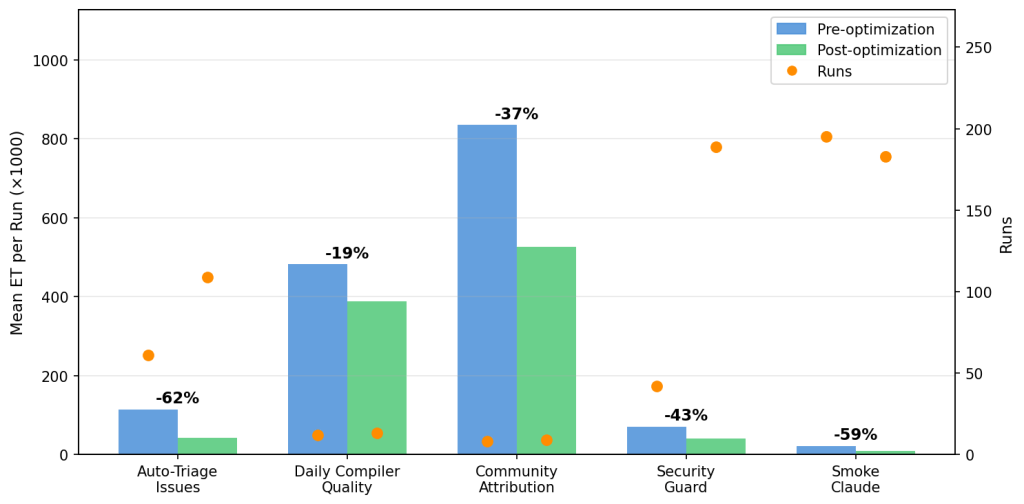
Auto-Triage Issues shows a clear, sustained reduction of 62% across 109 post-fix runs. Daily Compiler Quality shows 19% improvement over 12 post-fix runs, and Daily Community A
“`