“Where are the docs?” It is a question no product team enjoys answering. The honest reply is usually “behind.” A writer stares at a closed pull request, trying to reverse-engineer what changed. The author has already moved on. By the time the documentation publishes, the feature has shipped, sometimes more than once.
That was our situation on the Aspire team. We are a small group of 10 building dev tools for distributed apps. A few months ago, we sought to safely integrate AI into automations we already trusted. We found GitHub Agentic Workflows. I began attaching prototypes to the microsoft/aspire repository.
🔒 The constraint: cross-repo automation is the hard part
Our product lives in microsoft/aspire and our docs site lives in microsoft/aspire.dev. These are different repositories, deploy targets, and review chains. Most teams figure out same-repo automation quickly; cross-repo automation is where things get sharp. Broad repo-scoped tokens belong in a museum. Any responsible security posture restricts them accordingly. That is a good thing. It is also a real bottleneck if the place where you write the docs is not the place where you write the code.
The default workflow for years was:
- Engineer ships a feature in
microsoft/aspire. - Docs writer notices weeks later.
- Docs writer opens the pull request, reads the diff, and pings the engineer to clarify what changed.
- Engineer is on the next feature, vaguely remembers, replies with half the picture.
- Docs draft ships, sometimes against a release that is already out.
This is the reverse-engineering tax. We needed automation that crossed repos without handing an agent a write-everywhere token. GitHub Agentic Workflows turned out to be the answer.
🤖 Why GitHub Agentic Workflows
GitHub Agentic Workflows is a project from the GitHub Next team. I describe it to people as “GitHub Actions, but with a model as the work-item processor and guard rails that satisfy security review.” That is reductive, but it is close.
The shape of it:
- You author a workflow as a single markdown file (
.github/workflows/my-thing.md). YAML-style frontmatter sits on top, an English-language prompt underneath. - You run GitHub Agentic Workflows compile, and it generates a sibling
.lock.yml(a normal GitHub Actions workflow) that you commit alongside. - At runtime, the workflow runs an agent against your prompt with a constrained toolset.
- Critically, the agent does not write to GitHub directly. It emits intent (a JSON blob describing the pull requests, issues, and comments it wants to create), and a separate, narrowly scoped job (the safe-outputs handler) materialises that intent against a per-workflow GitHub app.
That last bullet is the solution. The agent gets read access and a prompt. Writes go through a tiny verifiable pipeline with explicit allow-lists. Security review nods. We ship.
💚 A small aside: kindred stacks
I love when the tools you are using to build are built with the same tools you are using to build with. The GitHub Agentic Workflows docs are built with Astro and Starlight. So is aspire.dev—Astro with Starlight, dressed up with the wider Starlight plugin ecosystem (astro-mermaid, starlight-llms-txt, starlight-sidebar-topics, starlight-image-zoom, the gorgeous @catppuccin/starlight theme, and more. Shout-out to Chris Swithinbank and the Starlight maintainers, the entire ecosystem feels designed by people who genuinely care).
There is a real kinship there. The tool we use to automate docs and the docs site we automate into share the same foundation. Convenient, because the Mermaid sequence diagram in the next section renders the exact same way in both worlds.
The end-to-end pipeline
Here is the flow we landed on. The protagonist is a workflow called pr-docs-check.md living in microsoft/aspire.
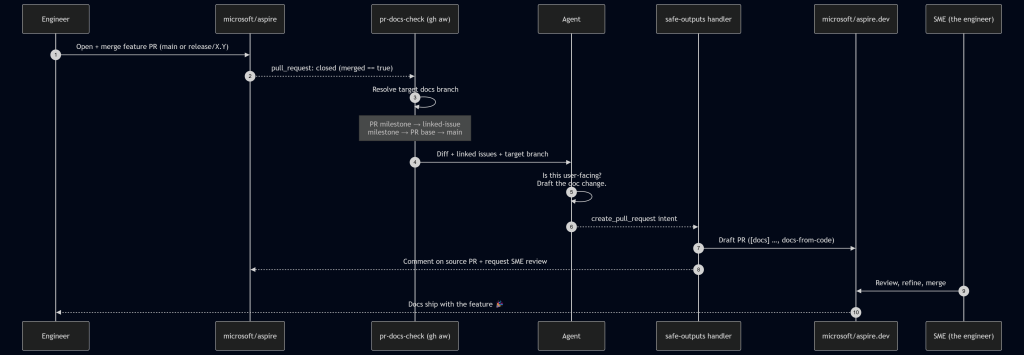
A run starts on pull_request: closed against main or release/*, gated by merged == true. From there, the workflow first runs a deterministic target branch resolver in plain bash before the agent ever wakes up:
- Pull request milestone title (e.g. 13.4 → release/13.4 on
aspire.dev). - Linked-issue milestone title (parse Fixes/Closes/Resolves #N from the body, fetch each issue, take the first non-empty milestone).
- Pull request base ref, if it matches release/X.Y[.Z].
- Fall back to main.
This is the linchpin. Milestones in the product repo map cleanly to release branches in the docs repo. When the agent finally runs, it knows exactly where the docs should land without any creative writing about target branches or guessing.
The agent reads the diff, scans linked issues, and decides: does this need docs? If yes, it drafts the actual content in a checked-out microsoft/aspire.dev workspace, following our existing doc-writer skill (voice, MDX conventions, Starlight components). It then emits a create_pull_request safe-output and hands off.
The safe-outputs handler takes over:
- Title prefix: [docs]
- Label: docs-from-code
- draft: true (we never auto-merge)
- Base branch: agent-supplied, restricted to
mainorrelease/* - Target repo:
microsoft/aspire.dev - Reviewer: the SME identified from the source pull request‘s reviews—i.e., whoever the product team trusted to approve the feature, now gets asked to approve the doc for that feature.
A companion job posts a marker comment back on the source pull request with the docs pull request link and minimises any older pr-docs-check comments on re-run. The engineer who just hit Merge gets a notification within a few minutes: “Here’s the docs draft. Look it over?”
🔐 The safe-outputs contract
The whole security story comes down to a small, boring stretch of frontmatter:
tools:
  github:
    toolsets: [repos, issues, pull_requests]
    min-integrity: approved          # only run pinned, integrity-checked actions
    allowed-repos:
      - microsoft/*
    github-app:
      app-id: ${{ secrets.ASPIRE_BOT_APP_ID }}
      private-key: ${{ secrets.ASPIRE_BOT_PRIVATE_KEY }}
      owner: "microsoft"
      repositories: ["aspire.dev", "aspire"]

safe-outputs:
  create-pull-request:
    title-prefix: "[docs] "
    labels: [docs-from-code]
    draft: true                      # human-in-the-loop, always
    base-branch: main
    allowed-base-branches: [main, release/*]
    target-repo: "microsoft/aspire.dev"
    protected-files: blocked         # AGENTS.md, manifests, security config: hands off
    fallback-as-issue: true
That is the deal in plain text. The agent gets a GitHub App token whose installation is scoped to exactly two repositories—the product repo and the docs repo—and nothing else in the org is reachable. It can only land pull requests against main or release/*. AGENTS.md and dependency manifests are off-limits by policy. If the pull request creation fails (network blip, conflict, anything), the framework falls back to filing an issue, so nothing is silently dropped.
This is the part security review actually liked. The agent’s reasoning is fuzzy. The action surface is not.
📊 By the numbers
Here are the stats from a rolling 30-day window (May 3 – June 2, 2026) spanning the back end of the Aspire 13.3 release and the run-up to 13.4:
| Metric | Value |
|---|---|
| Product pull requests merged in microsoft/aspire | 396 (338 main / 50 release/13.3 / 8 release/13.2) |
| pr-docs-check workflow runs | 396 |
| Draft docs pull requests created on microsoft/aspire.dev | 82 |
| – Merged | 82 (100%) |
| – Closed without merge | 0 |
| – Still open | 0 |
| Docs pull requests target branches | 52 → release/13.3, 27 → release/13.4, 3 → main |
| Median time-to-merge (docs) | 44.8 hours | Source Read original →