Apple released developer beta versions of iOS 27.3 and watchOS 27.3 on Tuesday, introducing four new AI capabilities to Apple Watch Series 12. These updates enable the device to detect significant sounds, identify tracks, summarise conversations, and create notes.
After using the Siri Recaps feature for a day, the practical benefits appear to outweigh the discomfort of constant audio recording. However, the system captures details that lack value and shows room for improvement.
Sound detection and song identification do not raise privacy concerns. The first alerts users to alarms or doorbells, aiding those who are deaf or hard of hearing. The second uses Shazam technology to name music. Apple has used this function on the iPhone for nearly twenty years.
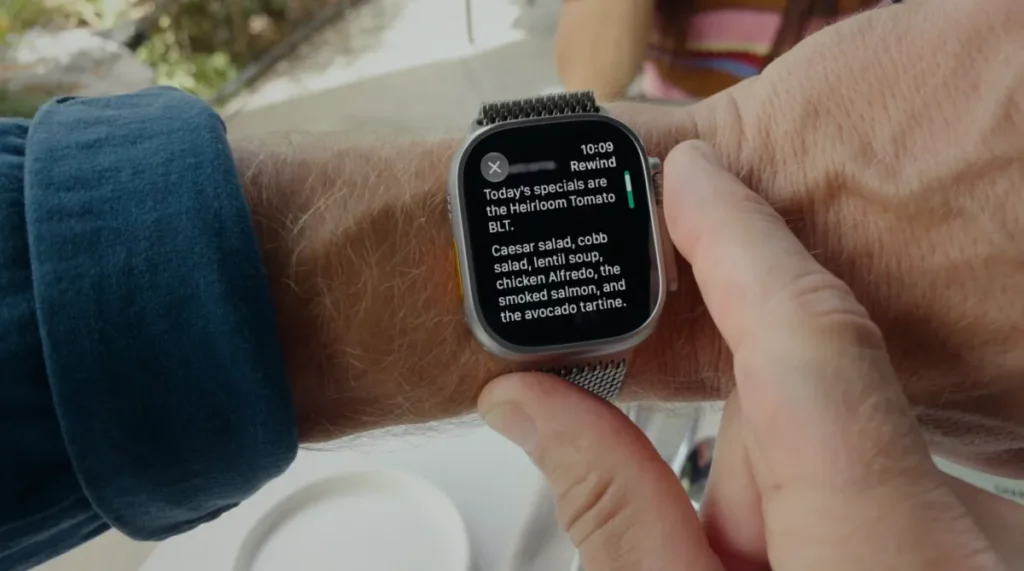
Live Rewind and Siri Recaps generate the main discussion. Live Rewind lets users review the last fifteen seconds of audio. Siri Recaps summarises the day’s audio and saves notes on important points.
Apple processes audio and runs AI models on the device where possible. The system does not identify speakers, store raw files, or redact private data such as government IDs or account numbers.
Some people dislike the normalisation of technology that is always listening.
I feel sympathy for both sides. I often regret how pervasive technology has become in daily life, yet I recognise the value of what Apple has built.
I have not yet found a suitable time to test Live Rewind and do not expect to use it often. If I miss something, I will likely ask “sorry, what?” or “can you repeat that?” before seeking help from the watch.
Siri Recaps, however, seems like a feature I will rely on to save important notes.
I tested the function yesterday while dropping off my teen’s car for repairs and picking up a rental. Staff at both locations shared details about time frames, prices, and policies verbally. The information arrived too quickly to stop and write it down. Returning to Siri Recaps later, it had captured key details I might need to reference.
For example, the system noted the deductible, the repair time frame, the initial amount of gas in the rental, and other items I wanted to remember.
One complaint is that Siri Recaps mixed this information with other topics discussed later at home, such as an errand and the time for babysitting. We were discussing these items to create a family calendar appointment with an appropriate alert time frame.
These items should have been saved in a separate note titled “family schedule and errands,” rather than in the same note as car repairs but under a separate heading.
Because I configured Siri Recaps to run constantly, it also captured non-essential items, like our plan to watch the midterms coverage on TV. This is not the kind of thing you would normally note down. It served as a stark reminder that the feature was listening to everyday conversations. This could feel invasive in different scenarios if the subject being discussed was more personal.
This made me consider turning off the Recap feature while at home in the evening so family dinner table chatter does not become note fodder.
While I appreciated that the Recap picked up a reminder about an errand I needed to run from a family conversation, other tidbits it saved, like what we were watching on TV, would only be valuable if you exported a Siri Recap note to Apple’s Journal app. This is because it was something you wanted to record for personal reasons.
I would like to see these extraneous details saved as separate notes or at least as dedicated sections that could be exported or deleted on their own at the end of the day.
I would also like to be able to swipe left on an individual bullet point to remove it from the Siri Recap entirely. This would avoid having to enter edit mode, place the cursor, and then start deleting text I do not need.
Another option I would like is a setting to automatically export any saved Siri Recap, the ones you click the bookmark icon to save, to Apple’s Notes app. This would remove an extra step.
These Recaps could go into their own folder in the Notes app for easy reference. I understand why this option is not the default given how many different ways people use a general-purpose app like Notes. However, it would be useful for those of us who want to keep Notes as the central starting point for all our jotted-down reminders and to-dos.
Although I was not immediately warmed up to the idea that my watch was always listening, I see the value of this automated note-taking in daily life.
What it means
The feature offers a practical solution for capturing verbal instructions and facts, though users should manually filter out casual conversation. The current workflow requires exporting notes to the Journal app for personal records, and manual editing remains necessary to remove irrelevant bullet points.