For creators and data-driven teams, the era of wrestling with complex SQL queries to find insights is effectively over. AI is finally delivering on the promise of truly self-serve analytics, turning raw data warehouses into accessible knowledge bases without needing a dedicated analyst on speed dial.
At GitHub’s scale, where dozens of product teams rely on vast amounts of telemetry, the old model of centralised support was a bottleneck. Teams often sat idle, unable to query the data they needed to drive decisions because they didn’t know the right grain, filter, or schema. Enter Qubot, an internal agent powered by GitHub Copilot that lets any employee ask plain-language questions about the data warehouse and get instant answers.
Qubot is not a replacement for dashboards or a static reporting tool. It is designed for exploratory, ad-hoc questions like “Which user cohort retains the best on this new feature?” or “What product shift drove the metric change last week?” It has zero maintenance overhead and accelerates onboarding for teams unfamiliar with specific datasets.
In this piece, we detail the architecture of Qubot, how it evolved, and the hard lessons learned in building an expert analytics agent.
How Qubot works
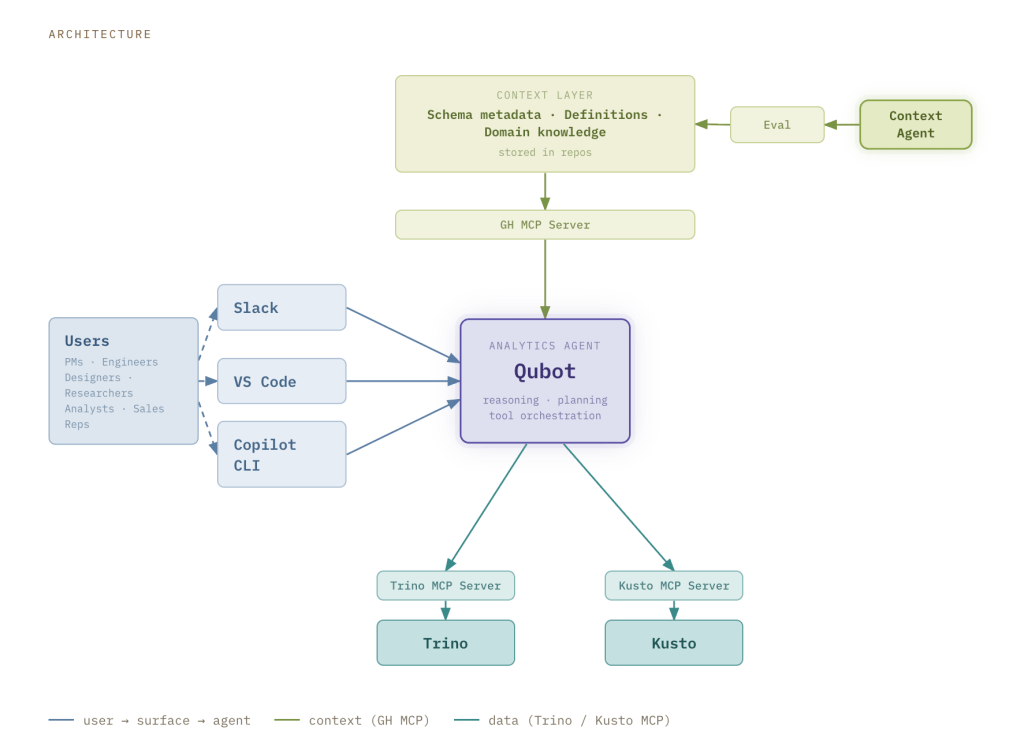
The system relies on three core pillars: a user interface, a context layer, and a query engine.
User interface
Users can access Qubot via Slack, VS Code, or the Copilot CLI. The Slack channel is the preferred collaboration hub for GitHub employees, requiring no setup. When a question is posted, a Qubot instance launches as a Copilot Cloud Agent running on github.com. The answer appears directly in the thread, allowing users to refine their query through conversation and share results instantly. Every interaction is saved as a markdown report in a pull request, providing a permanent record that can be referenced later or integrated into dashboards.
For those preferring a workflow-integrated experience, Qubot is available as a plugin in VS Code and the Copilot CLI. It installs with a single command and sits alongside other custom agents and tools within the user’s session.
Context layer
GitHub’s data warehouse is organised into three tiers of curation: raw events (bronze), conformed facts and dimensions (silver), and curated datasets for specific business use cases (gold). The context layer is federated, meaning the knowledge base is tailored to the specific type of data being queried.
- Bronze data: Includes telemetry context contributed by product teams, covering schema details and metadata.
- Silver data: Hosts examples of queries, usage guidance, and mandatory filters, maintained by the central data and analytics team.
- Gold data: Contains business rules and metric definitions contributed by the teams owning those specific datasets.
We also utilise our ETL pipelines to systematically enrich this layer with additional signals and derived metadata. At runtime, the GitHub MCP Server fetches this context dynamically.
Context agent
The context layer is continuously updated with new knowledge persisted across multiple repositories. Since GitHub primarily uses markdown for documentation, we avoid the complexity of interfacing with disparate tools.
We streamlined this process by introducing a dedicated context agent. Teams contribute via a standardised template or by referencing a repository containing relevant context. The agent then ingests, organises, and normalises this information into a structured format that our evaluations have proven effective for Qubot.
Evaluation framework
Every modification to the context layer or agent configuration undergoes evaluation before deployment. When a team wishes to add new knowledge, they open a pull request. This triggers an offline evaluation framework that measures response accuracy, the latency in finding the correct answer, and detects regressions before they impact users.
The benchmarking framework operates on three components:
- Test cases: A curated dataset of prompts with known correct answers, ground-truth SQL, and metadata including domain and difficulty.
- Automated run orchestration: A script that automates launching each test case as an agent task using the GitHub CLI
gh agent-task create. It runs parallel trials, polls for completion, and saves detailed JSON results. - Stats aggregation: A reporting script that reads the saved results to compute per-test-case metrics: completion rate, accuracy, and duration (average, minimum, maximum).
The end-to-end workflow is straightforward: define test cases, run Qubot multiple times per case, collect results, aggregate stats, and compare configurations.
Query engine
Qubot connects to both Kusto and Trino, the two engines powering most of GitHub’s analytics, via a Model Context Protocol (MCP) server. We developed a custom implementation of the Trino MCP server, while for Kusto we deployed a local version of the Fabric Real-Time Intelligence MCP Server. Kusto is optimised for speed and recent event data, while Trino handles complex joins and deep historical analysis.
Rather than forcing users to choose an engine, Qubot defaults to Kusto and automatically switches to Trino when the query complexity demands it.
What changed, and what we learned
Qubot has seen rapid adoption across GitHub, with hundreds of users executing thousands of queries. The volume of questions asked in central data and analytics Slack channels has dropped dramatically, as teams now explore data with greater autonomy and only escalate complex issues. It has also empowered employees who previously avoided the data warehouse to access the information needed for decision-making.
We quickly realised that the context layer is critical for enhancing Copilot’s reasoning capabilities and creating a truly expert agent. Our experiments showed that structured, well-curated context not only improved accuracy but made Qubot three times faster at returning the right answer. This has profound implications for analytics engineering, elevating context from an afterthought to a first-class citizen in data modelling.
Qubot stands as a rare example of successful hub-and-spoke execution. It relieves strain on the central data team, as product teams own their telemetry and business teams own their gold data definitions. Qubot acted as a gravitational force, centralising this distributed knowledge into a single tool that benefits the entire organisation, incentivising partner teams to contribute rather than creating isolated, domain-specific tools.
Key takeaways
- Context is the engine of accuracy and speed; structured, curated knowledge makes an AI agent three times faster at finding the right answer.
- A federated approach allows product and business teams to own their data definitions, removing the bottleneck of centralised analyst support.
- Multiple interfaces, from Slack to VS Code, ensure the tool has zero barrier to entry for technical and non-technical users alike.