Python 3.15 is here! Here’s the essential What’s new in Python 3.15 guide, this year curated by 3.14 and 3.15 release manager Hugo van Kemenade. As someone who builds open source software that works in every supported Python version, I get to say goodbye to Python 3.10 and start embracing features from Python 3.11.
First, some highlights from Python 3.15.
Explicit lazy imports
I’m most excited about Explicit lazy imports from PEP 810. These let you import modules like so:
lazy import json
lazy from pathlib import Path
The module will then be imported the first time those symbols are used in the code that follows.
My LLM CLI tool implements plugins. I had to recommend manual lazy imports in the plugin author documentation, because simply installing plugins that used heavy dependencies such as sentence_transformers could add multiple seconds to every invocation of the llm command. Lazy imports directly address this startup cost.
Unpacking in comprehensions
The new [*sublist for sublist in lists] unpacking syntax is neat. Here’s an illustration lifted from the documentation:
lists = [[1, 2], [3, 4], [5]]
[*L for L in lists]
# [1, 2, 3, 4, 5]
# equivalent to [x for L in lists for x in L]

sets = [{1, 2}, {2, 3}, {3, 4}]
{*s for s in sets}
# {1, 2, 3, 4}
# equivalent to {x for s in sets for x in s}

dicts = [{'a': 1}, {'b': 2}, {'a': 3}]
{**d for d in dicts}
# {'a': 3, 'b': 2}
# equivalent to {k: v for d in dicts for k,v in d.items()}
PEP 798: Unpacking in Comprehensions by Adam Hartz and Erik Demaine proposed this as an extension of the unpacking syntax from PEP 448, which landed in Python 3.5 back in 2015.
A sampling profiler
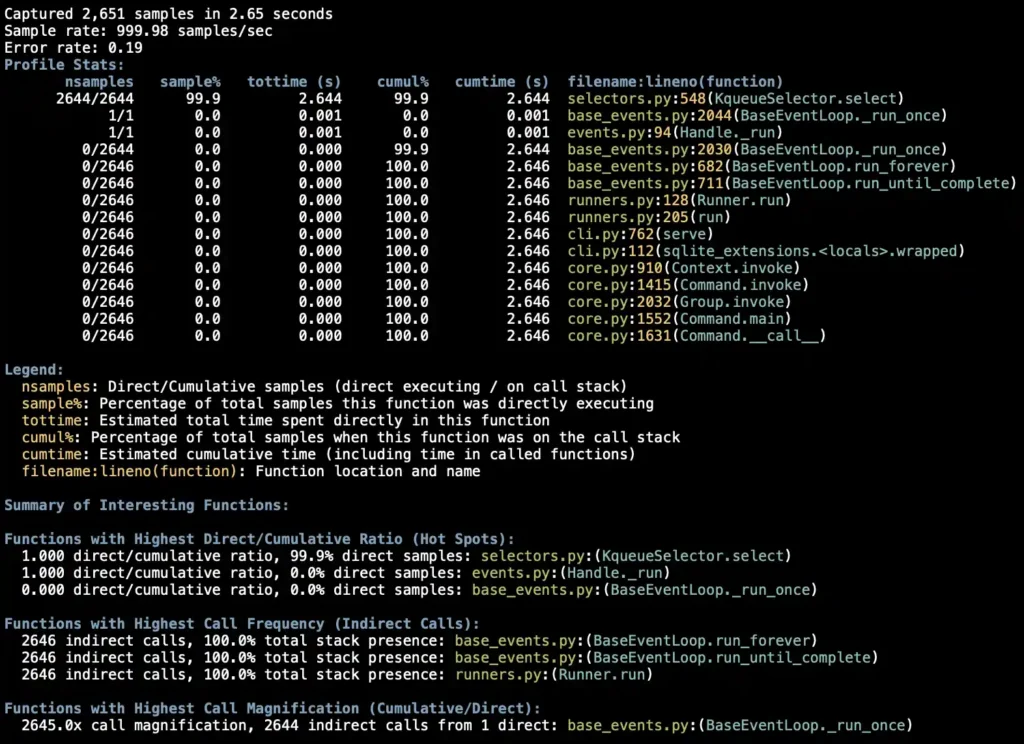
Python’s existing tracing profiler has been renamed from cProfile to profiling.tracing, and has been joined by an exciting new sampling profiler called Tachyon, aka profiling.sampling.
Sampling profilers work by periodically capturing stack traces from running processes, then using those to calculate which functions have the most time spent inside of them. They’re very low overhead and can provide a deep insight into running systems, without needing to instrument those systems first.
I’ve previously used tools like py-spy for this. Now this capability is baked into the standard library.
If you have the PID of an existing Python 3.15 process you can start gathering samples by running this (I had to use sudo on macOS):
sudo uv run --python 3.15 python -m profiling.sampling attach 1234Interact with the main program a bit, then hit Ctrl+C to stop gathering and see a report, which looks something like this:
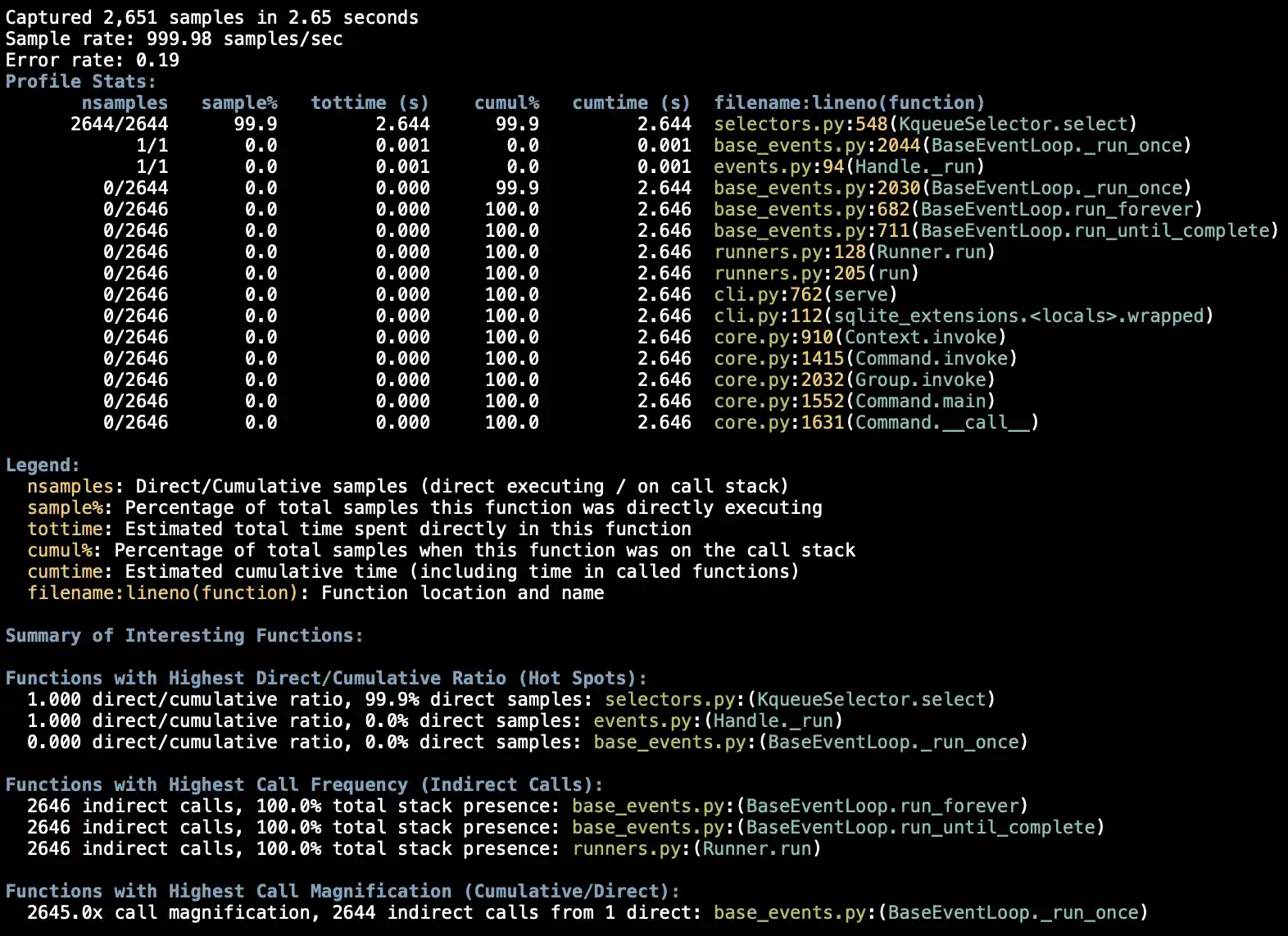
It can also produce flame graphs like this and heat maps like this, and can even output a format that can be viewed in the Firefox profiler UI.
3.15 isn’t much faster than 3.14
Miguel Grinberg investigated How fast is Python 3.15? the other day against the 3.15.0rc3 release and found performance to be mostly the same as 3.14, with the exception of the experimental JIT. The JIT gave a 1.2x boost over the standard 3.15 interpreter (on a Fibonacci test), the first time Miguel observed a meaningful JIT performance increase.
Miguel’s explorations of 3.14 last year found significant boosts against Python 3.13 across many more categories.
Upgrading to Python 3.15 with uv
I used the following sequence of commands to get uv to use Python 3.15 on my Mac. First I had to upgrade uv itself to ensure it knew about the new release:
uv self updateThen I installed the stable 3.15 release:
uv python install 3.15And told uv that I wanted that to be the default for every uv run command, unless the project itself pinned a different version:
uv python pin --global 3.15Now the following reports 3.15 as the version:
uv run python --versionI already have a bunch of tools installed using uv tool install. I reinstalled them to use Python 3.15 like this:
uv tool upgrade datasette --python 3.15Then I can confirm the version like this:
datasette --get /-/versions.json | jqHighlights from Python 3.11
The release of 3.15 means that Python 3.10 (released in 2021) is officially no longer supported.
My policy for my main open source projects is to keep them working in every supported Python version. I can now drop 3.10 and start using features that were introduced in 3.11.
Here’s the What’s new in Python 3.11 document. I finally get to rely on tomllib being available!
Datasette makes extensive use of asyncio. 3.11 adds TaskGroup and timeout(), and several more new features.
datetime.UTC is a new in 3.11 alias for datetime.timezone.utc.
Python’s SQLite support got some significant upgrades in 3.11, including:
- setlimit() and getlimit() expose a mechanism for setting SQLite runtime limits from Python.
-
create_window_function() lets us create custom window functions in Python, as a class with
step(),value(),inverse(), andfinalize()methods. -
blobopen() provides an efficient mechanism for partial reads and writes of large
BLOBbinary values stored in a SQLite row. - You can now call
set_authorizer(None)to remove a SQLite authorizer. Datasette had a workaround for this!
Plus a whole bunch of improvements to Python’s typing system.
I plan to land Python 3.11 improvements to a bunch of my projects over the next few weeks. Here’s my first Datasette PR removing that set_authorizer(None) workaround.
I’ve also updated my click-app, datasette-plugin, python-lib, and llm-plugin cookiecutter templates to test against Python 3.11 through Python 3.15.
Tags: open-source, profiling, python, sqlite, uv