From the Hugging Face Hub to robot hardware with Strands Agents and LeRobot
Imagine you possess a robot, a folder of demonstration data on the Hugging Face Hub, and a specific task you wish it to master. Currently, bridging that gap requires five distinct utilities: one for capturing demonstrations, another for training, a third for simulation testing, custom code for hardware deployment, and a separate system to coordinate multiple units. The components function individually but fail to communicate effectively.
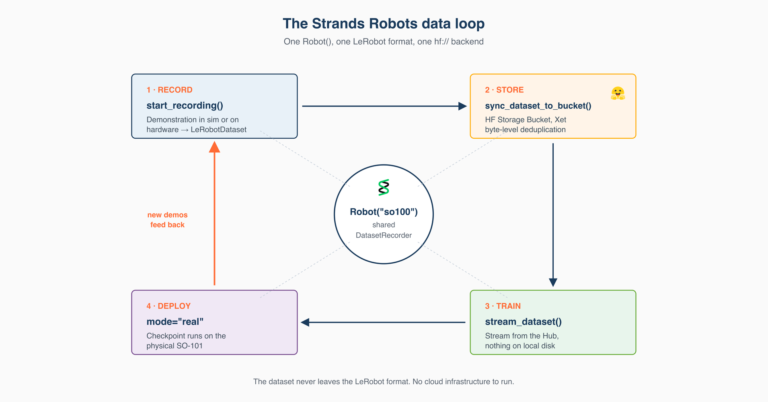
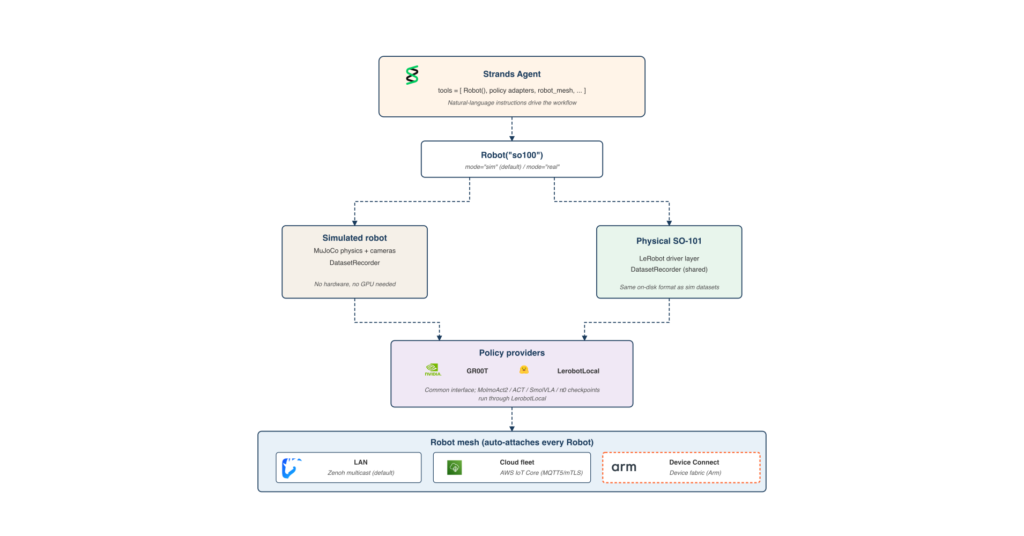
Strands Robots is an open-source SDK from AWS (Apache 2.0) that exposes robot abstractions, simulation environments, and the LeRobot stack as AgentTools you compose into a single Strands agent. The integration remains deliberately thin: LeRobot’s own scripts manage hardware recording and calibration, while Strands AgentTools handle the orchestration an agent actually requires. The simulation tool records LeRobotDatasets in the identical format LeRobot writes to hardware. GR00T and LerobotLocal serve policy inference behind a unified interface, and MolmoAct2 checkpoints traverse the LerobotLocal path. A peer mesh distributes the agent across remote robots. The dataset format remains exactly as LeRobot defined it; the agent loop acts as the glue.
This guide walks you through five steps within a single agent: build the agent over LeRobot AgentTools, record a demonstration as a LeRobotDataset in simulation, run a policy on the same robot, deploy the identical agent code to a physical SO-101 with a single keyword argument change, and broadcast commands across a fleet via the Zenoh mesh. By the end, you can clone the working sample application from GitHub and execute it on your laptop in simulation. No hardware, no GPU, and no Hugging Face credentials are required for the default path. The runnable companion to this post resides at
examples/lerobot/hub_to_hardware.py
and
hub_to_hardware.ipynb
. The notebook defaults to simulation-only and a Mock policy.
What you’ll build
The Strands Robots SDK exposes the LeRobot stack as AgentTools that you compose into one Strands agent. The example agent in this guide performs four functions: record new demonstrations in simulation, push the result to the Hub as a LeRobotDataset, run a policy in simulation against that same format, and deploy the same agent code to a physical robot with one keyword argument modification. When managing more than one robot, the agent coordinates the entire fleet through a built-in peer mesh. For hardware recording and calibration, LeRobot’s own CLIs (
lerobot-record
,
lerobot-calibrate
) manage the setup; the agent resumes from there.
Two design choices make this seamless. First,
Robot("so100")returns a simulation by default (no hardware, no risk), while
mode="real"
returns a hardware-backed robot driven by LeRobot. The agent code remains identical across both modes. Second, the
DatasetRecorder
that writes a LeRobotDataset is shared between the simulation path and LeRobot’s own hardware recording, ensuring a dataset captured in MuJoCo and one captured from a physical SO-101 exist in the same format.
The entire workflow executes in five lines of Python:
from strands_robots import Robot
from strands import Agent

arm = Robot("so100") # mode="sim" (default - safe, no hardware)
agent = Agent(tools=[arm])
agent("Pick up the red cube")
What follows is what is actually happening inside that call, step by step.
Prerequisites
Minimal (default simulation path)
- Python 3.12+, on Linux or macOS (Apple Silicon supported for the MuJoCo backend).
- A Strands-compatible model provider for the agent’s reasoning. Amazon Bedrock with AWS credentials, the Anthropic API, OpenAI, or Ollama running locally.
- Strands Robots installed with the install extras:
uv pip install "strands-robots[sim-mujoco,lerobot,mesh]"
That is all. The example in this post runs end-to-end on a laptop with these three.
Advanced (hardware deployment, real policies, Hub push)
- A Hugging Face account and token with write permission, for pushing datasets and pulling policy checkpoints from the Hub.
- For the hardware path: an SO-101 follower and leader pair, or any other LeRobot-supported robot. Both devices need calibration files under
~/.cache/huggingface/lerobot/calibration/
.
- For local GR00T inference: an NVIDIA GPU with at least 16 GB of video memory and Docker installed. The post uses the
gr00t_inference
tool’s
lifecycle="full"
action, which pulls the image, downloads a checkpoint, and starts the container in one call.
Step 1 – Set up the example
Install Strands Robots and retrieve the example files:
uv pip install "strands-robots[sim-mujoco,lerobot,mesh]"
git clone https://github.com/strands-labs/robots.git
cd robots
Export your Hugging Face token if you want the agent to push datasets or pull policies from the Hub. This is optional for the default simulation path in this post; the example runs end-to-end with the Mock policy and writes the dataset to your local cache without needing Hub access.
export HF_TOKEN=hf_...
The runnable example lives at
examples/lerobot/hub_to_hardware.py
(Python script) and
hub_to_hardware.ipynb
(notebook), in the
strands-labs/robots
repository alongside the MuJoCo and LIBERO examples. The notebook is the recommended starting point: open it in JupyterLab and run cells top-to-bottom in simulation mode without any hardware connected.
Step 2 – Record demonstrations and push to the Hub
The simulation tool records LeRobotDatasets in the identical format LeRobot writes on hardware. No hardware required. The
Simulation
tool’s
start_recording
action writes through the same
DatasetRecorder
class: same parquet schema for joint states and actions, same per-camera MP4 layout. The agent prompt is nearly identical:
from strands import Agent
from strands_robots import Robot

robot = Robot("so100")  # mode="sim" by default
agent = Agent(tools=[robot])

agent(
    "Record a demonstration of 'pick the red cube and place it in the box' "
    "using the Mock policy provider at FPS 30. Write the dataset to "
    "my_user/cube_picking_sim and push to the Hub when done."
)
The Mock policy is intentional: it generates placeholder joint actions so the workflow runs end-to-end without a trained checkpoint. The robot moves through random motions rather than completing the grasp, and the recording is structurally complete (valid joint states, valid camera frames, a well-formed LeRobotDataset episode), but the demonstration itself is not useful as training data. Step 3 below swaps in GR00T or LerobotLocal for real grasping behaviour. To see actual cube-picking in this step, run
--policy lerobot_local --checkpoint allenai/MolmoAct2-SO100_101
(a MolmoAct2 checkpoint, auto-detected from its config.json and routed through the LerobotLocal path); the prompt, dataset format, and agent code remain the same.
The proof is what happens next. LeRobot’s own dataset loader reads the sim-recorded data with no Strands-specific code path:
from lerobot.datasets.lerobot_dataset import LeRobotDataset

dataset = LeRobotDataset("my_user/cube_picking_sim")
print(dataset.features)
# {'observation.state': Sequence(...),
#  'observation.images.front': VideoFrame(...),
#  'action': Sequence(...),
#  'episode_index': Value(...), 'frame_index': Value(...), ...}
This features dict is identical in shape to any LeRobot dataset on the Hub: same column names, same parquet+MP4 layout, same loader path. Training scripts that consume hardware-recorded data consume the sim-recorded data without modification. Datasets pushed from sim sit alongside hardware recordings in the same Hub repository if you wish.
Recording on hardware
To record demonstrations on a physical SO-101 instead of simulation, use LeRobot’s record CLI directly. The Strands integration does not wrap that command as an AgentTool because LeRobot already performs the task cleanly:
lerobot-calibrate --robot.type=so101_follower --robot.id=my_follower
lerobot-calibrate --robot.type=so101_leader   --robot.id=my_leader

lerobot-record \
  --robot.type=so101_follower --robot.id=my_follower \
  --teleop.type=so101_leader  --teleop.id=my_leader \
  --dataset.repo_id=my_user/cube_picking \
  --dataset.single_task='Pick up the red cube and place it in the box' \
  --dataset.num_episodes=25 \
  --dataset.push_to_hub=true
The dataset that lands on the Hub from this command is in the same format as the simulation recording. To fine-tune a policy on it, run LeRobot’s training CLI (
lerobot-train
); training itself is out of scope for this post and follows the standard LeRobot workflow. From Step 3 onward, the agent picks up either the original or a fine-tuned checkpoint interchangeably. For full SO-101 hardware setup, calibration walkthroughs, and troubleshooting, see the README in the example folder.
Step 3 – Run a policy in simulation
With the dataset on the Hub, the next step is to run a policy. The example uses the
Robot()
factory in its default sim mode, then attaches
gr00t_inference
so the agent can manage the inference container:
from strands import Agent
from strands_robots import Robot, gr00t_inference

robot = Robot("so100")  # mode="sim" by default
agent = Agent(tools=[robot, gr00t_inference])

agent(
    "Start GR00T inference on port 5555 with the cube-picking checkpoint "
    "from my_user/cube-picker. Then ask the robot to pick up the red cube."
)
Under the hood, the agent runs
gr00t_inference(action="lifecycle", lifecycle="full", ...)
to pull the GR00T container image