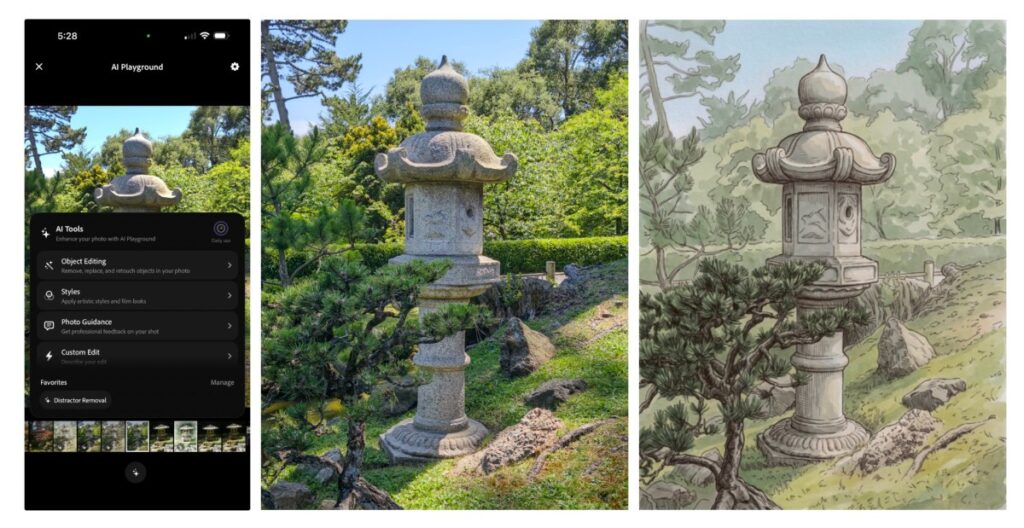
Adobe is rolling out new AI capabilities into its experimental iOS camera app, Project Indigo. The update introduces tools that use large language models to critique images and suggest edits, alongside features for object removal, depth of field generation, and style transfer.
Marc Levoy, who leads the project and previously built Google Pixel’s camera software, notes that most generative AI relies on prompts. Finding the right words to tweak a photo is often difficult. Instead, Project Indigo offers buttons that produce more consistent results.
Google’s camera coach, launched last year, gave generic advice on framing. Project Indigo provides more specific feedback. The app can teach photography techniques even if the user disagrees with the assessment. Two main features handle this. The first is a photo critique offering a professional opinion on framing, lighting, colour, and emotional impact. The second offers capture and edit suggestions, advising on reshooting, framing, exposure, and objects in the viewfinder. One test suggested removing a hexagonal white object from a photo.
A separate section explains how to improve an existing image using Adobe Lightroom controls.
Object removal has existed in apps like Apple Photos, Google Photos, and Adobe Photoshop for years. These tools usually require the user to draw around an item, which is not always accurate. Project Indigo offers toggles for common clutter, including people in the background, trash, wires, poles, fences, and vehicles. Users can also describe a custom object for removal. The results are notably clean.
In a test, the app removed a friend and the item he was holding from the background without creating strange artifacts.
The app can also use AI to create depth of field, simulating a blurred background.
Adobe is also testing style transfer, turning photos into tones like watercolour, pen and ink, ink line with colour wash, monochromatic, and backlit subject. Some styles resemble early versions of the Prisma app. Advanced models make the output look refined, though style transfer is not a new or particularly useful addition.
Despite Levoy’s criticism of prompt-based editing, Project Indigo allows users to describe their own edits. This enables workflows not found in preset tools but opens the door to low-quality content. The company uses Google’s Gemini-based Nano Banana for these features but may swap in other models, including Adobe Firefly.
These tools sit under the AI playground tab and remain in testing. Only select users have access. They might not reach a wider audience, but it is positive to see features that highlight photography nuances rather than just generating volume.
What it means
Users get immediate, specific feedback on their shots without needing to write complex prompts. The ability to toggle specific clutter for removal saves time compared to manual selection. However, the style transfer functions remain a novelty rather than a practical workflow improvement.