Java developers can now drive AI from enterprise applications without relying on framework-specific approaches.
Previous options like Langchain4j removed direct vendor dependencies but introduced a reliance on the library itself. Similarly, Spring AI tied users to Spring design decisions. The GitHub Copilot SDK for Java offers a framework-agnostic method to integrate AI. It also supports Bring Your Own Key (BYOK), allowing users to connect to any AI vendor.
💡 The SDK works with any direct model provider, such as OpenAI, Azure, Anthropic, or OpenAI-compatible endpoints. You pass a provider/ProviderConfig containing your own baseUrl and apiKey (or bearer token). A Copilot subscription is not required for this functionality. |
The library acts as a client for server-side Java code. It enables the creation of Copilot agent sessions, the registration of tools, the sending of prompts, and the receipt of structured responses. It operates within server environments including Jakarta EE and Spring. Developers building enterprise Java will find familiar patterns here: CompletableFuture, annotations, lambdas, and virtual threads.
This post demonstrates the SDK using a complete Jakarta EE 11 sample application. The author selected this version as the lead release coordinator for the update. Open standards remain the preferred method for empowering developers. Further details on Jakarta EE 11 are available via this InfoQ article.
The sample application functions as an agent harness. Developers can construct their own harness using preferred Java frameworks and libraries.
Clone the sample app and try it yourself >
Where to get it
The SDK is available as a Maven dependency:
<dependency>
    <groupId>com.github</groupId>
    <artifactId>copilot-sdk-java</artifactId>
    <version>1.0.7-preview.1</version>
</dependency>
Prerequisites:
- JDK 17 or 25 (25 is recommended to access virtual threads and other modern features)
- Maven 3.9+
- A GitHub account with an active Copilot subscription
- The Copilot CLI installed locally at version 1.0.71 or later.
Walk through the sample app
The most effective way to observe the SDK in action is to run the sample application linked above.
Get the code
git clone https://github.com/microsoft/Build26-BRK206-your-agent-anywhere-multiclient-multidevice-with-github-copilot-sdk.git
cd Build26-BRK206-your-agent-anywhere-multiclient-multidevice-with-github-copilot-sdk/src/java-agent-orchestrator
mvn clean package liberty:run
# Open http://localhost:9080/index.xhtml
The Java demo is built on the following stack:
| Concern | Technology |
|---|---|
| Runtime | Open Liberty 26.0.0.5 |
| Platform | Jakarta EE 11 (Faces 4.1, CDI 4.1, WebSocket 2.2, Data 1.0, Persistence 3.2) |
| UI | PrimeFaces 15.0.16 |
| AI orchestration | Copilot SDK for Java 1.0.7-preview.1 |
| Database | H2 in-memory (10 seed property listings) |
What the app does
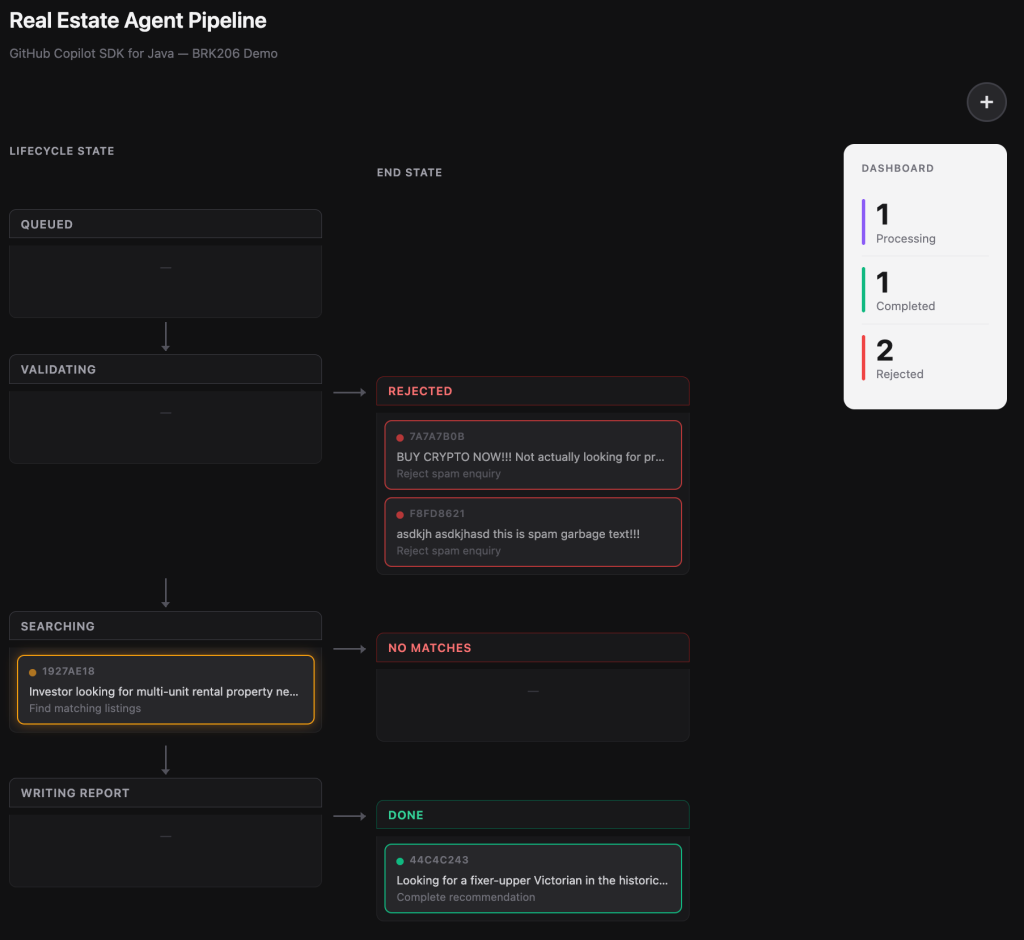
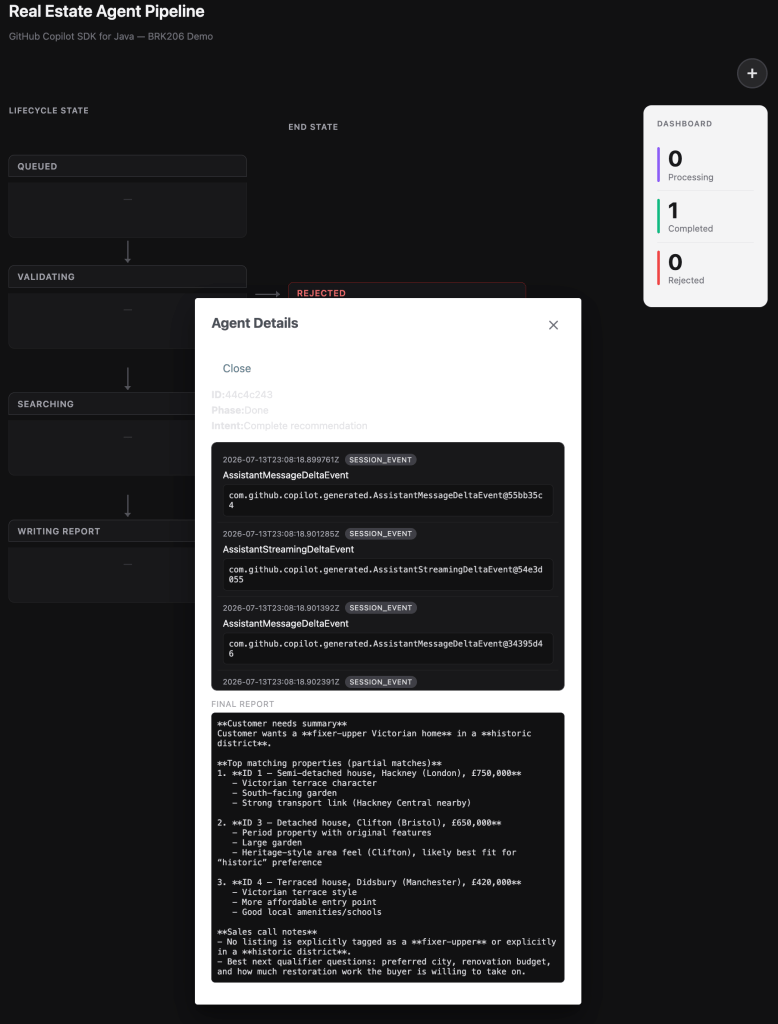
The application manages real-estate leads. A customer submits an enquiry, such as “I’m looking for a 3-bedroom house in London under £800,000”. The system then spins up an isolated Copilot Agent on a virtual thread to process the request through a pipeline.

The architecture uses Jakarta WebSocket to push real-time status updates from the server to the browser. This allows users to watch agents progress through phases as the model calls tools.
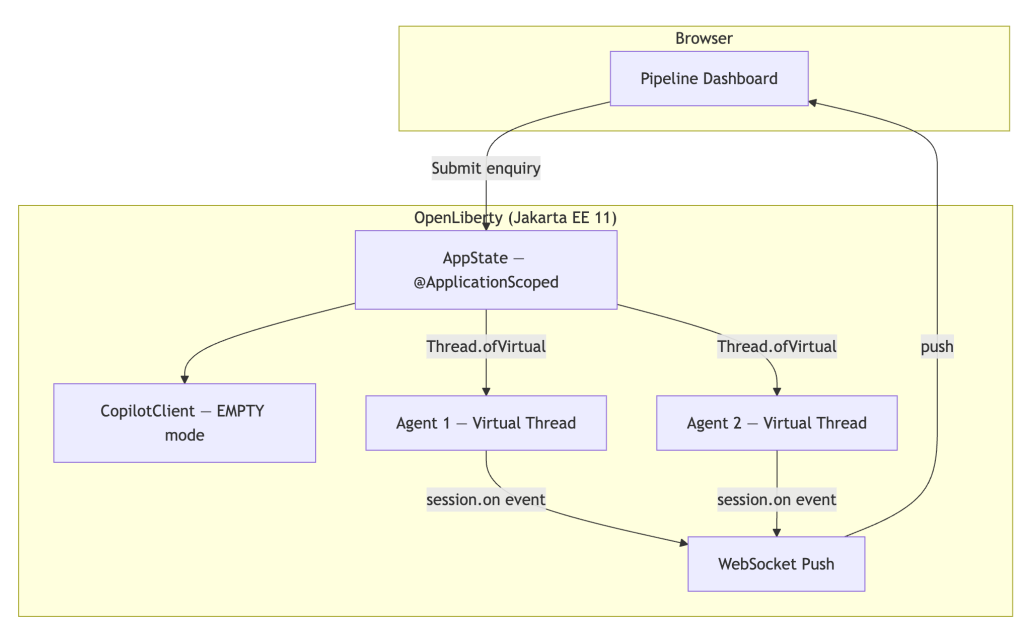
Users can submit multiple inquiries simultaneously to observe concurrent virtual-thread agents. Each agent processes independently with its own Copilot session.
SDK features in action
This section walks through key SDK features as they appear in the sample code.
Defining tools with @CopilotTool
This is the headline API. If you have written a @GET endpoint in JAX-RS or an @MessageDriven bean, this will feel instantly familiar:
@CopilotTool(value = "Sets the current phase of the agent. Use this to report progress.",
             name = "set_current_phase")
public String setCurrentPhase(
        @CopilotToolParam("The phase to transition to (VALIDATING, SEARCHING, "
                + "WRITING_REPORT, REJECTED_GARBAGE, REJECTED_NO_MATCHES, or DONE)")
        String phaseName) {
    phase = Phase.valueOf(phaseName.trim().toUpperCase(Locale.ROOT));
    notifyUi();
    return "Phase set to " + phase.getLabel();
}
The @CopilotTool annotation declares the method as a tool the model can call. The @CopilotToolParam annotation describes each parameter so the model knows what to pass. The SDK handles all JSON Schema generation, argument parsing, and dispatch. You simply write a normal Java method.
Two build prerequisites for @CopilotTool. The annotation-based tool API is an experimental feature of the SDK. You must configure two items in your Maven build:
- Enable experimental APIs: pass
-Acopilot.experimental.allowed=trueto the compiler. Without this flag, the annotation processor will refuse to generate the tool metadata. For more details on the experimental APIs see Copilot SDK documentation. - Register the annotation processor: add the Copilot SDK processor to your build configuration so the IDE and compiler recognise the annotations.
What it means
Developers can now integrate AI without being locked into a specific framework or vendor. The SDK uses standard Java patterns, meaning existing enterprise teams can adopt it without rewriting their architecture. The BYOK feature allows teams to connect to their preferred model provider while retaining the same code structure.