Simon Willison used an AI to create a video of pixel art kakapo parrots for his closing keynote at the WeAreDevelopers World Congress North America yesterday.
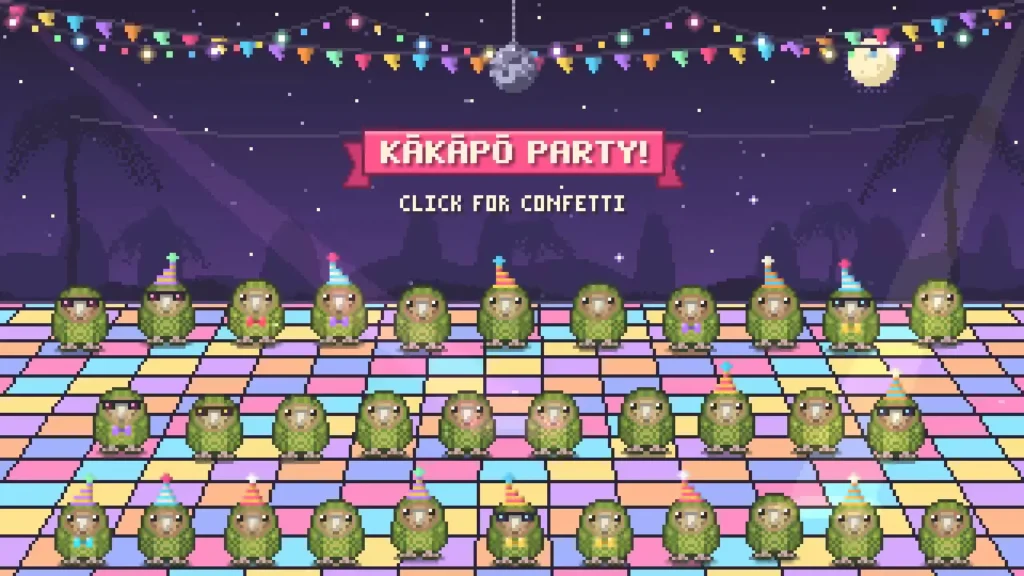
He wanted to celebrate the record-breaking 2026 kākāpō breeding season. He took three photos from Google and asked Claude Opus 5.5 to turn them into an animated scene.
Here are some photos of kakapo parrots just to remind you what they look like
I need you to make an animation in animated pixel art on HTML 5 canvas of obviously pixel art kakapo jumping up and down having a party with confetti and suchlike - there should be at least 20 of them
The result is an interactive HTML page with around 20 kakapo characters.
Willison needed a video file for his Keynote presentation. He downloaded the HTML and instructed a local session of Claude Code to record the interaction.
Make me a video of file:///Users/simon/Downloads/kakapo-party.html - you need to load it in a browser and click on it a few times to get the confetti effect, the video should be 15s long
don't start clicking until 3s in
make sure several clicks are spread around the clickable area
Claude Code used Playwright to control a browser window and generate a 15-second clip.
The code
The script Willison provided is straightforward. It defines a grid of coordinates to click across the screen.
# /// script
# dependencies = ["playwright"]
# ///
import time
from playwright.sync_api import sync_playwright
W, H = 1280, 720
# Canvas fills the viewport; spread clicks across corners, edges and centre
clicks = [
    (3.0, 640, 360),   # centre
    (4.2, 160, 120),   # top-left
    (5.4, 1120, 120),  # top-right
    (6.6, 180, 600),   # bottom-left
    (7.8, 1100, 600),  # bottom-right
    (9.0, 640, 100),   # top-centre
    (10.0, 380, 380),  # mid-left
    (11.0, 900, 380),  # mid-right
    (12.2, 640, 620),  # bottom-centre
    (13.2, 640, 300),  # finale centre
]
with sync_playwright() as p:
    b = p.chromium.launch()
    ctx = b.new_context(viewport={"width":W,"height":H}, record_video_dir="vids", record_video_size={"width":W,"height":H})
    page = ctx.new_page()
    t0 = time.time()
    page.goto("file:///Users/simon/Downloads/kakapo-party.html")
    for t,x,y in clicks:
        time.sleep(max(0, t-(time.time()-t0)))
        page.mouse.click(x,y)
    time.sleep(max(0, 16.0-(time.time()-t0)))
    ctx.close(); b.close()
What it means
This workflow shows how a developer can combine an LLM’s ability to generate code with a browser automation library to produce media assets. The process requires no manual animation or video editing, only the initial prompt and the final configuration of the recording parameters.