Protecting Pakistani Users from Scams with a Lightweight AI Triage Tool
Creators and makers in Pakistan face a daily battle against sophisticated digital fraud. The Pakistan Notice Helper is a safety-first AI application designed to give individuals a second look at suspicious communications before they click a link, call a number, share a one-time password, or authorise a payment.
The concept addresses a persistent local issue: citizens frequently receive messages purporting to come from banks, logistics firms, tax collectors, traffic police, utility providers, mobile carriers, or government bodies. While some are legitimate, many are fraudulent. The challenge is rarely just reading the text; it is knowing the correct course of action.
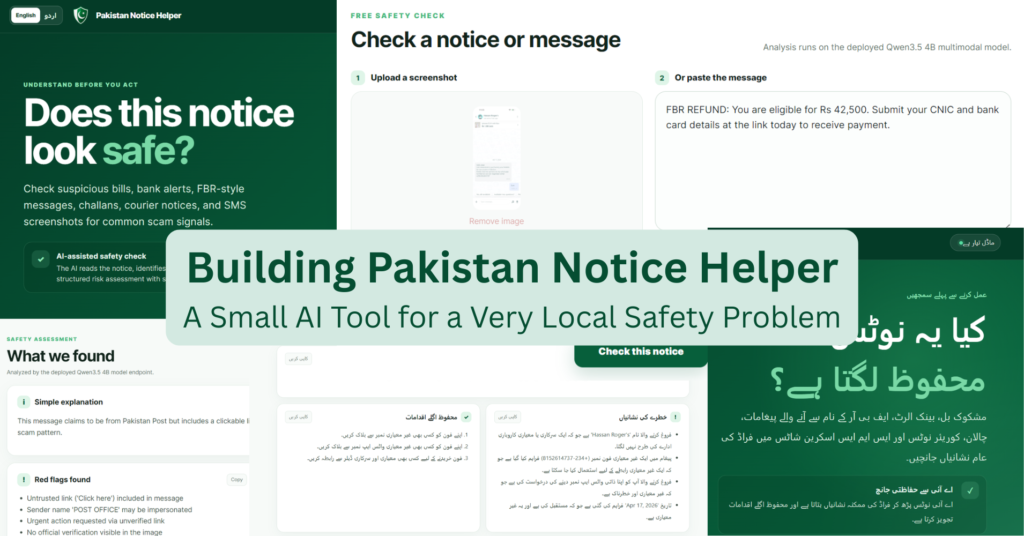
This tool does not claim to definitively verify the authenticity of a message. Instead, it functions as a triage system. Users can submit text or a screenshot to receive a risk classification, a brief rationale, a list of visible warning signs, and recommended safe next steps.
Why this fits the Build Small track
The project aligns with the Backyard AI initiative because it targets a specific, local problem: the prevalence of scam-style notices within Pakistan.
Rather than constructing a broad, general-purpose assistant, the goal was to determine the capabilities of a compact model when the scope is narrow, the product logic is precise, and the interface is built for actual end-users.
Initial testing involved a larger Qwen model, but the final production choice settled on Qwen3.5 4B Q8 via llama.cpp. This configuration successfully identified all high-risk scam cases and both screenshot scenarios in a ten-case evaluation, making it a practical choice for a safety-focused, small-model assistant.
The technical stack includes:
- Hugging Face Space
- Custom Gradio frontend
- Queued Gradio Server endpoint
- Modal endpoint
- CUDA llama.cpp
- Qwen3.5 4B Q8 MTP GGUF with vision projector
This architecture allowed the tool to process both text and images while remaining well within the hackathon’s 32B parameter limit.
Core functionality
The application supports both English and Urdu. This was a critical product decision, as suspicious messages in Pakistan often appear in English, Urdu, Roman Urdu, or a mixture of all three.
Urdu mode extends beyond a translated interface. When a user switches languages, the app adjusts the layout to right-to-left, translates headings, labels, risk cards, validation messages, and result controls. It also instructs the model to generate the assessment in clear Urdu script.
Consequently, users can submit a suspicious message and receive the full safety response in Urdu, including the risk label, explanation, red flags, safe next steps, and optional reply drafts where appropriate. For a local safety tool, this is vital; advice is more trusted and acted upon when delivered in the user’s preferred language.
The system scans for warning signs such as:
- Urgent threats or language suggesting account suspension;
- Requests for OTPs, PINs, passwords, CVVs, CNIC details, or card data;
- Suspicious payment links or personal mobile numbers;
- Impersonation of banks, telecom operators, couriers, tax authorities, or police;
- Prizes, refunds, jobs, or benefits requiring an advance fee.
The tool then suggests safer alternatives, such as verifying the claim through independently found official channels rather than using the link or phone number provided in the suspicious message.
Lessons learned during development
This project demonstrated that working with small models is less about chasing benchmark scores and more about finding the optimal balance between quality, speed, cost, and product safety.
1. Small models excel with clear scope
A primary lesson was that compact models perform surprisingly well when the task is carefully bounded.
The Pakistan Notice Helper does not need to act as a general scam investigator. Its job is to identify visible risk signals, avoid overconfidence, and provide safe next steps. This requirement made product scope, prompt design, and output contracts just as important as the model selection.
The application is designed to state: this looks risky, here are the warning signs, and here is what you should do safely next. It is not designed to declare: this is definitely real or definitely fake.
2. Starting with a larger model
Development began with Qwen3.6 27B, which delivered excellent quality. In testing, it handled suspicious messages effectively and produced strong, reliable explanations.
However, deployment cost and practicality were issues. The model required significantly more VRAM, a larger GPU machine, and longer recovery time during cold starts. For a hackathon demo with irregular traffic, this was not ideal. It worked, but it was too expensive and heavy for the intended small, focused tool.
In terms of quality, the larger model scored around 95/100 for this task. Yet, quality alone was insufficient. Cost, speed, cold starts, and overall responsiveness had to be considered.
3. Testing smaller local options
Next, a much smaller vision-language model, MiniCPM-V 4.6 Q8, was tested with the hope of running it more locally to reduce serving costs.
This experiment failed. It was extremely slow on GPU, and attempts to run it through ZeroGPU resulted in quota and runtime issues. Even when the interface indicated approximately 35 minutes of quota remained, the application behaved unreliably. The cause was unclear, but the deployment became unstable.
The deployment was subsequently reverted to Modal. While the setup was fast and responsive within seconds, the model quality was inadequate. It struggled to detect suspicious messages and failed too many test cases, leading to its removal.
4. Finding the “Goldilocks” model
Research into small open-source model rankings on Artificial Analysis led to the best fit: Qwen3.5 4B.
It was small enough to align with the Build Small ethos, fast enough for the user experience, and capable enough for the required safety behaviour. Compared to Qwen3.6 27B, it scored around 80/100 for this task, whereas the larger model approached 95/100.
However, the tradeoff was justified. The 4B model was cheaper to serve, faster to load, easier to deploy, and practical on a smaller Modal machine. This balance of quality, speed, cost, and cold-start behaviour made it the ideal choice for Pakistan Notice Helper.
5. Prompting and output contracts were crucial
Early versions failed in useful ways.
The thinking mode consumed the 500-token output budget before returning the final structured JSON, so thinking was disabled for production. A dense Roman Urdu screenshot reached the original completion limit, so image requests now receive a larger token budget.
Another response suggested an official-looking domain that had not been verified. This was a serious product issue, so the system prompt was updated to forbid invented URLs, phone numbers, organisations, and facts.
These adjustments made the system safer and more predictable. The model was not merely asked to “detect scams”; it was required to follow a strict safety contract.
6. Urdu UX required genuine product work
The Urdu interface demanded more effort than anticipated.
Direct translations sounded unnatural. Some headings required different line heights. Mixed Urdu and Latin model names could reorder unexpectedly. Mobile controls needed additional vertical space, particularly in the right-to-left layout.
A bundled Nastaliq webfont was tested. While it looked beautiful in isolation, it reduced readability within the product UI and made the interface feel inconsistent. It was removed in favour of a system Arabic font stack, retaining the improved Urdu copy and RTL layout.
These were not merely aesthetic details; they affected whether the app felt clear, usable, and trustworthy.
7. The main lesson
The final takeaway is that the best model for a product is not always the largest one.
For this project, Qwen3.6 27B offered the best raw quality, but Qwen3.5 4B provided the best product balance. It was small, fast, affordable, and sufficient for the clearly defined task.
That tradeoff is exactly what made the project feel right for Build Small.
Building with Codex
Codex accelerated progress across the project, especially since this was more than a simple model demo. Pakistan Notice Helper required a custom frontend, a Gradio backend, a Modal-hosted llama.cpp server, screenshot support, Urdu mode, tests, documentation, and a safer output pipeline.
The full code is available in the GitHub repository.
Codex was used as an engineering collaborator rather than just a code generator. It helped inspect the existing repository, implement changes, run tests, debug issues, update documentation, and ensure the Modal, Gradio, and llama.cpp setup remained aligned with the deployed system.
A particularly useful feature was building a custom HTML, CSS, and JavaScript interface while maintaining Hugging Face Spaces compatibility through Gradio Server. Instead of the default Gradio component layout, the app uses a product-style frontend that communicates with Gradio’s queued API routes and SSE protocol in the background.
This made the final Space feel more like a genuine local safety tool than a standard model playground. Codex also assisted with repeated UI refinements, including the English/Urdu switch, mobile layout fixes, result cards, cached examples, trace controls, and cleaner documentation for the deployment flow.
The primary benefit was the speed of iteration. The workflow allowed describing the desired product behaviour, reviewing the implementation, testing, and refining the app until the frontend, backend, model endpoint, and safety constraints functioned together.
Privacy-safe traces
An optional public trace feature was added to allow people to understand how the app is used without exposing private user content.
The trace option is visible inside the app and can be disabled before each request. When enabled, it records only limited request-level metadata, not the full user message or screenshot. Text is redacted and capped. Images are represented through fixed summaries and are not stored.
The trace excludes raw screenshots, links, identifiers, generated explanations, reply drafts, errors, credentials, and any free-form model output that could accidentally repeat private details.
The trace dataset was published so people can review the schema and see what kind of metadata is shared.
This matters because sensitive information can leak from sources other than the original input. A model explanation, reply draft, extracted phone number, URL, or exception message can repeat personal details even when the raw message is removed. To prevent this, the trace system only publishes limited categories,