Continuous fuzzing fails to find critical bugs in long-running projects because humans must constantly monitor coverage, write harnesses for unreach code, and triage crashes. The GitHub Security Lab Taskflow Agent addresses this by automating those specific manual tasks.
The system is an autonomous pipeline designed for C/C++ projects. Pointing it at a GitHub repository allows it to identify entrypoints, analyse build systems, write harnesses, run AFL++, read coverage reports, and generate vulnerability reports without human intervention.
It relies on the GitHub Security Lab Taskflow Agent framework, which expresses security automation as sets of taskflows executed end to end.
How to run it
The quickest method is to open a codespace at https://github.com/GitHubSecurityLab/seclab-taskflows-fuzzing.
Execute the following script:
./scripts/fuzzing/run_fuzzing.sh PROJECTFor example:
./scripts/fuzzing/run_fuzzing.sh tukaani-project/xzThe argument is a GitHub owner/repo slug. The agent then handles preliminary steps independently:
- Installing software such as AFL
- Cloning the repository
- Identifying the most relevant functions in the code
- Creating fuzz targets for those functions
For a quick smoke test, use a smaller project:
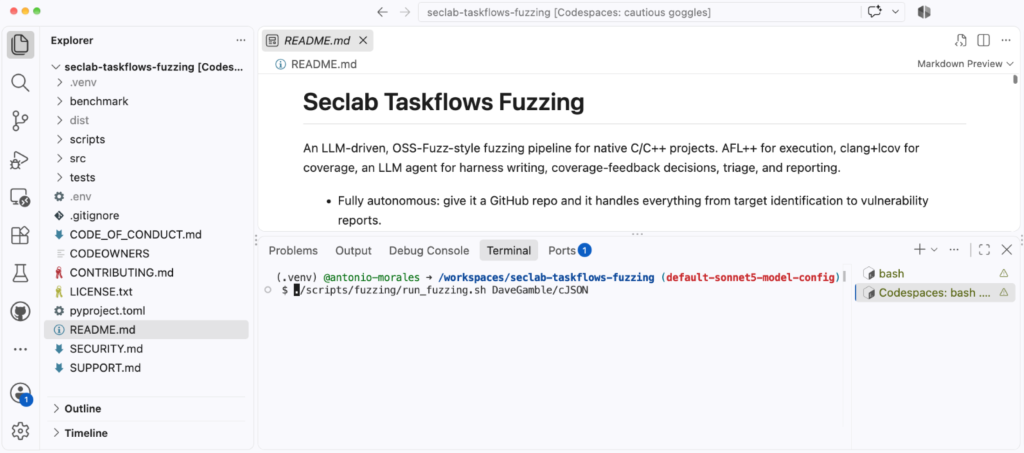
./scripts/fuzzing/run_fuzzing.sh DaveGamble/cJSONWarning: this taskflow runs afl-fuzz, clang, and arbitrary build commands chosen by the LLM directly on the host. A prompt-injected agent could execute any command available to the user. Run it only inside a disposable environment, such as a Codespace or a throwaway VM, without elevated privileges.
Model selection
Some frontier models impose security guardrails on their outputs. The system uses Claude Sonnet 5 by default because it passed all internal tests. You can choose a different model by modifying src/seclab_taskflows_fuzzing/configs/model_config.yaml.
The architecture in one minute
The system consists of three layers:
- A shell driver (run_fuzzing.sh) that chains the pipeline stages together.
- A set of taskflow YAMLs, one per stage, which act as prompts telling the LLM agent what to do.
- A set of MCP tools that the agent calls to execute work: running AFL, compiling harnesses, storing crashes, and reading coverage reports.
The core design rule is a clean separation of responsibility: the LLM agent owns the decisions, and the MCP tools own the execution. The agent decides what to fuzz, which harness to write, and which coverage gap to chase. The tools expose primitives like run_afl_for or compile_harness. The agent never calls AFL or clang directly; it composes the pipeline from these building blocks. All state lives in a SQLite database (fuzz_context.db), so stages exchange data only through the database.
Each harness is built twice. AFL’s edge instrumentation guides the fuzzer but is useless for human-readable coverage reports. Every harness becomes both a .afl binary (built with afl-clang-lto -fsanitize=address,undefined) and a .cov binary (built with clang -fprofile-instr-generate -fcoverage-mapping). The .afl binary performs fuzzing; the .cov binary replays AFL’s queue to produce real source-line and branch coverage.
The coverage-feedback loop
This is the heart of the pipeline and automates the manual workflow described earlier.
Improving fuzzing coverage by hand is an iterative process:
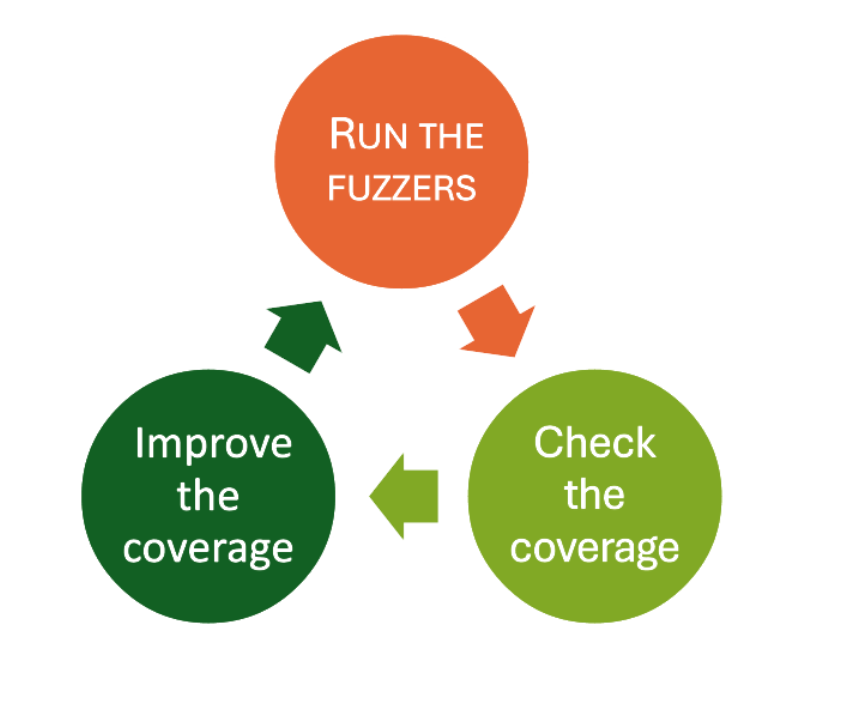
The “check the coverage” step previously involved manually reading an LCOV report for uncovered branches. The “improve the coverage” step involved writing new harnesses or crafting new inputs. The Fuzzing Taskflow hands both steps to the agent.
In each iteration, for each harness, the agent runs AFL for a time budget, replays the queue against the .cov binary to get a real coverage report, and reads the list of uncovered branches. Based on these findings, it picks one of several actions:
- Add a new seed crafted to reach an uncovered branch
- Edit the harness source to call an additional API
- Auto-enrich the AFL dictionary with magic constants a guard is comparing against
- Simply skip the gap if it is a cold error path or vendor code not worth chasing
The time budgets double every iteration:
30s → 60s → 120s → 240s → 480s → 960s (≈ 32 min/target)
The logic is to spend cheap, short rounds early when there is low-hanging coverage to grab, and longer rounds later when the fuzzer needs more time to break through a hard guard.
To answer “when do we stop?”, the loop uses plateau detection: once two consecutive iterations each gain less than a configurable threshold (1% absolute line coverage by default), the loop decides it has hit diminishing returns and moves on. This prevents the agent from burning hours of compute squeezing out the last fraction of a percent.
Structure-aware fuzzing
AFL’s default byte-level mutators (bit flips, arithmetic, block splicing) perform well on binary formats but struggle with structured, text-based inputs. The classic solution is to h