A new way to explore the web with AI Mode in Chrome
Searching for information online can often feel like a juggling act. You start one search, then open another tab to follow up on specific details or topics. Then you have to switch back and forth between tabs to keep your train of thought flowing.
Our new Search experience in Chrome now makes it easier to access and engage with content without losing your place or needing to switch tabs. This is a more fluid way to discover and learn from the vast range of perspectives across the web.
Introducing a better way to explore the web
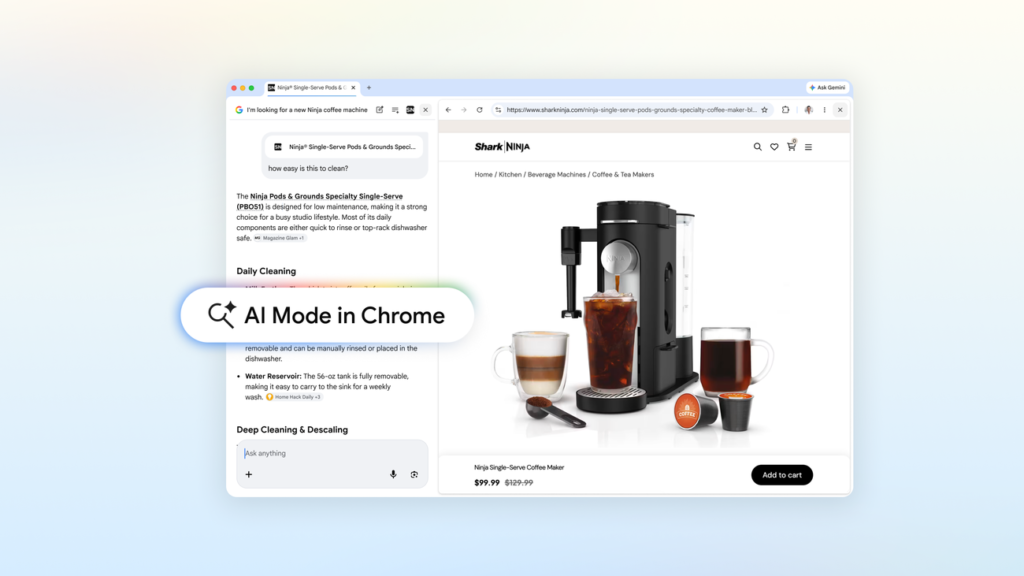
Now, when you’re using AI Mode on Chrome desktop, clicking a link opens the webpage side-by-side with AI Mode. This makes it much easier to visit relevant websites and compare details while still maintaining context of your search.
For example, let’s say you’re looking for a coffee maker that fits in your cozy apartment and can make lattes. Just head to AI Mode in Search and describe what you need. You’ll get a range of options that fit your criteria. See a model you like? Open the retailer’s site alongside AI Mode and ask specific questions, such as “How easy is this to clean?” Using context from both pages and across the web, AI Mode will share insights about the product, helping you make an informed decision with ease.
Or, if you want to learn more about how McLaren Racing teams train their pit crews. With AI Mode in Chrome, you can easily explore related pages like McLaren Racing’s official site without breaking your flow. AI Mode is ready to handle your follow-up questions in real-time, creating a seamless process that helps you better digest each page and uncover the next one to explore.
Our early testers loved not having to constantly switch tabs for help with comprehensive articles or long videos. And they found that having both Search and the web side-by-side helped them stay focused on their tasks while exploring useful web pages.
Search across your recent tabs and more
We’re also making it possible to search across the Chrome tabs you’re already exploring. On Chrome desktop or mobile, you can tap the new “plus” menu in the search box on the New Tab page (or the existing plus menu within AI Mode) to select recent tabs and add them to your search. You aren’t limited to one type of input; you can now mix and match multiple tabs, images, or files like PDFs, and bring that context into your AI Mode searches.
For instance, if you’re researching local hiking trails and have several related sites open already, you can add those tabs to your search and ask for similar kid-friendly trails in a different location.
If you’re studying for a statistics midterm and have class notes, lecture slides, and academic papers open, you can bring that context into your AI Mode searches. Ask for more examples to illustrate a tricky concept; AI Mode will use those tabs to provide tailored responses and suggest more sites to explore.
Finally, powerful tools in AI Mode like Canvas or image creation are accessible wherever you see the new plus menu in Chrome.
All of today’s updates are now available in the U.S., and we’ll expand soon to more places around the world.
Key Takeaways
- AI Mode in Chrome makes it easier to engage with content without losing your place or needing to switch tabs.
- The new plus menu allows you to search across multiple tabs and additional types of context (like images, PDFs).
- Powerful tools like Canvas are now accessible within AI Mode wherever the plus menu is available.