Searches for “home decor inspo” rose by 300% last month, with “bathroom inspo” and “living room inspo” leading the surge. Trending paint colours include teal and magenta.
While finding inspiration is easy, turning a vision into reality often causes problems. Google Search tools offer five methods to move from a mood board to a finished room.
Visualize furniture in your space
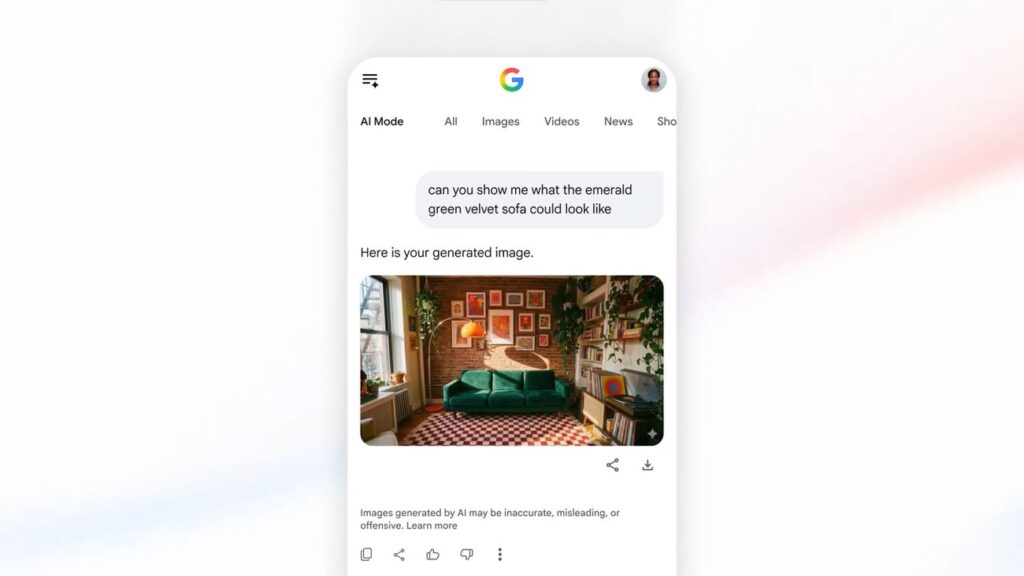
Deciding on a large piece of furniture is difficult when you cannot see if it fits physically or aesthetically. AI Mode in Search allows you to upload a photo of your room and ask for recommendations. You might specify dimensions, such as a wall that is 84 inches wide, to find suitable options. You can then refine the request, for example by asking to see an emerald green velvet sofa placed in that specific spot to view a mockup.
Learn more and shop decor with Lens in Search
Interest in vintage items is high, with “vintage braided rugs” and “vintage wood coffee table” ranking as top trending home furnishings. If you find a decorative item you like while out, use Google Lens on the iOS or Android app to identify it. The tool pulls up links to similar items within your budget, helping you bring that style home.
Uncover new decor finds with Circle to Search
Scrolling online often reveals the best discoveries. Circle to Search lets you track down items from videos, social feeds, or web pages without changing apps. Searches for fish wallpaper are up 140% in the past month. On the latest Pixel and Samsung Galaxy S26 devices, long press the home button or navigation bar, then circle the wallpaper on your screen. This action shows similar options or answers questions about the product.
Tackle DIY projects with Search Live
Floating shelves are a popular item for new studio apartments, but installation requires guidance. Search Live provides step-by-step instructions for DIY projects. Open the Google app and tap the Live icon under the search bar. You can ask questions out loud and enable video input to share visual context from your camera feed.
Get a great price
Bringing a home up to standard involves costs. Before buying items like a funky lamp or harlequin wallpaper, check prices to ensure a good deal. Tap any product listing to compare costs across stores. You can expand the typical price section to view history and determine if the current listing is high, low, or average. Select “Track price” to receive an alert when the item drops into your budget.
What it means
These tools reduce the friction between finding an idea and executing it. Users no longer need to guess if a sofa fits or hunt for alternatives to a physical object. The process moves from passive browsing to active planning and purchasing within a single interface.