



Revolutionizing Note-Taking with Notta AI Notetaker
Taking notes during meetings can be a challenging balancing act. You’re trying to capture important details while staying engaged in the conversation – it’s like attempting to juggle while riding a bicycle.
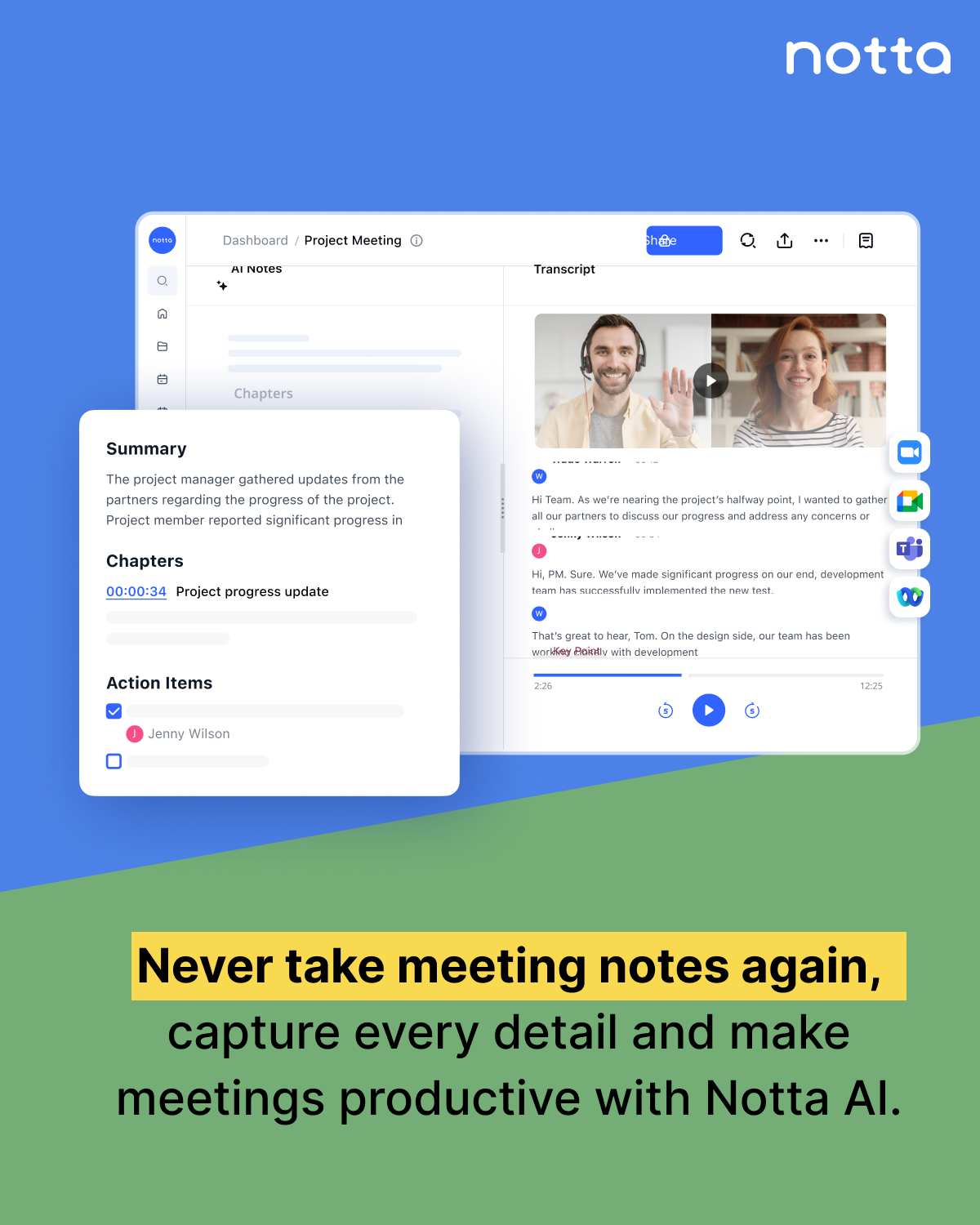
Enter Notta AI Notetaker, a game-changing solution that’s transforming how professionals handle meeting documentation. This AI-powered tool transcribes conversations in real-time with an impressive 98.86% accuracy rate, letting you focus on what truly matters: participating in the discussion.
Think of Notta as your personal meeting assistant that:
- Captures every word spoken in 58 different languages
- Creates instant, editable transcripts
- Identifies different speakers automatically
- Integrates seamlessly with platforms like Zoom and Google Meet
Are you wondering whether to stick with your trusty notebook or make the leap to AI-assisted note-taking? In this article, we’ll dive deep into Notta’s capabilities, compare them with traditional note-taking methods, and help you decide which approach best suits your professional needs. We’ll explore real user experiences, examine the pros and cons, and look at how combining both methods might give you the best of both worlds.
For those considering the transition to AI-assisted note-taking, this article will provide valuable insights into the benefits and advantages of such tools.
Understanding Notta’s Advanced Features
Notta’s AI-powered transcription engine operates through sophisticated Automatic Speech Recognition (ASR) technology. The system processes audio input in real-time, breaking down speech patterns into recognizable text with remarkable 98.86% accuracy for most transcripts.
Core Technology Components
The core technology behind Notta includes:
- Advanced Speech Pattern Recognition: Identifies and distinguishes multiple speakers
- Noise Reduction Algorithms: Filters background interference
- Natural Language Processing: Understands context and improves accuracy
- AI-Enhanced Punctuation: Automatically adds proper grammar marks
Real-Time Capabilities
The platform excels in live transcription scenarios:
- Instant text conversion during meetings
- Speaker identification with timestamps
- Live editing capabilities
- Simultaneous note organization
Multilingual Support
Notta breaks language barriers with extensive linguistic capabilities:
- 58 Language Support: Transcribes content across multiple languages
- 11 Bilingual Options: Enables real-time translation between language pairs
- Accent Recognition: Adapts to various speech patterns and dialects
Integration Features
You can seamlessly connect Notta with popular platforms:
- Video Conferencing: Direct integration with Zoom and Google Meet
- Business Tools: Compatible with HubSpot, Salesforce, and Zoho
- Workflow Automation: Zapier integration for custom workflows
The platform processes uploaded files within minutes, generating transcripts in multiple formats including PDF, DOCX, TXT, SRT, and Excel. This versatility makes Notta particularly valuable for teams working across different time zones and languages, enabling efficient collaboration and communication.
The Pros and Cons of Relying on Technology for Note-Taking
AI-powered note-taking brings distinct advantages and challenges to your workflow. Let’s examine these aspects through Notta’s key features and integrations.
Advantages of AI Note-Taking:
1. Speaker Identification
- Automatically distinguishes between different speakers
- Labels each participant’s contributions
- Creates organized, easy-to-follow conversation flows
- Tracks speaking time for each participant
2. Precise Timestamps
- Marks exact moments of key discussions
- Enables quick navigation through lengthy meetings
- Links directly to specific conversation points
- Simplifies content review and reference
Integration Benefits:
- Direct connection with Zoom and Google Meet
- Automatic meeting join capability
- Real-time transcription during live sessions
- Immediate access to meeting content
Potential Drawbacks:
1. Technology Dependence
- Requires stable internet connection
- Limited offline functionality
- Potential technical glitches during meetings
2. Learning Curve
- New interface adaptation needed
- Time investment in feature familiarization
- Team training requirements
Platform Integration Considerations:
- Meeting platform compatibility checks needed
- Additional setup time for first-time users
- Regular updates to maintain connectivity
- Storage space requirements for recordings
The seamless workflow integration capabilities transform your meeting experience, but success depends on proper setup and consistent internet connectivity. These technological solutions streamline your note-taking process while introducing new considerations for implementation and maintenance.
Manual Note-Taking: The Old School Approach
Traditional note-taking methods have stood the test of time, with many professionals still relying on these tried-and-true techniques. Let’s examine the classic approaches to capturing information:
Handwritten Notes
- Cornell Method: Dividing pages into sections for questions, notes, and summaries
- Mind Mapping: Creating visual connections between related concepts
- Outline Method: Organizing information hierarchically with main points and sub-points
- Bullet Journaling: Combining tasks, notes, and schedules in a systematic format
Digital Typing
- Quick capture in text editors
- Basic word processing software
- Note-taking apps like Evernote or OneNote
- Real-time collaborative documents
While these methods offer familiarity and control, they come with notable challenges:
Time-Related Issues
- Difficulty keeping pace with fast speakers
- Missing important details while writing
- Time-consuming review and organization process
- Delayed sharing of meeting notes with team members
Accuracy Concerns
- Human error in capturing complex information
- Inconsistent abbreviations and shorthand
- Illegible handwriting under pressure
- Incomplete context due to multitasking
Organization Challenges
- Physical storage limitations for paper notes
- Difficulty in searching through handwritten content
- Risk of losing or damaging physical notebooks
- Limited ability to edit and reorganize information
These limitations highlight why many professionals seek alternative solutions for their note-taking needs.
The Hybrid Approach: Combining Both Methods for Optimal Results
A strategic combination of AI-powered and manual note-taking creates a robust system that maximizes accuracy and efficiency. Notta AI achieves a remarkable 98.86% accuracy rate in most transcripts, surpassing human note-taking precision – especially during fast-paced conversations or complex technical discussions.
Here’s how you can leverage both methods effectively:
- Real-time Enhancement: Take brief manual notes during meetings to highlight personal insights while Notta captures the complete dialogue. For those who prefer a hands-free approach, there are options for real-time voice transcription that can further streamline the process.
- Cross-Reference Capability: Compare your handwritten notes against AI transcriptions to ensure critical points aren’t missed
- Selective Focus: Let Notta handle verbatim transcription while you concentrate on strategic thinking and relationship building
- Customized Organization: Add personal annotations to AI-generated transcripts for deeper context and meaning
The time-saving aspect is significant. A one-hour meeting typically requires 2-3 hours for manual transcription. Notta processes the same content in minutes, allowing you to:
- Review key discussion points immediately after meetings
- Share accurate meeting summaries with team members
- Focus on action items rather than documentation
- Maintain comprehensive records without sacrificing engagement
The bilingual support feature adds another layer of efficiency, transcribing conversations in 58 languages with 11 bilingual combinations. This capability proves invaluable in international business settings where manual note-taking across languages would be impractical.
Real User Experiences with Notta: Is It Worth the Hype?
Users across different platforms share mixed experiences with Notta AI Notetaker. Many praise its 98.86% transcription accuracy for clear audio recordings, highlighting its effectiveness in professional settings.
Positive Feedback
A significant number of users appreciate Notta’s intuitive interface:
- “The real-time transcription feature saves hours of manual note-taking during meetings”
- “Speaker identification works flawlessly in most scenarios”
- “The ability to export in multiple formats makes sharing and collaboration seamless”
The platform’s bilingual support receives positive feedback from international users, particularly for its ability to handle 58 languages with 11 bilingual transcription options.
Areas for Improvement
Yet, several pain points emerge from user reviews:
- Limited Free Tier: The 3-minute per conversation restriction feels too restrictive
- Pricing Structure: Users find the jump from free to paid tiers steep
- Premium Trial Issues: Multiple reports of unexpected billing after trial periods
- UI Navigation: Some users describe the interface as cluttered compared to competitors
Business users particularly value Notta’s integration capabilities with platforms like HubSpot, Salesforce, and Zoho. The quick processing time for uploaded files and real-time transcription during live meetings stands out as a key advantage in professional settings.
The platform’s customer support receives mixed reviews, with response times varying significantly between free and paid tiers.
Making a Choice: Which Note-Taking Method is Best?
The choice between Notta AI notetaker and traditional methods depends on your specific needs. Notta is great for professional settings with its 98.86% accuracy rate and real-time transcription capabilities – perfect for fast-paced meetings and collaborative environments.
Traditional note-taking still has its value in personal learning and creative processes. The physical act of writing helps with information retention and provides a distraction-free experience.
The future of note-taking technology points toward a hybrid approach:
- AI tools like Notta handle meeting documentation and team collaboration
- Manual notes serve personal learning and brainstorming sessions
- New AI developments will likely introduce more sophisticated features for context understanding and personalized note organization
The key is to use both methods strategically – relying on AI for efficiency in professional settings while sticking to traditional techniques for deep learning and creativity.
In this hybrid approach, AI tools like Notta can handle the bulk of meeting documentation and collaboration, saving time and ensuring accuracy. This allows humans to focus on active listening, critical thinking, and generating new ideas during meetings. Manual note-taking still holds value in personal learning and brainstorming sessions, fostering deeper understanding and creativity. As AI technology continues to advance, we can expect more sophisticated features that understand context and offer personalized note organization, further enhancing the efficiency and effectiveness of this hybrid note-taking approach.ing and creativity. As AI continues to advance, we can expect more sophisticated features for context understanding and personalized note organization. Striking a balance between AI efficiency in professional settings and traditional techniques for deep learning will be key for maximizing productivity and innovation.